

Compress PDF - PDF Compressor
Muhammad Awais Younas Productivity iPhoneiPadiPod touch
Compress PDF - PDF Compressor is a free Productivity app for iPhone and iPad by Muhammad Awais Younas. Requires iOS 15.0. Updated August 28, 2026.
- Price
- Free
- on the App Store
- Size
- 33 MB
- Age 4+
- Updated
- Aug 28
- 2026 · v1.2
Screenshots


About Compress PDF - PDF Compressor
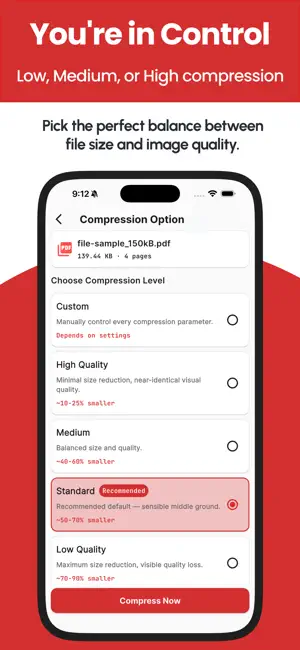
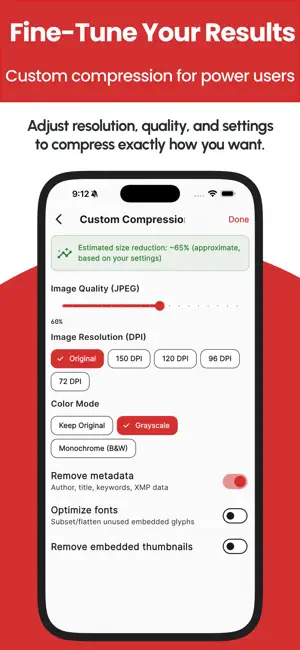
Compress PDF — Shrink File Size, 100% On Your Device Is a PDF too large to email, upload, or submit? Compress PDF reduces file size in seconds, right on your iPhone or iPad — without ever sending your document to a server. COMMON PROBLEMS THIS SOLVES - An application portal rejects your file for exceeding its size limit - A form, registration, or submission system caps uploads at a few MB - Your email provider blocks large attachments - A scanned document or photo-heavy PDF is taking up way too much storage - You just want a faster, lighter file to share If any of that sounds familiar, Compress PDF fixes it in a few taps. 100% OFFLINE — NOTHING IS EVER UPLOADED Unlike most PDF compressor apps, which quietly send your files to a server to process them, Compress PDF works entirely on-device. Your contracts, IDs, scans, and personal documents never leave your phone. No account, no sign-up, no cloud dependency — just fast, private compression, even with no internet connection. 5 COMPRESSION LEVELS — PICK ONE, OR TAKE FULL CONTROL - High Quality — light compression, virtually no visible quality loss - Medium — balanced size reduction - Standard (Recommended) — a smart default so you don't have to think about it - Low Quality — maximum size reduction when you need the smallest file possible - Custom — full manual control over JPEG quality, image resolution/DPI, color mode (grayscale or black & white), metadata removal, thumbnail removal, and font optimization — with a live estimated size preview as you adjust Most competing apps give you a single "compress" button and hope for the best. Compress PDF gives you a real dial when you need one, so you can hit an exact size target for a strict upload portal instead of guessing. BATCH COMPRESS MULTIPLE PDFs AT ONCE Select several files and compress them together in a single batch job. A dedicated progress screen shows the true status of every file — waiting, compressing, done, failed, or skipped — instead of one vague spinner. When it's finished, Share All or Export All bundles every result into a single zip so you're not tapping through separate share sheets one file at a time. HANDLES PASSWORD-PROTECTED PDFs Locked PDF? The app detects it and asks for the password instead of silently failing partway through. A COMPLETE PDF WORKFLOW, NOT JUST A COMPRESSOR - Built-in viewer to preview any PDF before or after compressing — vertical or book-style scrolling, pinch-to-zoom, rotate, jump-to-page, print, and share - Export or Save to any location you choose — not locked into app-only storage - History tracks every compression with before/after size and % saved, searchable by name, with quick re-share, re-export, or delete BUILT FOR EVERYONE Available in 20 languages with full right-to-left support for Arabic and Urdu. Light, dark, and system themes, each fully designed. Set your default compression level once so returning visits don't require re-picking settings. WHO IT'S FOR - Students and professionals submitting documents with a strict size cap - Anyone emailing large scans, reports, or contracts - People freeing up storage without sacrificing document quality - Power users who want manual control over DPI, quality, and color — not just a black-box "compress" button Compress PDF is free to use, with ads. Pro is an auto-renewable subscription (in-app purchase) that removes all ads and lifts the batch-size limit for unlimited files per batch — support ongoing development and get early access to new features. Download Compress PDF and shrink your files in seconds — privately, offline, and exactly the way you want. Terms of use: https://codifyappsprivacy.blogspot.com/p/terms-of-use.html
What’s new
Version 1.2 · Updated August 28, 2026
Minor bug fixes and performance improvements.
App privacy
The developer, Muhammad Awais Younas, reported these privacy practices to Apple.
Data Not Linked to You
The following data, which may be collected but is not linked to your identity, may be used for the following purposes:
- Identifiers: Device ID
Used for: Third-Party Advertising
Alternatives to Compress PDF - PDF Compressor
Looking for apps like Compress PDF - PDF Compressor? Here are 6 similar apps on the App Store. The highest rated is Pdf Compressor - Compress File (4.6/5), and all 6 are free to download.
-
 Shrink PDF: Compress PDF Files
-
 Compress PDF: Smaller Files
-
 SuiRead: HTML Reader
-
 Pdf Compressor - Compress File
4.6
Pdf Compressor - Compress File
4.6
-
 SlideCrop: Slide Scanner & PDF
-
 PDF Compressor: Shrink files
1.0
PDF Compressor: Shrink files
1.0
| App | Rating | Price | Last updated | Compare |
|---|---|---|---|---|
| Compress PDF - PDF Compressor | – | Free | August 28, 2026 | |
| Shrink PDF: Compress PDF Files | – | Free | Oct 11, 2026 | Compare |
| Compress PDF: Smaller Files | – | Free | Sep 29, 2026 | Compare |
| SuiRead: HTML Reader | – | Free | Jul 18, 2026 | Compare |
| Pdf Compressor - Compress File | 4.6 / 5 (5) | Free | Aug 21, 2026 | Compare |
| SlideCrop: Slide Scanner & PDF | – | Free | Sep 14, 2026 | Compare |
| PDF Compressor: Shrink files | 1.0 / 5 (1) | Free | Mar 19, 2026 | Compare |