

Air File Transfer
Secgin LLC Productivity iPhoneiPadiPod touch
Air File Transfer is a free Productivity app for iPhone and iPad by Secgin LLC. Rated 5.0/5 from 1 ratings. Requires iOS 17.0. Updated August 1, 2026.
- Rating
- 5.0
- 1 ratings
- Price
- Free
- on the App Store
- Size
- 18 MB
- Age 4+
- Updated
- Aug 1
- 2026 · v1.0.2
Screenshots


About Air File Transfer
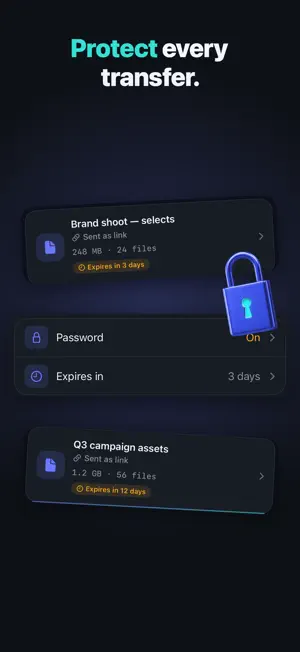
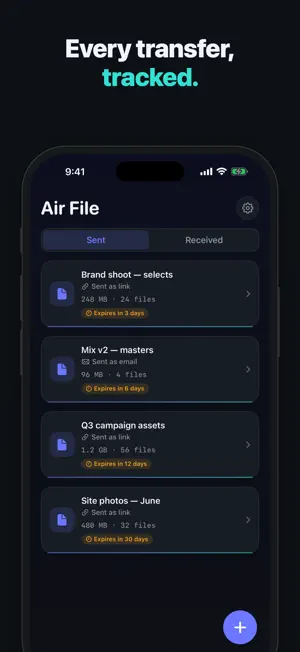
Send big files the easy way. Air File turns any photo, video, or document into a clean, shareable download link in seconds — no account, no clutter, no ads. Pick your files, tap Transfer, and hand over a link. Whoever you send it to just opens it in their browser — they don't need the app. Every transfer is time-boxed and tracked, so nothing lingers online longer than you want. WHY AIR FILE - No account needed to start — open the app and send. - No ads, ever. A calm, native iPhone experience. - Honest pricing with a genuinely usable free tier — no launch paywall. - Your Sent history in one place, each transfer with size, file count, and an expiry countdown. HOW IT WORKS 1. Tap + and add photos, videos, or files. 2. Set a password and expiry (optional). 3. Tap Transfer to get your link. 4. Share it anywhere — messages, email, anywhere you can paste a link. FREE - Unlimited transfers - Up to 1 GB per transfer - 3-day link expiry - Basic download count PRO - Send up to 250 GB per transfer - Long expiry — up to 30 days, or links that never expire - Password-protect any transfer - Full download tracking — see exactly when your link is opened and downloaded Air File Pro is a subscription (weekly, monthly, or yearly) with a 7-day free trial. Cancel anytime. The free tier stays free and fully usable — Pro just removes the ceilings and adds privacy and insight. Move the files that are too big for chat and email, without the surprise billing and neglected apps you've come to expect from file transfer. Air File is built to be the file-sharing app that's actually a great iPhone app. Subscriptions auto-renew unless turned off at least 24 hours before the end of the period. Payment is charged to your Apple ID. Manage or cancel in Settings. Privacy Policy: https://dropbeam-0016a2.web.app/privacy.html Terms of Use (EULA): https://www.apple.com/legal/internet-services/itunes/dev/stdeula/
What’s new
Version 1.0.2 · Updated August 1, 2026
- Improved performance: faster, smoother app experience - Bug fixes: minor issues resolved for seamless use - Enhanced security: updated to protect your data
App privacy
The developer, Secgin LLC, reported these privacy practices to Apple.
Data Not Collected
The developer does not collect any data from this app.
Alternatives to Air File Transfer
Looking for apps like Air File Transfer? Here are 6 similar apps on the App Store. The highest rated is MobiDrive Cloud Storage & Sync (4.7/5), and all 6 are free to download.
-
 MobiDrive Cloud Storage & Sync
4.7
MobiDrive Cloud Storage & Sync
4.7
-
 Torrent File Saver
2.8
Torrent File Saver
2.8
-
 Owlfiles - File Manager
4.6
Owlfiles - File Manager
4.6
-
 Smart Switch・Copy & Move Data
4.4
Smart Switch・Copy & Move Data
4.4
-
 µBrowser: Fast, Safe & Private
3.9
µBrowser: Fast, Safe & Private
3.9
-
 PairDrop
3.7
PairDrop
3.7
| App | Rating | Price | Last updated | Compare |
|---|---|---|---|---|
| Air File Transfer | 5.0 / 5 (1 rating) | Free | August 1, 2026 | |
| MobiDrive Cloud Storage & Sync | 4.7 / 5 (566) | Free | Sep 17, 2026 | Compare |
| Torrent File Saver | 2.8 / 5 (9) | Free | Jun 24, 2026 | Compare |
| Owlfiles - File Manager | 4.6 / 5 (7,237) | Free | Oct 21, 2026 | Compare |
| Smart Switch・Copy & Move Data | 4.4 / 5 (472) | Free | Jul 2, 2026 | Compare |
| µBrowser: Fast, Safe & Private | 3.9 / 5 (332) | Free | Jan 9, 2026 | Compare |
| PairDrop | 3.7 / 5 (131) | Free | Sep 20, 2025 | Compare |
Compare Air File Transfer with the top alternatives: ratings, updates, ASO score and keyword gaps →