

OneFocus: Deep Work
Freedom Dimension (shenzhen) Technology Co., Ltd Productivity iPhoneiPadiPod touchMac
OneFocus: Deep Work is a free Productivity app for iPhone and iPad by Freedom Dimension (shenzhen) Technology Co., Ltd. Requires iOS 17.0.
- Price
- Free
- on the App Store
- Size
- 33 MB
- Age 4+
- Updated
- Sep 22
- 2026 · v1.1
Screenshots
About OneFocus: Deep Work
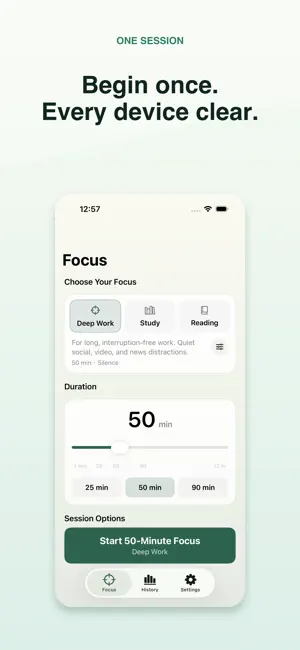
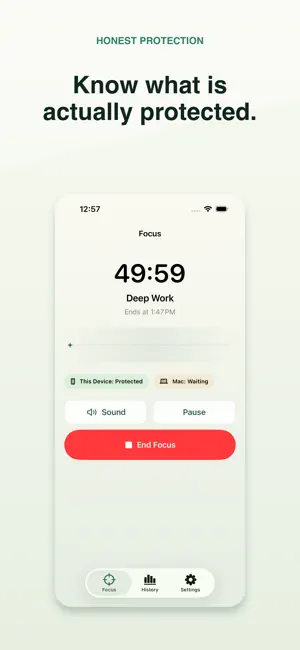
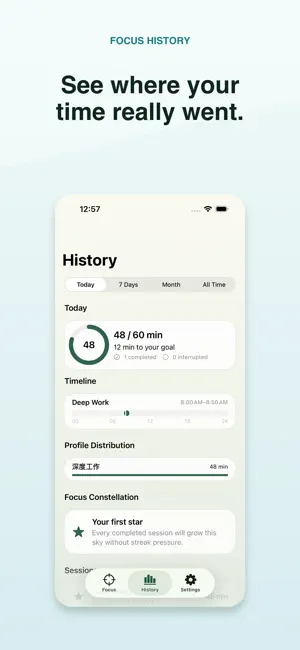
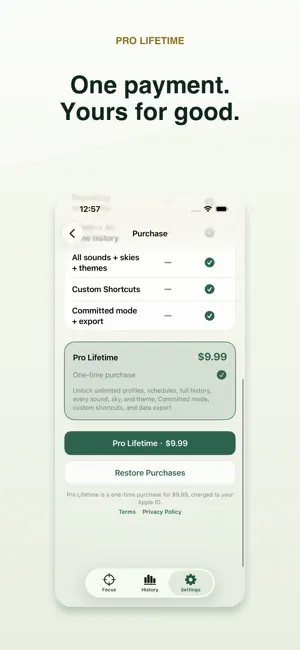
OneFocus turns a focus plan into one clear session across iPhone, iPad, and Mac. Choose a Focus Profile, set a duration, and see whether each device is protected—without a vague all-green status hiding a problem. FOCUS YOUR WAY • Start 25, 50, or 90-minute sessions, or choose a custom duration. • Build Profiles for Deep Work, Study, Reading, and your own routines. • Block selected apps and websites on iPhone and iPad with Apple's Screen Time controls. • Use the free Mac companion to protect supported apps and websites. • Keep a session going with local rain, café, train, forest, wave, and other procedural sounds. ONE SESSION, HONEST STATUS Private iCloud sync carries your active session, Profiles, schedules, history, and verified Pro status between devices. OneFocus shows iPhone Protected, Mac Protected, Waiting, Needs Permission, or Offline separately, so you know what is actually happening. Existing local sessions and history remain useful offline. HISTORY THAT EXPLAINS YOUR TIME Review Today, 7 Days, Month, and All Time. See pause-aware totals, streaks, Profile distribution, a calendar heatmap, Focus Constellation, and per-device protection intervals. Session details preserve the Profile used at the time, even if you later rename it. APPLE WORKFLOWS Use App Shortcuts for quick 25 or 50-minute starts, open History, and coordinate OneFocus with an Apple Focus through a guided Shortcut. Core actions support VoiceOver, larger text, reduced motion, and keyboard navigation. FREE AND PRO The free version includes manual sessions, one custom Profile, four sounds, a daily goal, basic iPhone/Mac connection, Flexible mode, and recent history. A single US$9.99 Pro Lifetime purchase unlocks unlimited Profiles, repeating schedules, full history, all sounds, skies, and themes, Committed mode, advanced Shortcuts, and data export. Restore purchases at any time. PRIVATE BY DESIGN No OneFocus account. No ads. No third-party tracking. Browser content and Screen Time selections are not uploaded. Sync uses your private iCloud database, and sounds are generated locally. Terms of Use: https://oneapps.studio/terms
What’s new
Version 1.1 · Updated September 22, 2026
OneFocus 1.1 updates the Chinese brand presentation and keeps focus timing, app blocking, and duration history consistent across the store listing.
App privacy
The developer, Freedom Dimension (shenzhen) Technology Co., Ltd, reported these privacy practices to Apple.
Data Not Collected
The developer does not collect any data from this app.
Alternatives to OneFocus: Deep Work
Looking for apps like OneFocus: Deep Work? Here are 6 similar apps on the App Store.
-
 mdReview - Markdown Editor
-
 Meow Timer
-
 Deep Session - Focus Timer
-
 FocusFlow: Gentle ADHD Timer
-
 LifeNetwork - Personal CRM
-
 My Tracker - 时间管理
| App | Rating | Price | Last updated | Compare |
|---|---|---|---|---|
| OneFocus: Deep Work | – | Free | September 22, 2026 | |
| mdReview - Markdown Editor | – | Free | Sep 22, 2026 | Compare |
| Meow Timer | – | Free | Sep 3, 2026 | Compare |
| Deep Session - Focus Timer | – | Free | Apr 3, 2026 | Compare |
| FocusFlow: Gentle ADHD Timer | – | Free | Oct 7, 2026 | Compare |
| LifeNetwork - Personal CRM | – | Free | Jun 18, 2026 | Compare |
| My Tracker - 时间管理 | – | Free | Feb 20, 2024 | Compare |