

Voice to Text: AI Transcribe
Afsha jahangeer Productivity iPhoneiPadiPod touch
Voice to Text: AI Transcribe is a free Productivity app for iPhone and iPad by Afsha jahangeer. Requires iOS 16.4. Updated August 10, 2026.
- Price
- Free
- on the App Store
- Size
- 9 MB
- Age 4+
- Updated
- Aug 10
- 2026 · v1.0.1
Screenshots


About Voice to Text: AI Transcribe
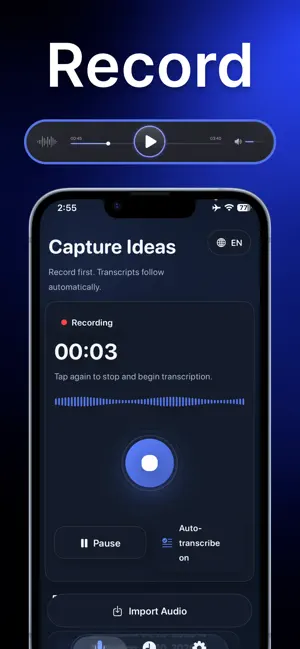
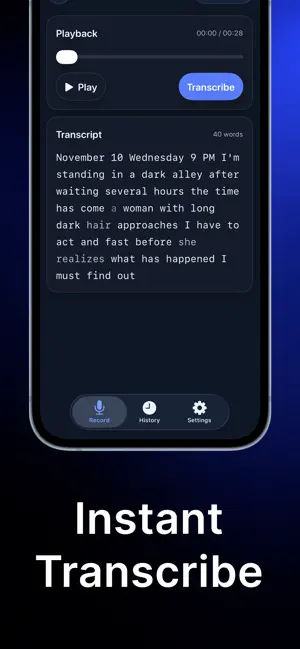
Turn any voice, audio, or video into accurate text in seconds. Record meetings, lectures, interviews, and ideas — AI transcribes, summarizes, and organizes everything into clean, structured notes automatically. Stop typing. Start speaking. ACCURATE AI TRANSCRIPTION • Supports 100+ languages and dialects, including heavy accents • Record live or import audio & video files (MP3, M4A, WAV, MP4 & more) • Record hours-long sessions with pause & resume • Background processing — lock your screen or switch apps while AI works • Speaker detection — automatically labels who said what AI NOTES, SUMMARIES & KEY POINTS Every recording becomes four things at once: • Full transcript — every word captured • Clean AI note — messy speech turned into polished, readable text • Key points list — the important stuff, extracted automatically • Short summary — get the gist without re-listening SMART AI TEMPLATES Choose a template and AI structures your note to match: • Meeting — decisions, action items, follow-ups • Lecture — organized study notes with main concepts • Interview — structured Q&A breakdown • Journal — daily reflections, formatted beautifully • Dictation — pure voice typing with punctuation commands • Doctor visit, sermon, brainstorm & more BUILT FOR REAL LIFE • MEETINGS — capture every decision, share recaps with your team in one tap • STUDENTS — turn lectures into study notes, summaries & flashcard-ready points • INTERVIEWS & RESEARCH — record conversations, review them structured • PODCASTERS & CREATORS — transcribe episodes for show notes, captions & social posts • WRITERS — speak your book, article, or ideas; AI formats them into drafts • PROFESSIONALS — dictate memos, reports & emails hands-free ORGANIZE, EXPORT & SHARE • Folders to keep notes organized • Export as PDF or TXT with clean formatting, no watermark • Copy to any app, or share summaries directly • iCloud sync across iPhone, iPad & Mac • Home screen widgets & Siri Shortcuts — start recording in one tap • Live Activity shows recording & transcription progress on your lock screen PRIVATE & SECURE Your recordings are processed securely and automatically deleted from servers after transcription. Your notes stay yours. Whether it's a two-minute voice memo or a two-hour board meeting, turn speech into organized, searchable, shareable text — instantly. Privacy policy: https://transcriberprivacy.netlify.app/ Terms of Use: https://transcriberterms.netlify.app/ Subscription Terms: https://transcribersubscriptionterms.netlify.app/
What’s new
Version 1.0.1 · Updated August 10, 2026
Live transcription, AI notes, folders, audio editing, and more.
App privacy
The developer, Afsha jahangeer, reported these privacy practices to Apple.
Data Not Collected
The developer does not collect any data from this app.
Alternatives to Voice to Text: AI Transcribe
Looking for apps like Voice to Text: AI Transcribe? Here are 6 similar apps on the App Store. The highest rated is Tuck - Screenshot Reminders (5.0/5), and all 6 are free to download.
-
 VOSUMI: Voice Translator
-
 AI Dictation
3.0
-
 Ultra Note Pro
-
 Tuck - Screenshot Reminders
5.0
-
 Sheaf: Offline OCR & Documents
1.0
-
 ThoughtTrace: Brain Dump Timer
| App | Rating | Price | Last updated | Compare |
|---|---|---|---|---|
| Voice to Text: AI Transcribe | – | Free | August 10, 2026 | |
| VOSUMI: Voice Translator | – | Free | Aug 25, 2026 | Compare |
| AI Dictation | 3.0 / 5 (1) | Free | Sep 25, 2026 | Compare |
| Ultra Note Pro | – | Free | Apr 7, 2026 | Compare |
| Tuck - Screenshot Reminders | 5.0 / 5 (1) | Free | Aug 29, 2026 | Compare |
| Sheaf: Offline OCR & Documents | 1.0 / 5 (1) | Free | Sep 13, 2026 | Compare |
| ThoughtTrace: Brain Dump Timer | – | Free | Oct 5, 2026 | Compare |