

Multiplex — SSH tmux Terminal
Jhen Jie Hong Developer Tools iPhoneiPadiPod touch
Multiplex — SSH tmux Terminal is a free Developer Tools app for iPhone and iPad by Jhen Jie Hong. Rated 5.0/5 from 1 ratings. Requires iOS 17.0.
- Rating
- 5.0
- 1 ratings
- Price
- Free
- on the App Store
- Size
- 22 MB
- Age 4+
- Updated
- Nov 2
- 2026 · v1.5.1
Screenshots



About Multiplex — SSH tmux Terminal
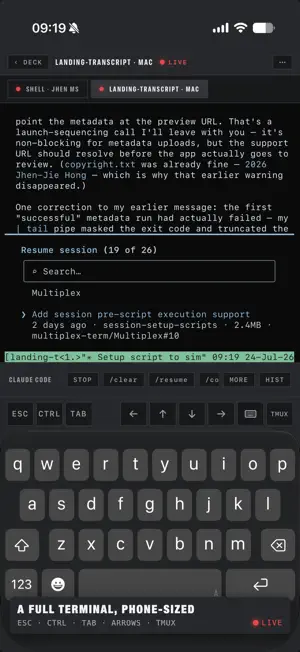
Multiplex is a terminal for people who live inside persistent remote sessions — open source, built native for iPhone and iPad. THE WALL Hosts probe concurrently. Every session is a live monitor: its actual last screen lines, red LIVE while attached. See the fleet before attaching; NO SIGNAL reconnects in one tap. Run tmux, or switch a host to herdr — one tile per session, agent state from herdr itself. A SESSION WHERE YOU NEED IT On iPad each session opens in a real scene for Stage Manager, Split View, and external displays. Merge windows into tabs and split them back out — the SSH connection and scrollback move with the tab, so shells never drop. On iPhone, the wall and terminal share one adaptive full-screen shell. BUILT FOR AI AGENT SESSIONS Start Claude Code, Codex, Pi, Grok Build, Antigravity CLI, or Hermes with a setup script, model, and first prompt in one step. Multiplex spots all six in any pane; helper chips follow the foreground agent — commands reach the process receiving your keystrokes; rearrange or add your own, synced everywhere. A message box takes longer prompts: autocorrect, dictation, attached or dropped files land in the pane's directory, sent as one message. Pro lifts the daily chip limit, alerts you when an unwatched turn ends or needs input (Claude Code, Codex, Grok Build on tmux; all agents on herdr), and opens Claude Code prompt history with transcript jumps. FILES & LINKS BESIDE THE TERMINAL Tap a link or path — Multiplex confirms the resolved target first. Files open read-only in the ▤ File Viewer: code, rendered Markdown, images, PDFs, sound files, git diffs. Web links can open in an inline ⌗ viewport. On iPad both land in a side panel beside the pane — the terminal never changes size — or move into a tab. WIDGETS & SHORTCUTS Put a host on your Home Screen — last-known frames, an honest SEEN stamp, SHELL and AGENT keys straight into a connection — or a fleet widget for every host at a glance. Shortcuts and Siri open a shell, show a remote file, or launch an agent in a chosen directory, fresh or inside an existing session. A multiplex:// URL scheme drives automations. MOSH BUILT IN With Pro, switch a host to mosh and the session survives sleep, roaming, and IP changes — a native Swift mosh client, no companion app. CONNECTION STATS A live latency chip on every host rail; Pro opens the full per-host board: round-trips, typing echo, mosh loss and roams, reconnects, data volume. Measured in-session; nothing leaves the device. A REAL TERMINAL xterm-256color emulation, multilingual system-keyboard input, touch and pointer clicks for mouse TUIs, hardware keyboards, live PTY resize, and a menu of everyday tmux (or herdr) commands. Hold CTRL for Key Commands: saved chords the software keyboard cannot press (Shift+Enter, a double Ctrl-C) and one-line text macros, synced everywhere. Pane-clamped selection on long press or double tap. System, Light, and Dark switch the whole chassis, each with its own terminal theme — ten built in; Pro adds an editor down to all 16 ANSI colors. The app speaks English, Traditional Chinese, and Japanese. OPEN SOURCE, PRIVATE BY DESIGN The complete app — terminal engine, mosh client, and all — is open source, Apache 2.0, at github.com/multiplex-term/Multiplex. Read the code that holds your keys, or build it yourself. Hosts, command setups, and secrets sync through iCloud Keychain, end-to-end encrypted. Nothing touches our servers — there are none. No account, no analytics, no tracking. MULTIPLEX PRO One purchase, no subscription: unlimited hosts, mosh, agent notifications, the Connection Stats board, the unmetered command strip, custom themes, and twelve Key Commands. Free includes two hosts, the complete terminal, five Key Commands, and 10 chip taps a day. WHAT YOU NEED A remote host reachable over SSH (password or ed25519/RSA key). The wall and persistent sessions need tmux 1.8+ or herdr 0.7.5+; plain SSH shells need neither. mosh needs mosh-server on the host.
What’s new
Version 1.5.1 · Updated November 2, 2026
Multiplex 1.5.1 — give the whole window to the terminal, and select text in herdr panes the way a mouse drag does on your desktop. • Full screen: three-dot menu ▸ Full Screen hands the window to the terminal. The rails, tabs, and keys step aside and the agent bar folds to its dot; one button in the corner brings them back. • herdr: on herdr 0.9 and later, Select Text stays inside the pane you pressed. Multi-line copies no longer pick up the sidebar's border or lose the pane's right edge. • herdr: long-press text and keep going into a drag to let herdr select it, the way a mouse drag works in iTerm or Ghostty. Lifting copies it to the clipboard. • herdr: the HRDR panel can show or hide herdr's sidebar (Toggle Sidebar under Workspaces). • Keep screen on: Settings ▸ Screen ▸ Keep screen on keeps the display lit while a terminal or the file viewer is on screen, instead of locking on Auto-Lock. Off by default. • Smaller Text and Larger Text leave the three-dot menu open, so you can keep stepping the size. • A deck you hid with HIDE stays hidden when you rotate the iPhone or leave the app and come back. • iPhone Duo: the file viewer's CLOSE clears the clock on the open display, and the TMUX / HRDR panel gets the full screen on the closed display. • A host you add, or bind with mpx, lands at the top of the host list.
App privacy
The developer, Jhen Jie Hong, reported these privacy practices to Apple.
Data Not Collected
The developer does not collect any data from this app.
Alternatives to Multiplex — SSH tmux Terminal
Looking for apps like Multiplex — SSH tmux Terminal? Here are 6 similar apps on the App Store. The highest rated is Shepherd: AI Agents & SSH (5.0/5), and all 6 are free to download.
-
 iTmux: Your AI Coding Terminal
-
 Shepherd: AI Agents & SSH
5.0
-
 Drover: Steer AI Coding Agents
-
 SSH App
4.2
-
 TermRover - SSH Terminal
5.0
-
 Conduit: SSH, Mosh & SFTP
5.0
| App | Rating | Price | Last updated | Compare |
|---|---|---|---|---|
| Multiplex — SSH tmux Terminal | 5.0 / 5 (1 rating) | Free | November 2, 2026 | |
| iTmux: Your AI Coding Terminal | – | Free | Oct 17, 2026 | Compare |
| Shepherd: AI Agents & SSH | 5.0 / 5 (3) | Free | Oct 31, 2026 | Compare |
| Drover: Steer AI Coding Agents | – | Free | Oct 25, 2026 | Compare |
| SSH App | 4.3 / 5 (4) | Free | Aug 27, 2026 | Compare |
| TermRover - SSH Terminal | 5.0 / 5 (5) | Free | Oct 30, 2026 | Compare |
| Conduit: SSH, Mosh & SFTP | 5.0 / 5 (2) | Free | Jul 6, 2026 | Compare |