

CallSheet: Crew Calls
Geared Like A Machine LLC Productivity iPhoneiPadiPod touchMac
CallSheet: Crew Calls is a free Productivity app for iPhone and iPad by Geared Like A Machine LLC. Rated 4.5/5 from 6 ratings. Requires iOS 17.0.
- Rating
- 4.5
- 6 ratings
- Price
- Free
- on the App Store
- Size
- 12 MB
- Age 4+
- Updated
- Oct 8
- 2026 · v1.2.34
Screenshots

About CallSheet: Crew Calls
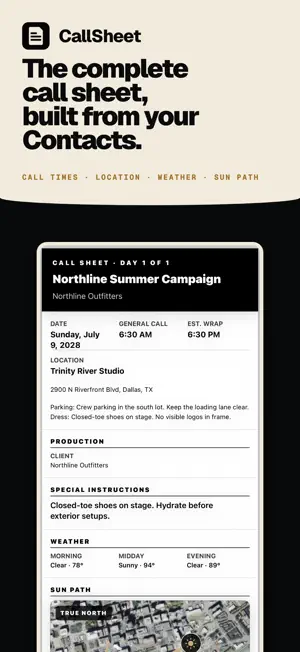
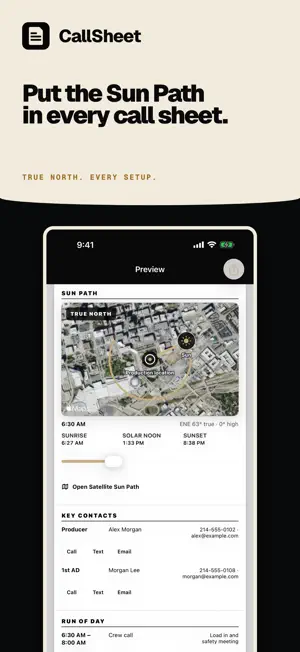
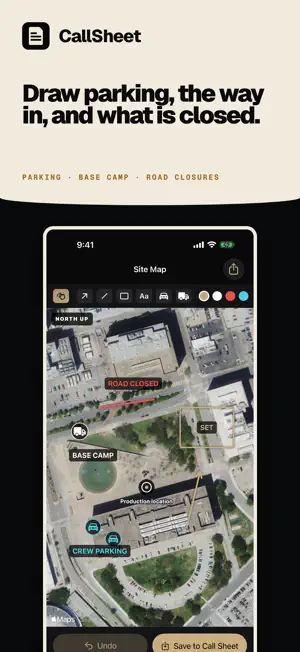
Change one call time. Only the people it touches get a new link. The rest of the crew does not get a new sheet. Select crew, cast, and key contacts, build the shoot day around them, and send each person a private link and current PDF. CallSheet: Crew Calls is a crew call-sheet app at calltimes.app. It is not the movie-lookup Callsheet and not Callsheet Pro by Early Studios. BUILD THE SHOOT DAY • Create and edit unlimited local drafts offline • Add selected people from Apple Contacts, or a whole Apple Contacts list • Import a vCard or CSV exported from Google Contacts, Outlook, or a spreadsheet • Confirm CSV columns and review every person, including new, merged, and repeated entries, before saving • Set a department, position, or list for everyone in one pass • Export your crew directory as vCard or CSV • Add people manually when they are not in Contacts • Assign roles, departments, personal calls, or relative calls • Drag Run of Day items into place, move them up or down, sort by time, or resequence the times • Shift the entire shoot day at once • Add schedule, locations, company moves, parking, weather, safety, meals, vehicles, equipment, and notes • Find the nearest hospital from the location address, with phone and distance Local drafting works without an account or network connection. CallSheet Pro and Sign in with Apple are required for cloud distribution, private recipient links, email delivery, confirmation tracking, and cloud restore. KEEP THE CREW CURRENT Change one person’s call time or a shared production detail and CallSheet identifies only who needs the update. The producer reviews the affected recipients, publishes the revision, and sees who confirmed the current information. Crew and cast use private web links, so they do not need the app or an account. CHANGE • Edit a personal call time or shared production detail • See exactly what changed before publishing PUBLISH • Preselect only recipients whose information changed • Keep unaffected recipients’ current delivery and response status • Send recipient-specific private links and the current PDF • Include maps, safety plans, sides, and other production files • Prepare Apple Messages links without sending automatically CONFIRM • Track delivery, link opens, confirmations, and declines • Bind confirmations to the information that recipient reviewed • Reject stale confirmations after a relevant newer change • Revoke private links when access should end WRAP THE JOB • Send selected crew one closing email when the job wraps • It carries a thank-you, the job code for their invoice, and how to invoice the production • Enter the legal entity, remit-to address and email, payment methods, terms, and file naming note once on your Account page • Those details appear under every Wrap Sheet after that • See who was already sent one • Crew need no app and no account REUSE THE WORK • Keep a device-local Crew Directory built from people you already added • Mark Go-To crew and reuse people from past call sheets • Compare two external call-sheet PDFs on device to see which known recipients are affected PLAN FOR THE SUN • See the Sun Path in the native app over satellite imagery that provides geographic context • Jump to crew call, first shot, company moves, meals, or wrap SUBSCRIPTION CallSheet Pro is an auto-renewing subscription. Eligible new subscribers may receive a one-week introductory trial. The App Store shows current pricing, trial eligibility, and renewal terms for your country or region before purchase. Payment is charged to your Apple ID account at confirmation of purchase. Subscriptions automatically renew unless auto-renew is turned off at least 24 hours before the end of the current period. Manage or cancel your subscription in your App Store account settings. Privacy Policy: https://calltimes.app/privacy. Terms of Use: https://calltimes.app/terms. Terms of Use (EULA): https://www.apple.com/legal/internet-services/itunes/dev/stdeula/
Ratings & reviews
4.5
6 ratings
What’s new
Version 1.2.34 · Updated October 8, 2026
Built for iPhone Duo. Folded, your call sheet works on the outer screen. Unfolded, Call Sheets, Crew, Preview and Sun Path fill the inner screen, held tall or wide. Sun in Camera is not offered on iPhone Duo yet, so Sun Path shows the satellite view and every time on the run of day there. On every other iPhone, iPad and Mac, CallSheet works as before.
App privacy
The developer, Geared Like A Machine LLC, reported these privacy practices to Apple.
Data Linked to You
The following data, which may be collected and linked to your identity, may be used for the following purposes:
- Identifiers: User ID
- Usage Data: Product Interaction
- Purchases: Purchase History
- Location: Precise Location
- Contact Info: Physical Address, Email Address, Name, Phone Number
- Contacts: Contacts
- User Content: Photos or Videos, Other User Content
- Diagnostics: Crash Data, Performance Data
Used for: Analytics, App Functionality
Alternatives to CallSheet: Crew Calls
Looking for apps like CallSheet: Crew Calls? Here are 6 similar apps on the App Store. The highest rated is Callsheet Companion (5.0/5), and all 6 are free to download.
-
 Callsheet Companion
5.0
Callsheet Companion
5.0
-
 SetPilot - Film Production
-
 Rolling! Mobile App
5.0
Rolling! Mobile App
5.0
-
 Video Production Planner
5.0
Video Production Planner
5.0
-
 CallTime: Call Sheets & Pay
3.6
CallTime: Call Sheets & Pay
3.6
-
 Script Breakdowns
5.0
Script Breakdowns
5.0
| App | Rating | Price | Last updated | Compare |
|---|---|---|---|---|
| CallSheet: Crew Calls | 4.5 / 5 (6 ratings) | Free | October 8, 2026 | |
| Callsheet Companion | 5.0 / 5 (2) | Free | Jun 17, 2026 | Compare |
| SetPilot - Film Production | – | Free | Sep 2, 2026 | Compare |
| Rolling! Mobile App | 5.0 / 5 (4) | Free | Apr 15, 2025 | Compare |
| Video Production Planner | 5.0 / 5 (2) | Free | Mar 12, 2026 | Compare |
| CallTime: Call Sheets & Pay | 3.6 / 5 (7) | Free | Oct 20, 2026 | Compare |
| Script Breakdowns | 5.0 / 5 (5) | Free | Oct 20, 2026 | Compare |