

CaptureNote - Screenshot Notes
思迪 李 Education iPhoneiPadiPod touch
CaptureNote - Screenshot Notes is a free Education app for iPhone and iPad by 思迪 李. Requires iOS 18.0. Updated October 22, 2026.
- Price
- Free
- on the App Store
- Size
- 6 MB
- Age 4+
- Updated
- Oct 22
- 2026 · v1.3.1
Screenshots

About CaptureNote - Screenshot Notes
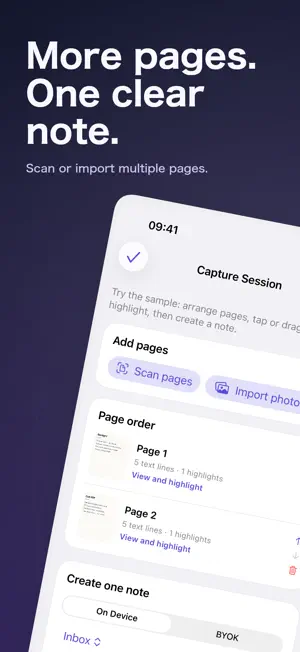
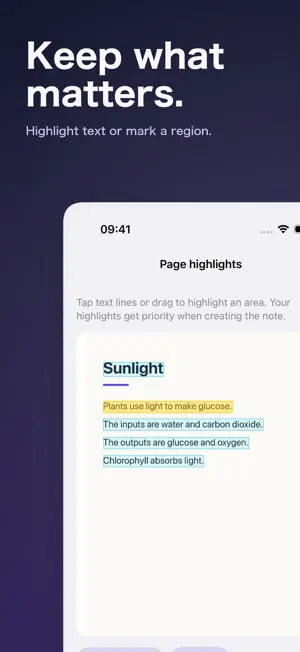
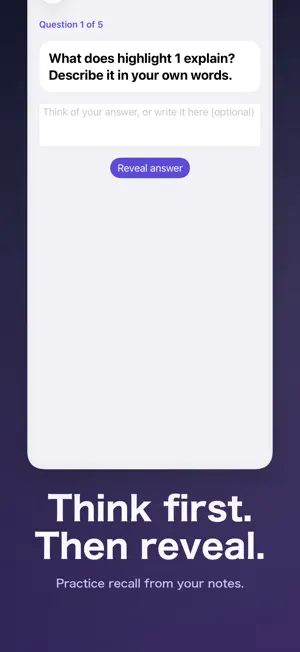
Turn screenshots from textbooks, lectures, websites, and chats into notes you can actually find and use. CaptureNote extracts text from images, distills summaries and key points, and keeps the source image, full recognized text, and structured note together. You can also send a screenshot to CaptureNote from Shortcuts and save it directly to the folder you choose. KEY FEATURES • Multi-page capture: scan or import pages, arrange, crop, rotate, and highlight them. • Active recall: practice from your notes, reveal reference answers, and return to source pages or note points. • Image to text: On-device OCR extracts text from screenshots and photos. • Smart summaries: Create a title, concise summary, and key points with less manual copying. • Shortcuts actions: Summarize a Screenshot or Recognize Screenshot Text as part of your automation. • Folders and search: Organize, search, edit, move, share, or delete notes. • Keep the context: Store the source image, full text, summary, and key points together. • Bring your own key: connect an OpenAI-compatible API and model. Only OCR text is sent; provider fees are separate. • Local first: OCR and local processing happen on device. Content is never uploaded without your explicit consent. Ideal for lecture slides, textbook screenshots, web research, reading highlights, and quick ideas. Turn the screenshots in your photo library into knowledge you can reuse. CaptureNote is free to download. Basic OCR, editing, folders, search, and 5 complete smart summaries are free; unlimited smart summaries and summary Shortcuts require a one-time Lifetime Pro in-app purchase.
What’s new
Version 1.3.1 · Updated October 22, 2026
Refreshed App Store screenshots and artwork to better explain capture sessions, note highlights, active recall, and BYOK.
App privacy
The developer, 思迪 李, reported these privacy practices to Apple.
Data Linked to You
The following data, which may be collected and linked to your identity, may be used for the following purposes:
- Purchases: Purchase History
- Location: Coarse Location
- Identifiers: Device ID
- Usage Data: Product Interaction
- User Content: Other User Content
Used for: Analytics, App Functionality
Data Not Linked to You
The following data, which may be collected but is not linked to your identity, may be used for the following purposes:
- Diagnostics: Other Diagnostic Data
Used for: Analytics
Alternatives to CaptureNote - Screenshot Notes
Looking for apps like CaptureNote - Screenshot Notes? Here are 6 similar apps on the App Store. The highest rated is Safe Study AI (5.0/5), and all 6 are free to download.
-
 Minoo: Earn Screen Time
-
 Safe Study AI
5.0
Safe Study AI
5.0
-
 NotePal: AI Notes,Mindmap,Quiz
-
 PagePrism: Doc Summaries
-
 StudyCapy: Flashcards & Quiz
4.3
StudyCapy: Flashcards & Quiz
4.3
-
 LexiCore Vocabulary
5.0
LexiCore Vocabulary
5.0
| App | Rating | Price | Last updated | Compare |
|---|---|---|---|---|
| CaptureNote - Screenshot Notes | – | Free | October 22, 2026 | |
| Minoo: Earn Screen Time | – | Free | Sep 10, 2026 | Compare |
| Safe Study AI | 5.0 / 5 (3) | Free | Jul 10, 2026 | Compare |
| NotePal: AI Notes,Mindmap,Quiz | – | Free | Jul 7, 2026 | Compare |
| PagePrism: Doc Summaries | – | Free | Aug 6, 2026 | Compare |
| StudyCapy: Flashcards & Quiz | 4.3 / 5 (3) | Free | Oct 9, 2026 | Compare |
| LexiCore Vocabulary | 5.0 / 5 (1) | Free | Oct 17, 2026 | Compare |