

Invoya
Aleksandr Gordienko Business iPhoneiPadiPod touchMac
Invoya is a free Business app for iPhone and iPad by Aleksandr Gordienko. Requires iOS 17.0. Updated October 10, 2026.
- Price
- Free
- on the App Store
- Size
- 63 MB
- Age 4+
- Updated
- Oct 10
- 2026 · v1.3
Screenshots


About Invoya
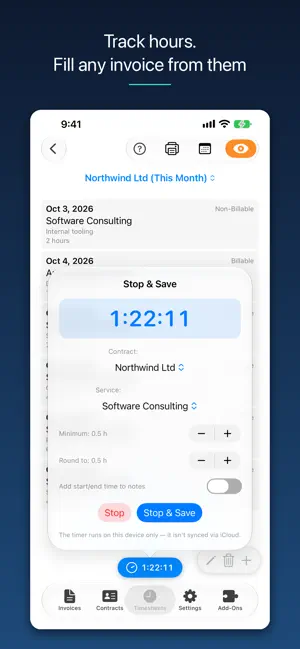
Invoicing without the headache Invoya is a native invoicing and time-tracking app for Mac, iPhone and iPad. Create an invoice, export it to PDF, send it to your client, and get paid. No account, no signup, no server — nothing you create ever leaves your devices. INVOICES AND PDFs Add your contracts, set the payment terms, create an invoice, and export it to PDF that's ready to send. TRACK HOURS, INVOICE FROM THEM Start the timer and get on with the work. When it's time to invoice, fill it straight from your timesheets. Records are grouped by service, so each service lands on the invoice as a single line. No retyping, no spreadsheet in between. MADE FOR CONSULTANTS AND FREELANCERS Minimum durations and rounding increments make sure your hours are billed exactly the way you charge for them. LOCK IT, SELL AHEAD Face ID or Touch ID keeps invoices, clients and hours hidden until you unlock. Sell time in advance with client credits — a paid invoice tops them up, logged time draws them down, and every service shows what's left. Bundle services into packages at a single price, and build your rate card once in Settings to drop onto any new client in a couple of taps. YOUR DATA STAYS YOURS There is no Invoya account, because there is no Invoya server. All your invoices, clients and hours live on your device and sync through your own private iCloud database, which only you can read. No analytics. No telemetry. No third parties. The app works offline — because it has no business being online in the first place. ONE NATIVE APP, THREE DEVICES Written for Apple platforms, not thrown together from a website. Add a client on the Mac, run the timer on the iPad, generate a PDF invoice on the iPhone. Available in several languages. START FREE, RIGHT NOW Invoicing is completely free — no signup. Time tracking is available as a paid add-on, handy if you bill by the hour. Choose a one-time purchase — pay once, use it for as long as the app is available on the App Store — or a monthly/yearly subscription, whichever fits how you work. Timesheets Add-On (one-time purchase): a single payment, no renewals, no recurring charges. Timesheets Add-On (auto-renewable subscription): available as a monthly or yearly plan. Payment is charged to your Apple Account at confirmation of purchase. The subscription renews automatically unless cancelled at least 24 hours before the end of the current period. Manage or cancel anytime in your Apple Account settings. Privacy Policy: https://invoya.app/privacy Terms of Use (EULA): https://www.apple.com/legal/internet-services/itunes/dev/stdeula/
What’s new
Version 1.3 · Updated October 10, 2026
Invoices that repeat, reminders before payment is due, and templates for how your invoices look. Recurring invoices Turn on Repeat for an invoice and choose how often it comes back, every few days, weeks or months. The next invoice is already waiting as a scheduled draft, dated and ready for you to check before you send it. Payment reminders Invoya reminds you on the due date and, if you like, earlier: a day, two days or a week before. Add a daily reminder about overdue invoices, and one on the date a scheduled invoice is due to go out. It's all in the new Reminders section of Settings. Invoice templates Choose Classic, Studio or Formal, or download more from the template gallery, each with its own colors, fonts and logo placement. Templates sync through your own iCloud account, and on iPhone, iPad and Mac, Quick Look previews a downloaded template before you add it. Your own footer The new Invoice Template section in Settings holds your template and the line at the foot of every invoice, which you can now replace with your own text.
App privacy
The developer, Aleksandr Gordienko, reported these privacy practices to Apple.
Data Not Collected
The developer does not collect any data from this app.
Alternatives to Invoya
Looking for apps like Invoya? Here are 6 similar apps on the App Store. The highest rated is Naqdi — Invoices & VAT (5.0/5), and all 6 are free to download.
-
 Naqdi — Invoices & VAT
5.0
Naqdi — Invoices & VAT
5.0
-
 FatooraZ: ZATCA Invoice KSA
-
 Aveli: Budget & Expenses
-
 Timer by UzVIP
-
 Sinon
Sinon
-
 FinCon
| App | Rating | Price | Last updated | Compare |
|---|---|---|---|---|
| Invoya | – | Free | October 10, 2026 | |
| Naqdi — Invoices & VAT | 5.0 / 5 (1) | Free | May 29, 2026 | Compare |
| FatooraZ: ZATCA Invoice KSA | – | Free | Feb 18, 2026 | Compare |
| Aveli: Budget & Expenses | – | Free | Sep 3, 2026 | Compare |
| Timer by UzVIP | – | Free | Aug 1, 2025 | Compare |
| Sinon | – | Free | Oct 26, 2026 | Compare |
| FinCon | – | Free | Sep 8, 2026 | Compare |
Compare Invoya with the top alternatives: ratings, updates, ASO score and keyword gaps →