

사이트인터넷속도측정
이트랜씨엔씨 Productivity iPhoneiPadiPod touch
사이트인터넷속도측정 is a free Productivity app for iPhone and iPad by 이트랜씨엔씨. Requires iOS 15.0. Updated July 24, 2026.
- Price
- Free
- on the App Store
- Size
- 32 MB
- Age 4+
- Updated
- Jul 24
- 2026 · v1.0.4
Screenshots



About 사이트인터넷속도측정
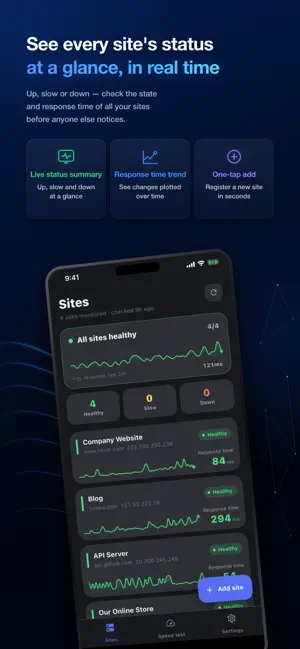
Is your site up right now? NetWatch watches the websites and servers you run — or simply depend on — and keeps an eye on how fast they respond. When a site slows down or stops answering, you get a push notification right away. No more refreshing the page yourself just to check. ■ Key Features ▷ Automatic monitoring Add a site's address and NetWatch checks it on the schedule you pick — every 10 minutes, 30 minutes, hour, 3 hours, or an interval you type in yourself. Our servers do the checking, so you don't have to leave the app open. ▷ Instant push alerts Get notified when a site goes down, when it starts responding slowly, and when it recovers. Each alert type can be turned on or off per site. ▷ Response time graphs See response times charted over time, so you can spot exactly when a site gets slow. Outage history is kept per site. ▷ Multiple check types Combine HTTP requests, Ping, and TCP port connections however you like. It isn't limited to websites — if a port is open, you can watch it: game servers, mail servers, and more. ▷ Test your own connection Measure the download speed and latency (ping) of the Wi-Fi or mobile data you're on, right now. When things feel slow, you'll know whether it's your connection or the site. ▷ Tune the sensitivity Decide how many seconds counts as "slow" and how many consecutive failures it takes before an alert fires — so you're not buried in noise. ■ Who it's for · Anyone running a store, blog, or company website · Anyone managing a home server or NAS from outside the house · Anyone who needs to hear about an outage before their customers do · Anyone who wants to know why the internet feels slow ■ Languages Available in English, Korean, Japanese, Chinese, and Spanish. The app follows your device language automatically. ■ Get in touch Send feedback and bug reports from Settings → Contact Us in the app. We read every message.
What’s new
Version 1.0.4 · Updated July 24, 2026
• SSL certificate expiry alerts: Get notified before your HTTPS site's certificate expires. See the expiry date and issuer right on the site screen. • Slowdown & outage cause hints: When a site is slow or unreachable, we now estimate which stage (DNS, connection, server) is at fault. • Clearer packet-loss labeling: Servers that block ping now show "Ping blocked" instead of a misleading "100% loss." • Added app version and a store shortcut in Settings. • Refined site report sharing and account recovery codes. • Stability improvements and bug fixes.
App privacy
The developer, 이트랜씨엔씨, reported these privacy practices to Apple.
Data Used to Track You
The following data may be used to track you across apps and websites owned by other companies:
- Identifiers: Device ID
- Usage Data: Product Interaction, Advertising Data
Data Linked to You
The following data, which may be collected and linked to your identity, may be used for the following purposes:
- User Content: Customer Support
Used for: App Functionality
Data Not Linked to You
The following data, which may be collected but is not linked to your identity, may be used for the following purposes:
- Identifiers: Device ID
- Usage Data: Product Interaction, Advertising Data
- User Content: Other User Content
Used for: Third-Party Advertising, Analytics, App Functionality
Alternatives to 사이트인터넷속도측정
Looking for apps like 사이트인터넷속도측정? Here are 6 similar apps on the App Store. The highest rated is ArcGIS IPS Setup (5.0/5), and all 6 are free to download.
-
 ArcGIS IPS Setup
5.0
-
 Notable - Text Editor
3.0
-
 깔끔 한글뷰어 - hwp, hwpx, 한글파일 뷰어
1.0
-
 Transync AI - Translator
4.6
-
 Molica AI-集大成于一身的AI工具集合
5.0
-
 Rayyan
3.9
| App | Rating | Price | Last updated | Compare |
|---|---|---|---|---|
| 사이트인터넷속도측정 | – | Free | July 24, 2026 | |
| ArcGIS IPS Setup | 5.0 / 5 (1) | Free | Jun 11, 2026 | Compare |
| Notable - Text Editor | 3.0 / 5 (2) | Free | Jan 27, 2026 | Compare |
| 깔끔 한글뷰어 - hwp, hwpx, 한글파일 뷰어 | 1.0 / 5 (2) | Free | Oct 30, 2026 | Compare |
| Transync AI - Translator | 4.6 / 5 (206) | Free | Oct 30, 2026 | Compare |
| Molica AI-集大成于一身的AI工具集合 | 5.0 / 5 (3) | Free | Apr 7, 2026 | Compare |
| Rayyan | 3.9 / 5 (25) | Free | Aug 6, 2026 | Compare |
Compare 사이트인터넷속도측정 with the top alternatives: ratings, updates, ASO score and keyword gaps →