

MYOQ: Make Your Own Quiz
Simple Fun Software LP Education iPhoneiPadiPod touch
MYOQ: Make Your Own Quiz is a free Education app for iPhone and iPad by Simple Fun Software LP. Requires iOS 17.0. Updated October 19, 2026.
- Price
- Free
- on the App Store
- Size
- 28 MB
- Age 4+
- Updated
- Oct 19
- 2026 · v3.0
Screenshots


About MYOQ: Make Your Own Quiz
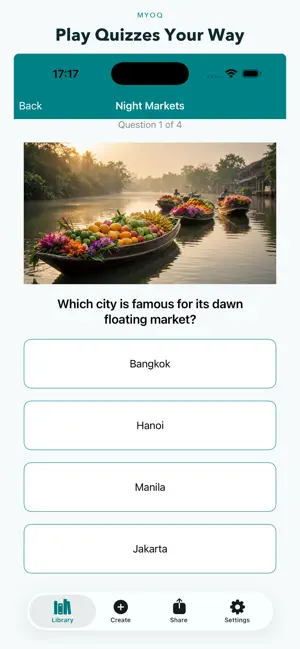
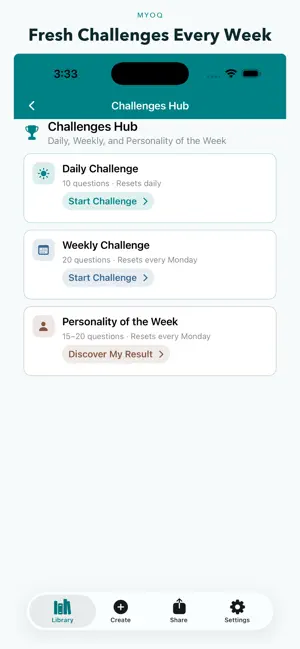
Make, play, and share your own quizzes with MYOQ. Build them yourself or start from an AI draft, then add photos, video, and audio. Create and play quizzes offline on your device without signing in. Sign in with Apple or Google is required for cloud features: AI generation, uploading and downloading share codes, browsing the public library, Daily Challenge, likes, and restoring your uploads after reinstall. Free weekly AI uses, ad unlocks, Pro limits, and owned share codes stay tied to your account. GENERATE QUIZZES WITH AI • Sign in, then turn a topic or notes into a quiz draft in seconds • Generate Standard or Personality quizzes, then edit every question before you play or share • Add your own prompts for tone, difficulty, and focus so the AI builds what you need • Enjoy a free AI generation each week, with optional rewarded ads for more CREATE ANY TYPE OF QUIZ • Standard quizzes — mix multiple question types in one quiz: multiple choice, true/false, short answer, multi-select, and ordering • Personality quizzes — design result types with images, video, audio, or YouTube, then let players discover their match • Matching games — flip cards and pair identical images • Add photos, video, audio, or YouTube clips to questions and personality results • Add titles, descriptions, and categories to keep quizzes organized and easy to find PLAY, PRACTICE, AND LEARN • Start quizzes with optional shuffle and timers • Resume anytime if you leave mid-session • Review scores and practice missed questions • Finish personality quizzes on a polished result screen with your type, description, and media • Great for studying, classroom activities, trivia nights, test prep, or just having fun SHARE QUIZZES AND RESULTS • Sign in to upload quizzes you create and get an 8-character share code • Friends download and play instantly with the code • Share your personality result as a card or a video clip with sound so friends can take the quiz too • Explore public quizzes by popularity, likes, and what’s trending • Search the community library by name or description • Re-download your own uploads after reinstall from Your uploads YOUR PERSONAL QUIZ LIBRARY • Keep all your quizzes in one place on this device • Home shows today’s challenge, your streak, and a personalized 15-question quiz from interests you pick • Personalized quizzes use the normal weekly AI allowance. Choosing interests is free • Search and edit your creations anytime • Enjoy light and dark themes PERSONALITY OF THE WEEK • Sign in to play a new shared personality quiz each week and share your result CHALLENGES • Daily Challenge is 10 questions. Weekly Challenge is 20. Personality of the Week is 15 to 20 questions MYOQ PRO (OPTIONAL) • No advertisements • 8 AI quiz generations each week, for normal or personalized quizzes • 8 AI images each week • Up to 40 questions, higher audio and video allowances, and 4 uploads and downloads a day • Export quizzes as PDF MYOQ is free to use and supported by ads, with an optional MYOQ Pro subscription for more power. Available in multiple languages. Whether you’re a teacher, student, parent, or trivia fan, MYOQ makes it simple to create quizzes, share them, and play together anywhere.
What’s new
Version 3.0 · Updated October 19, 2026
Overall app improvements.
App privacy
The developer, Simple Fun Software LP, reported these privacy practices to Apple.
Data Used to Track You
The following data may be used to track you across apps and websites owned by other companies:
- Identifiers: Device ID
- Usage Data: Advertising Data
Data Linked to You
The following data, which may be collected and linked to your identity, may be used for the following purposes:
- Location: Coarse Location
- Identifiers: Device ID, User ID
- Usage Data: Product Interaction, Advertising Data
- Other Data: Other Data Types
- Contact Info: Email Address, Name
- User Content: Photos or Videos, Audio Data
Used for: Third-Party Advertising, Developer’s Advertising or Marketing, Analytics, Product Personalization, App Functionality
Data Not Linked to You
The following data, which may be collected but is not linked to your identity, may be used for the following purposes:
- Diagnostics: Crash Data, Performance Data, Other Diagnostic Data
Used for: Third-Party Advertising, Developer’s Advertising or Marketing, Analytics, App Functionality
Alternatives to MYOQ: Make Your Own Quiz
Looking for apps like MYOQ: Make Your Own Quiz? Here are 6 similar apps on the App Store. The highest rated is QuizBuilder - Custom Quiz Make (5.0/5), and all 6 are free to download.
-
 QuizBuilder - Custom Quiz Make
5.0
QuizBuilder - Custom Quiz Make
5.0
-
 Quiz Make
-
 Quiz Maker: AI Test & Study
2.0
Quiz Maker: AI Test & Study
2.0
-
 Sharpener - The Quiz Maker
-
 Memora: Make Flashcards & Quiz
-
 Quizel: AI Quiz Maker
| App | Rating | Price | Last updated | Compare |
|---|---|---|---|---|
| MYOQ: Make Your Own Quiz | – | Free | October 19, 2026 | |
| QuizBuilder - Custom Quiz Make | 5.0 / 5 (2) | Free | Oct 22, 2026 | Compare |
| Quiz Make | – | Free | Apr 14, 2026 | Compare |
| Quiz Maker: AI Test & Study | 2.0 / 5 (1) | Free | Sep 24, 2026 | Compare |
| Sharpener - The Quiz Maker | – | Free | Apr 14, 2026 | Compare |
| Memora: Make Flashcards & Quiz | – | Free | Oct 10, 2026 | Compare |
| Quizel: AI Quiz Maker | – | Free | Oct 12, 2026 | Compare |