

Plantempo: Plant Care Journal
Gerardo Pacheco Sicart Lifestyle iPhoneiPadiPod touch
Plantempo: Plant Care Journal is a free Lifestyle app for iPhone and iPad by Gerardo Pacheco Sicart. Requires iOS 18.0. Updated October 16, 2026.
- Price
- Free
- on the App Store
- Size
- 80 MB
- Age 4+
- Updated
- Oct 16
- 2026 · v1.7.1
Screenshots


About Plantempo: Plant Care Journal
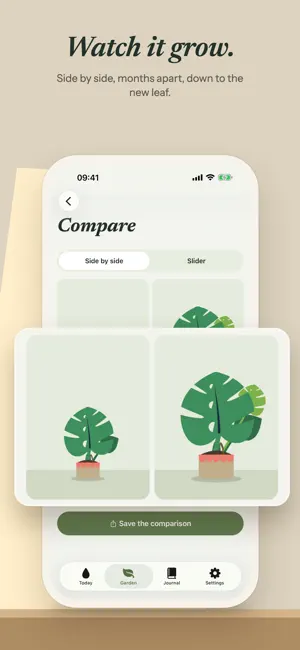
Plantempo learns how fast each of your houseplants really dries, from your local weather and a touch of the soil, and tells you when to water. Free. No subscription. No account. No ads. Your windowsill, in your weather. The Today screen shows your plants on a wooden windowsill, in the light of your local weather and the hour, from dawn to night. The thirsty ones droop until you water them. Below, the day comes in cards: slide to water, or flip one to see why a plant needs water today. Home Screen widgets. Two widgets show which plants need water today. The Sill puts your windowsill on the Home Screen, in every iPhone size: the plants sway, and the thirsty ones droop. Today’s Round gives each plant due today its own card. Both keep their color and their motion on Clear and Tinted Home Screens. Watering that learns. Every plant starts on its species’ rhythm. Then Plantempo reads your local heat, humidity and rain, asks you to touch the soil now and then, and shows your reading next to what it expected. After a few checks, each plant waters on its own learned rhythm — not a calendar. One watering reminder a day. A single nudge, at the hour you choose, and only when a plant actually needs you. Mark it watered and the next one schedules itself. Not sure which one it is? On an iPhone with Apple Intelligence and iOS 27, take a photo as you add a plant and Plantempo names the species, with its watering rhythm already set. The photo never leaves your phone. Ask Siri. “Hey Siri, water the monstera in Plantempo”, and it’s in the journal without opening the app. Ask what’s due today, or find a plant from your phone’s search. A plant’s whole life. Cuttings wait on the windowsill in a glass of water, a plug of soil or a bag of moss, rooting a little more each day. Fresh soil, feeding counted in waterings, moss poles, where each plant came from — all remembered. Every species comes with its own plant care guide: light, water, humidity, soil, feeding, propagation and pets. Before and now. Pick any two moments from a plant’s journal and see them side by side, or with a slider. Save the pair as one image to share — and when a plant reaches a milestone, save that moment too. Every plant has a story. A private plant journal of photos, notes and check-ins — and, on iPhones with Apple Intelligence, a paragraph that sums it up, written from your own notes. Deleted something by mistake? It waits 30 days in Recently deleted. On iPad, in ten languages. The whole garden laid out for iPad. English, Spanish, German, French, Portuguese, Japanese, Korean and Chinese. Yours, and only yours. No Plantempo account. Your garden lives on your device and syncs through your own iCloud. It works offline; the weather refreshes when you’re back online. Free. Nothing locked away. No subscription, no in-app purchases, no ads. The whole garden is yours from day one. Plant the first one. Let’s grow.
What’s new
Version 1.7.1 · Updated October 16, 2026
Today, in your window’s light. Your plants now sit on a wooden windowsill, under the light from your window: sun, cloud, rain or snow, as it is outside, from dawn to night. They sway, and the thirsty ones droop until you water them. The day, in cards. Below the sill, today comes in cards. Slide to water, flip a card to see why today, and tick off fresh water for a cutting or a damp moss pole. Anniversaries and milestones turn up too, ready to save as an image. Every plant, redrawn. Every species has a new hand-drawn look, and they all move: touch one and it answers. Cuttings wait in their glass of water, their plug of soil or their bag of moss, rooting a little more each day. Two new widgets. The Sill brings your windowsill to the Home Screen, in the light of the hour, the thirsty plants drooping. Today’s Round gives each plant due today its own card, and the ones you’ve watered stand up again. Both keep their color, and keep moving, on Clear and Tinted Home Screens. To add one, touch and hold your Home Screen, tap Edit, then Add Widget, and search for Plantempo. And more. A plant’s portrait now also lives in its gallery, and choosing a new one no longer deletes the old photo. Picking a species from search closes the keyboard. And everything runs smoother.
App privacy
The developer, Gerardo Pacheco Sicart, reported these privacy practices to Apple.
Data Not Linked to You
The following data, which may be collected but is not linked to your identity, may be used for the following purposes:
- Usage Data: Product Interaction
- Location: Coarse Location
- Diagnostics: Crash Data
Used for: Analytics, App Functionality
Alternatives to Plantempo: Plant Care Journal
Looking for apps like Plantempo: Plant Care Journal? Here are 6 similar apps on the App Store. The highest rated is WeaveLife: Habit Tracker (5.0/5), and 2 of the 6 are free to download.
-
 WeaveLife: Habit Tracker
5.0
-
 PennyWise Pro
-
 Daily Affirmations: Monke Mind
5.0
-
 Baby Diary Growth Milestone
-
 Pet Health Diary Dog & Cat Log
-
 Whilst
| App | Rating | Price | Last updated | Compare |
|---|---|---|---|---|
| Plantempo: Plant Care Journal | – | Free | October 16, 2026 | |
| WeaveLife: Habit Tracker | 5.0 / 5 (1) | 4.99 USD | Sep 20, 2026 | Compare |
| PennyWise Pro | – | 0.99 USD | Jun 2, 2026 | Compare |
| Daily Affirmations: Monke Mind | 5.0 / 5 (2) | Free | Aug 20, 2026 | Compare |
| Baby Diary Growth Milestone | – | 1.99 USD | Jul 31, 2026 | Compare |
| Pet Health Diary Dog & Cat Log | – | 1.99 USD | Aug 2, 2026 | Compare |
| Whilst | – | Free | May 22, 2026 | Compare |