

Zoom Makeup: Magnify Mirror
Frederic Varraud Lifestyle iPhoneiPadiPod touch
Zoom Makeup: Magnify Mirror is a free Lifestyle app for iPhone and iPad by Frederic Varraud. Requires iOS 16.4. Updated August 22, 2026.
- Price
- Free
- on the App Store
- Size
- 82 MB
- Age 4+
- Updated
- Aug 22
- 2026 · v2.0.1
Screenshots
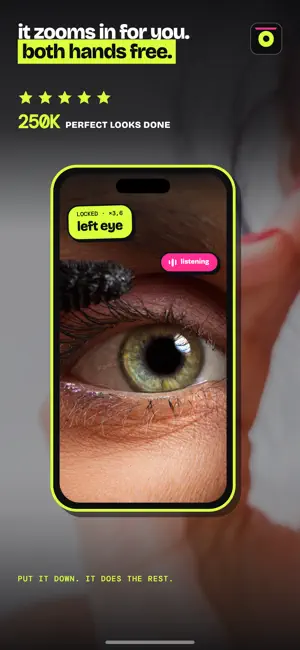


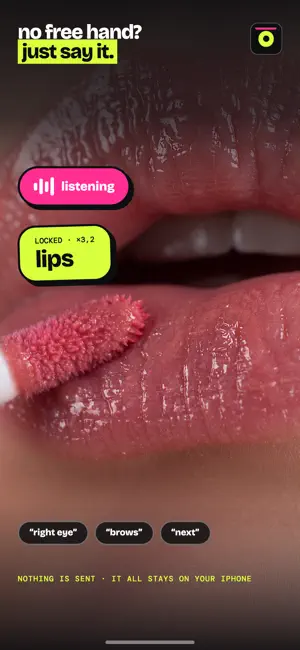
About Zoom Makeup: Magnify Mirror
Put your phone down. Zoom Makeup finds your face and magnifies the area you're working on: eye, brow, lip, beard line. The framing stays centred even when you move, and both hands stay free. PICK AN AREA WITHOUT HUNTING FOR IT Hold a finger on your face, slide, lift it where you want. A guide appears while you press, showing the fourteen areas: forehead, brows, eyes, cheeks, nose, lips, dark circles, moustache, beard line, neck, whole face. Each one has its own magnification, set for what you do there. SYMMETRY, WHICH NO MIRROR CAN DO Take a photo and the app doubles one side of your face, then the other. What isn't aligned jumps out at once: a wing sitting higher on one side, a shorter brow, a beard line creeping up. A mirror will never show you that. A ROUTINE THAT RUNS ON ITS OWN The app watches the order you work in. After three identical sessions it turns that into a routine, and you can reorder the steps by dragging them. Start it and it moves through the areas, holding each one for as long as you usually spend on it. You stop touching the screen. VOICE, WHEN YOUR HANDS ARE BUSY Say "left eye", "lips", "beard", and the zoom goes there. Say "light", "warm light", "photo", "symmetry". While a routine runs, say "next", "pause", "stop". Recognition runs on your phone: nothing is recorded, nothing is sent. LIGHT, EVEN AT 10 PM A lit frame runs around the screen and brightens your face. Five shades from white to gold, three strengths. Your screen goes to full brightness, which also helps the camera find you in the dark. YOUR PHOTOS STAY YOURS Shots taken in the app live in the app. It never reads your photo library: it has no right to and no need to. A photo is copied there only if you tap save. ONE PURCHASE The free version shows an ad banner. A one-time purchase removes it and unlocks symmetry, photos and the guided routine. No subscription, no renewal. Updates included.
What’s new
Version 2.0.1 · Updated August 22, 2026
Voice control now looks for whole words. "Nose" is finally recognised, with "nostril" as a backup, and an ordinary sentence no longer triggers a zoom by surprise.
App privacy
The developer, Frederic Varraud, reported these privacy practices to Apple.
Data Not Linked to You
The following data, which may be collected but is not linked to your identity, may be used for the following purposes:
- Identifiers: Device ID
- Usage Data: Advertising Data, Product Interaction
- Purchases: Purchase History
Used for: Third-Party Advertising, Analytics, App Functionality
Alternatives to Zoom Makeup: Magnify Mirror
Looking for apps like Zoom Makeup: Magnify Mirror? Here are 6 similar apps on the App Store. The highest rated is Mirror - Light, Camera, Zoom (5.0/5), and all 6 are free to download.
-
 Mirror — Makeup & Light
-
 Mirror - Light, Camera, Zoom
5.0
-
 ShaveMe
-
 HD Pocket Mirror - Lumira
-
 HairMorph: Hair Transplant AI
-
 OLEAP REVOLUTION
| App | Rating | Price | Last updated | Compare |
|---|---|---|---|---|
| Zoom Makeup: Magnify Mirror | – | Free | August 22, 2026 | |
| Mirror — Makeup & Light | – | Free | Aug 14, 2026 | Compare |
| Mirror - Light, Camera, Zoom | 5.0 / 5 (3) | Free | Oct 8, 2026 | Compare |
| ShaveMe | – | Free | Oct 14, 2026 | Compare |
| HD Pocket Mirror - Lumira | – | Free | Jun 1, 2026 | Compare |
| HairMorph: Hair Transplant AI | – | Free | Oct 5, 2026 | Compare |
| OLEAP REVOLUTION | – | Free | Aug 7, 2026 | Compare |