

XdoList
Yong Zhang Productivity iPhoneiPadiPod touch
XdoList is a free Productivity app for iPhone and iPad by Yong Zhang. Requires iOS 15.0. Updated July 28, 2026.
- Price
- Free
- on the App Store
- Size
- 29 MB
- Age 4+
- Updated
- Jul 28
- 2026 · v0.2.1
Screenshots

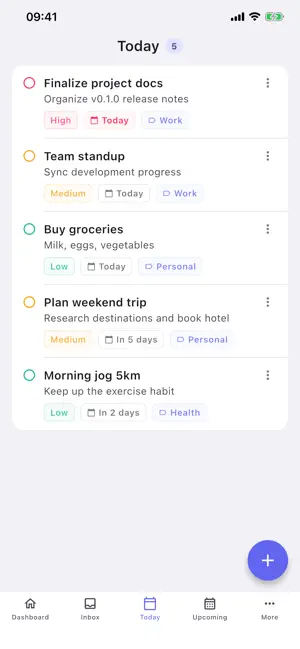
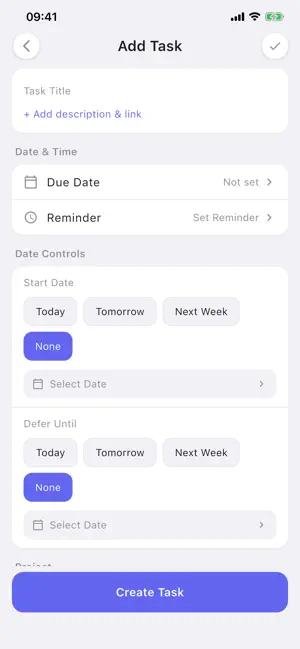
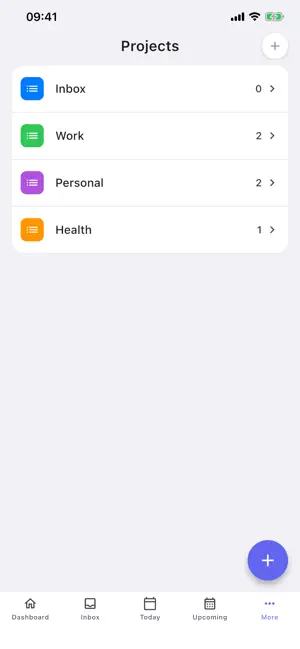
About XdoList
XdoList is The Workflow Freedom Task App. One model, multiple workflows, composable views. WHY XDOLIST? WORKFLOW FREEDOM Your tasks, your structure. Start with the workflow that feels familiar: Things, Todoist, OmniFocus, TickTick, Reminders, or build your own Custom workflow. ONE MODEL, MANY VIEWS Tasks, Projects, Areas, and Tags share one powerful domain model. Mix and match Saved Views to see exactly what you need, when you need it. SAVED VIEWS Create custom filters, groupings, and sorts. Save them once, switch instantly. From today to upcoming, from project hubs to tag clouds. OFFICIAL PACKS Choose from 6 official workflow styles at setup. Each style brings a proven task-management structure into XdoList, so you never start from scratch. FAST AND RELIABLE SYNC Your data stays in your control. Optional cloud sync is fast, reliable, and built for people who move between devices. CLEAN DESIGN Beautiful, distraction-free interface with smooth animations. Dark mode included for comfortable viewing. FEATURES: - Create tasks with titles, descriptions, due dates, and priorities - Organize with Projects, Areas, and Tags - Choose a built-in workflow style or design your own workflow - Save custom views with filters, groupings, and sorts - Search and filter tasks instantly - Dark mode and light mode support WHO IS IT FOR? Students, professionals, parents, and anyone who wants a task app that adapts to their workflow. Perfect for daily todos, work tasks, project planning, and personal organization. SUPPORT Have feedback? We would love to hear from you! Email: [email protected] Website: https://xdolist.com/ Download XdoList today and start working the way you want.
What’s new
Version 0.2.1 · Updated July 28, 2026
XdoList 0.2.1 makes getting around the app feel truly native. Navigation, Fixed Everywhere - Swipe from the left edge to go back on list pages reached from the dashboard or the More drawer, now with a back button to match. - List pages entered from the bottom tabs stay clean, with no misplaced back buttons. - No more black flash when swiping back. Sidebar, Organized - The sidebar groups destinations by meaning: views, organization, and status, with clearer dividers. - The trash can now lives in the sidebar and the More drawer, right next to Search and Settings. - Choose bottom tabs or a sidebar for your custom workflow style. Trash, On Your Terms - Set how long deleted tasks stay in the trash: 7, 14, 30, or 90 days. - Expired items are cleaned up automatically at launch, no need to open the trash. Pack Styles Aligned - Pro GTD now uses streamlined bottom navigation, while Elegant Flow gets a clean sidebar with a built-in Logbook. Plus fixes for area task counts, duplicated tasks in areas, and quicker task capture from an area page.
App privacy
The developer, Yong Zhang, reported these privacy practices to Apple.
Data Not Linked to You
The following data, which may be collected but is not linked to your identity, may be used for the following purposes:
- Identifiers: User ID, Device ID
- Usage Data: Product Interaction
Used for: Analytics
Alternatives to XdoList
Looking for apps like XdoList? Here are 6 similar apps on the App Store. The highest rated is AnyHabit: App Blocker & Focus (5.0/5), and all 6 are free to download.
-
 AnyHabit: App Blocker & Focus
5.0
AnyHabit: App Blocker & Focus
5.0
-
 Mouthful: Voice to To-Do List
5.0
Mouthful: Voice to To-Do List
5.0
-
 Log or Lock: Daily Journal
-
 Daily Planner - Trio
5.0
Daily Planner - Trio
5.0
-
 Simply Things: To-Do List
5.0
Simply Things: To-Do List
5.0
-
 The Drive AI - File Manager
3.7
The Drive AI - File Manager
3.7
| App | Rating | Price | Last updated | Compare |
|---|---|---|---|---|
| XdoList | – | Free | July 28, 2026 | |
| AnyHabit: App Blocker & Focus | 5.0 / 5 (1) | Free | Jun 14, 2026 | Compare |
| Mouthful: Voice to To-Do List | 5.0 / 5 (3) | Free | Sep 4, 2026 | Compare |
| Log or Lock: Daily Journal | – | Free | Jan 3, 2026 | Compare |
| Daily Planner - Trio | 5.0 / 5 (4) | Free | Sep 22, 2025 | Compare |
| Simply Things: To-Do List | 5.0 / 5 (3) | Free | Sep 24, 2026 | Compare |
| The Drive AI - File Manager | 3.7 / 5 (6) | Free | Oct 6, 2026 | Compare |
Compare XdoList with the top alternatives: ratings, updates, ASO score and keyword gaps →