

Scroll - Auto Scroll Browser
Kosuke Yamanaka Utilities iPhoneiPadiPod touch
Scroll - Auto Scroll Browser is a free Utilities app for iPhone and iPad by Kosuke Yamanaka. Rated 5.0/5 from 4 ratings. Requires iOS 15.0.
- Rating
- 5.0
- 4 ratings
- Price
- Free
- on the App Store
- Size
- 23 MB
- Age 17+
- Updated
- Oct 22
- 2026 · v1.3.3
Screenshots


About Scroll - Auto Scroll Browser
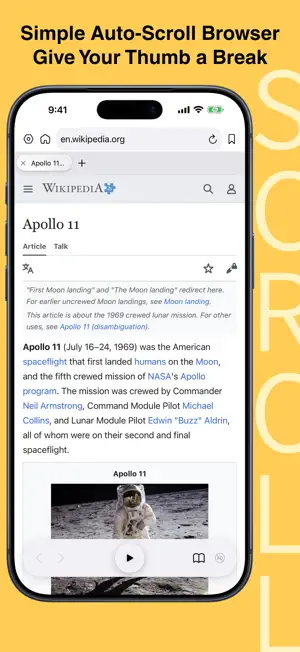
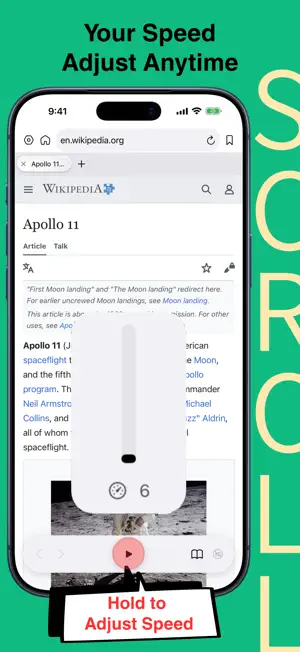
Scroll is a browser for iPhone and iPad designed to make long web pages easier to read — without constant swiping. ■AUTO-SCROLL AT YOUR PACE Start or pause automatic scrolling with the central play button. Press and hold the button to view and adjust the scrolling speed without leaving the page. ■SIMPLE TAB MANAGEMENT Open, switch between, and close tabs from the tab bar. Open links in a new Scroll tab to keep your current page open. ■ESSENTIAL BROWSING TOOLS Enter a website address or search the web directly from the address bar. Move backward and forward, return to your home page, and organize frequently visited websites with bookmarks and folders. Import bookmarks exported from Safari all at once or choose individual items. Duplicate detection lets you add only bookmarks that are not already in Scroll or repeated in the import file. ■SAVE IMAGES, BROWSE ANYTIME Save images from a webpage all at once to Scroll’s built-in library. Browse them later—even offline—and use auto-scroll while viewing saved images. ■CONTENT CONTROLS Use supported content controls to hide distracting page elements and stay focused on what you want to read. Privacy Policy: https://cob-app.com/2026/07/18/privacy-policy-scroll/ Terms of Service: https://www.apple.com/legal/internet-services/itunes/dev/stdeula/ CREDITS Some screenshots and previews display third-party web content for demonstration purposes only. Pepper&Carrot: Based on the webcomic Pepper&Carrot by David Revoy. https://www.peppercarrot.com Licensed under Creative Commons Attribution 4.0 International (CC BY 4.0). https://creativecommons.org/licenses/by/4.0/ Wikipedia: Article text from “Apollo 11” and “Coffee” by Wikipedia contributors. https://en.wikipedia.org/wiki/Apollo_11 https://en.wikipedia.org/wiki/Coffee Wikipedia text is available under Creative Commons Attribution-ShareAlike 4.0 International (CC BY-SA 4.0). https://creativecommons.org/licenses/by-sa/4.0/
What’s new
Version 1.3.3 · Updated October 22, 2026
Update: • The bottom toolbar now hides when you scroll down manually, giving you a clearer view of the page. Scroll up to bring it back.
App privacy
The developer, Kosuke Yamanaka, reported these privacy practices to Apple.
Data Not Collected
The developer does not collect any data from this app.
Alternatives to Scroll - Auto Scroll Browser
Looking for apps like Scroll - Auto Scroll Browser? Here are 6 similar apps on the App Store. The highest rated is Modex - Build Your Own Browser (5.0/5), and all 6 are free to download.
-
 Modex - Build Your Own Browser
5.0
Modex - Build Your Own Browser
5.0
-
 Continuous Scroll Speed App
5.0
Continuous Scroll Speed App
5.0
-
 Telescopure
5.0
Telescopure
5.0
-
 Avodek: Private Browser + AI
5.0
Avodek: Private Browser + AI
5.0
-
 Dart Browser
5.0
Dart Browser
5.0
-
 Blank Browser
5.0
Blank Browser
5.0
| App | Rating | Price | Last updated | Compare |
|---|---|---|---|---|
| Scroll - Auto Scroll Browser | 5.0 / 5 (4 ratings) | Free | October 22, 2026 | |
| Modex - Build Your Own Browser | 5.0 / 5 (2) | Free | Oct 22, 2026 | Compare |
| Continuous Scroll Speed App | 5.0 / 5 (1) | Free | Feb 1, 2026 | Compare |
| Telescopure | 5.0 / 5 (1) | Free | Mar 8, 2026 | Compare |
| Avodek: Private Browser + AI | 5.0 / 5 (1) | Free | Oct 21, 2026 | Compare |
| Dart Browser | 5.0 / 5 (1) | Free | Sep 9, 2026 | Compare |
| Blank Browser | 5.0 / 5 (1) | Free | Sep 28, 2026 | Compare |