

CircleBell: Send Notifications
Baran Toppare Utilities iPhoneiPadiPod touch
CircleBell: Send Notifications is a free Utilities app for iPhone and iPad by Baran Toppare. Requires iOS 18.0. Updated September 9, 2026.
- Price
- Free
- on the App Store
- Size
- 23 MB
- Age 12+
- Updated
- Sep 9
- 2026 · v1.1
Screenshots


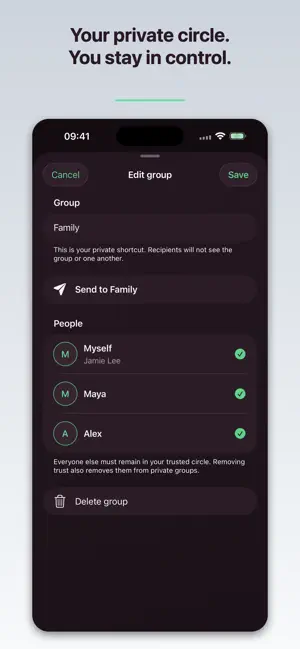
About CircleBell: Send Notifications
Remember your medication. Pick up groceries on the way home. Take the library books back tomorrow. CircleBell helps you remind yourself and the people you care about of everyday tasks. Send a reminder now, or use CircleBell Pro to choose a date and time for later. A reminder to take your medication this evening. A note to your partner to pick up milk and bread on the way home. A nudge to yourself to return the library books tomorrow. Keep each reminder short, clear, and easy to act on. SEND NOW FOR FREE - Send a notification to yourself - Reach one trusted person or a private group - Invite people with one-use links and connect only after they accept - See recent activity for 24 hours CircleBell Pro - Schedule notifications for later - Edit or cancel scheduled notifications - Choose a distinct notification tone for each person - Bring a received notification back as a reminder Your circle stays private. Other people can reach you only after you accept them, and private-group recipients do not see the group or one another. Notification content is deleted after 24 hours. CircleBell does not sell your data or use it for advertising. CircleBell Pro is available monthly, yearly, or as a lifetime purchase. Eligible purchases support Apple Family Sharing. Payment is charged to your Apple ID. Subscriptions renew automatically unless canceled at least 24 hours before the end of the current period. Manage or cancel subscriptions in App Store settings. Privacy Policy: https://circlebell.app/privacy Terms of Use: https://circlebell.app/terms Support: https://circlebell.app/support
What’s new
Version 1.1 · Updated September 9, 2026
Invite someone directly while choosing a recipient, send from a person or group, and read Activity more comfortably at larger text sizes. Pro features are now explained in context, and notification character limits appear as you approach them.
App privacy
The developer, Baran Toppare, reported these privacy practices to Apple.
Data Linked to You
The following data, which may be collected and linked to your identity, may be used for the following purposes:
- Identifiers: Device ID, User ID
- Purchases: Purchase History
- Contact Info: Email Address, Name
- Contacts: Contacts
- User Content: Emails or Text Messages, Other User Content
- Diagnostics: Other Diagnostic Data
Used for: Analytics, App Functionality
Data Not Linked to You
The following data, which may be collected but is not linked to your identity, may be used for the following purposes:
- Location: Coarse Location
- Usage Data: Product Interaction
Used for: Analytics
Alternatives to CircleBell: Send Notifications
Looking for apps like CircleBell: Send Notifications? Here are 6 similar apps on the App Store. The highest rated is Missuo: Couples Widget & Love (4.1/5), and all 6 are free to download.
-
 Alarmee: Friends Shared Alarms
-
 HomyScan Inventory management
1.0
-
 Movie Vision: Scan TV Ratings
4.0
-
 Missuo: Couples Widget & Love
4.1
-
 JustNotify - Notification App
-
 Alibi Wake Up
| App | Rating | Price | Last updated | Compare |
|---|---|---|---|---|
| CircleBell: Send Notifications | – | Free | September 9, 2026 | |
| Alarmee: Friends Shared Alarms | – | Free | Sep 6, 2026 | Compare |
| HomyScan Inventory management | 1.0 / 5 (1) | Free | Jun 27, 2026 | Compare |
| Movie Vision: Scan TV Ratings | 4.0 / 5 (3) | Free | Apr 15, 2026 | Compare |
| Missuo: Couples Widget & Love | 4.1 / 5 (10) | Free | Sep 15, 2026 | Compare |
| JustNotify - Notification App | – | Free | Jul 10, 2026 | Compare |
| Alibi Wake Up | – | Free | Aug 27, 2026 | Compare |