

ListenCards Flashcards
江 彭 Education iPhoneiPadiPod touch
ListenCards Flashcards is a free Education app for iPhone and iPad by 江 彭. Rated 5.0/5 from 1 ratings. Requires iOS 18.6. Updated October 15, 2026.
- Rating
- 5.0
- 1 ratings
- Price
- Free
- on the App Store
- Size
- 373 MB
- Age 4+
- Updated
- Oct 15
- 2026 · v3.5
Screenshots


About ListenCards Flashcards
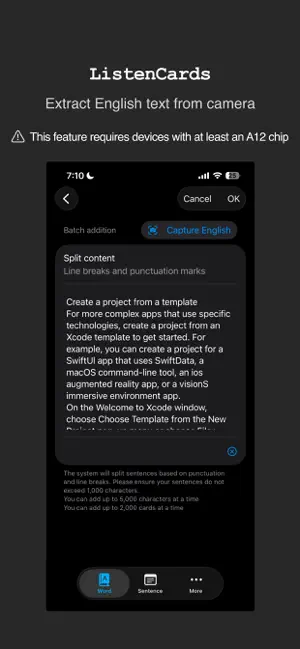
This is a flashcard software focused on learning English. The core purpose is to quickly create dictation flashcards and focus on practicing dictation, which can be learned repeatedly. You can make up to 100 cards for free without expiration. 1. Quickly create flashcards. You can input a word, a sentence, or an article, and the application will help you automatically split it into flashcards based on the flashcard type. 2. By long-pressing the app icon, you can take photos to create word flashcards. When you input your native language (English, Chinese, Japanese, Korean, German, French, Spanish, Italian, Russian), it will quickly translate it into the learning language for flashcard creation, which is particularly effective for learning nouns. 3. During the blind listening phase, you can associate sounds with images to help establish a connection between audio and visual cues. 4. When you are learning, you establish associations between sounds and language through blind listening. You can also click on the hidden text to listen repeatedly. A sentence can be split into words for blind listening or listened to as a whole, helping you build an overall perception of the language. 5. Additionally, during the blind listening phase, you can compare your input with the correct answer to better master listening skills. 6. You can adjust the pronunciation speed: extremely slow, slow, normal, fast, or extremely fast, to help you adapt to different speech rates. 7. You can also pre-download different high-quality voice packs in the iOS system and switch between different speakers in this application to help you better adapt to different accents. 8. You can set the maximum number of new cards to learn each day, helping you manage your learning effectively. 9. You can choose when to review, such as after 1 day, 3 days, 5 days, etc., to help you consolidate your memory. 10. Automatically play audio for flashcards, with settings for speed, repetition, and pause duration. 11. You can also manage flashcards in bulk conveniently. 12. Cards in the deck can be played as an audio stream and filtered based on relevant conditions 13. Protect your privacy, as all data is stored in your private iCloud space, accessible only by you. 14. From the deck list, you can enter reading mode to play, pause, go to the previous or next card, and loop playback. Additionally, background playback is supported. 15. Locally generate audio files that closely resemble human speech, supporting multiple speaker options to help you better adapt to different accents (this feature requires a device with at least an A14 chip). 16. Use the camera to capture English text in real-time and paste it into the text box (this feature requires a device with at least an A12 chip).
What’s new
Version 3.5 · Updated October 15, 2026
1. Put the editing, reading, copying, and translation options in the bottom right corner of the reading page. 2. Optimize shortcuts. 3. Insert “Try again” at the end of the learning process.
App privacy
The developer, 江 彭, reported these privacy practices to Apple.
Data Not Collected
The developer does not collect any data from this app.
Alternatives to ListenCards Flashcards
Looking for apps like ListenCards Flashcards? Here are 6 similar apps on the App Store.


| App | Rating | Price | Last updated | Compare |
|---|---|---|---|---|
| ListenCards Flashcards | 5.0 / 5 (1 rating) | Free | October 15, 2026 | |
| PicFizz: Language Stickers | – | Free | Sep 18, 2026 | Compare |
| WordScene: Snap & Learn | – | Free | Aug 9, 2026 | Compare |
| das Worthaus | – | Free | Dec 11, 2025 | Compare |
| 图记单词-看图背单词高效记忆 | – | Free | Oct 14, 2026 | Compare |
| OriSent | – | Free | Oct 15, 2026 | Compare |
| TapNRead | – | Free | Apr 15, 2026 | Compare |