

TimeSense - Time& Task Tracker
Huizhou Yangli Technology Co., Ltd Utilities iPhoneiPadiPod touch
TimeSense - Time& Task Tracker is a free Utilities app for iPhone and iPad by Huizhou Yangli Technology Co., Ltd. Requires iOS 15.6.
- Price
- Free
- on the App Store
- Size
- 58 MB
- Age 4+
- Updated
- Oct 13
- 2026 · v1.1.0
Screenshots


About TimeSense - Time& Task Tracker
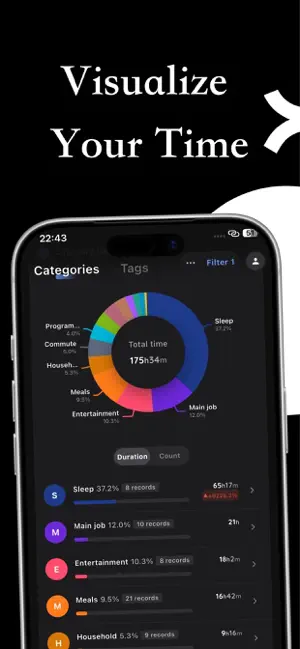
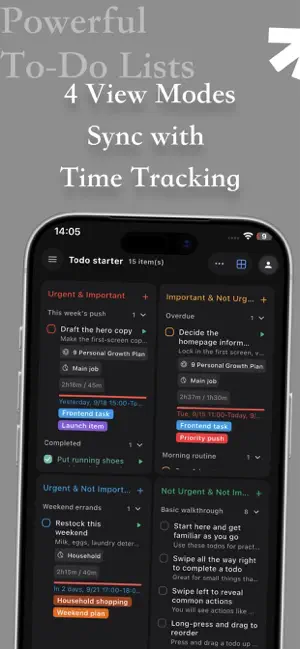
TimeSense: Master Your Time, Effortlessly. Do you ever reach the end of a busy day and wonder, "Where did all my time go?" TimeSense is a minimalist, ad-free time tracking and planning tool built for deep focus. It's not just about logging hours; it's about understanding your time so you can reclaim it. Why TimeSense? Real-Time Incremental Sync Unlike other apps that require painful manual cloud uploads, TimeSense uses smart incremental sync. Your data stays perfectly consistent across all your devices - phone, tablet, and desktop - lightning fast. Overlapping Time Tracking Real life isn't linear. You might commute while listening to a podcast, or wait for a build while replying to emails. TimeSense allows events to overlap. Our block, week, and day views are completely redesigned to visualize your true, parallel timeline. Seamless Todo & Timer Integration Your tasks and your time are finally connected. Create lists, tags, reminders, and infinite subtasks. But the magic happens on the timeline: drag to create tasks directly on your Day, Week, or Block views, and watch them sync perfectly with your running timers. Infinite Nested Plans From yearly goals to daily actions, TimeSense supports infinite levels of sub-plans. Assign weight or percentage to each sub-plan, and watch your progress bar automatically fill up as you complete tasks and track time. Designed for Deep Focus - Zero Ads. Zero Clutter. - Custom Theme Colors. - Global Start of Week/Day settings. - Home Screen Widgets for one-tap tracking. Our Philosophy TimeSense is built by an independent developer who believes time tracking shouldn't be a chore. It should be a mindful habit. Join us and make every minute count.
What’s new
Version 1.1.0 · Updated October 13, 2026
- Added: The recurring to-do page now supports displaying recurring to-dos in advance. - Added: Timeline Week, Day, Block, and Schedule views support displaying recurring to-do items for future cycles. - Added: Support for checking off future recurring cycle to-do items. - Added: Added a recurrence cycle page for recurring to-dos, where all cycles of the recurring to-do can be viewed. - Added: To-do items support setting colors, and to-do views also support displaying colors by to-do item, list, tag, and priority. - Added: Theme colors support custom colors. - Added: Week, Day, and Block views support long-pressing and dragging to change created to-do items and events. - Added: Schedule view adds a time block style and a day view style, and supports dragging to-do items from the left to the right to create events, and vice versa. - Added: Timeline Day, Week, Block, and Schedule views support displaying gridlines. - Added: Statistics - Year - added 4 types of heatmaps. - Added: Support for custom backgrounds and cards. - Added: Dates at the top of the timeline can be displayed as durations. - Added: Plans support negative check-ins; optimized the display of the check-in popup. - Added: The multi-category timer widget can be configured separately for multi-timer and single-timer modes. - Added: To-do items support binding timer tags. - Added: The Block view popup adds two settings: 1. A popup for setting block size; 2. After selecting a time block, clicking a category on the right no longer opens the event edit popup. - Added: The event edit popup adds a three-dot button, allowing you to hide the Pause, Estimated Time, and Tags modules. - Added: To-do item bound categories support binding corresponding tags. - Added: Settings support hiding the home timer bar. - Added: Warning popup for accidental overwrite/dangerous operations. - Added: Multi-select to-do items support modifying the four quadrants, to-do item color, and bound category. - Added: Multi-select events support batch editing notes, including direct editing, appending a prefix, appending a suffix, and replacing characters (replacement with empty is allowed). - Fixed: In category/tag statistics, the bottom of event items did not display bound to-do items. - Added: The category/tag secondary statistics page adds a by-count function. - Added: The event edit popup for an ongoing timer adds a Record Again button; after clicking, it stops and restarts a timer. - Added: Time filtering; events within n seconds are not saved. - Added: To-do items support custom colors; to-do items can be displayed by to-do, list, to-do tag, or four-quadrant color. - Improved: In Block view, clicking a category on the right and switching to-dos should automatically bind the to-do to the selected category. - Improved: In statistics pie charts, add a divider between adjacent same-color segments. - Improved: When modifying a parent to-do's list, group, or pin status, child to-dos should follow. - Improved: On HarmonyOS widgets, the category list is changed to vertical scrolling instead of pagination. - Fixed: In Block view, after swiping the left grid and then clicking a category item on the right, the popup event did not add tags bound to the category. - Fixed: To-do items bound to plans can also skip check-in; when checking in, entering 0 is allowed. - Fixed: On the plan edit page, categories/tags created in the bind category/tag popup did not appear immediately.
App privacy
The developer, Huizhou Yangli Technology Co., Ltd, reported these privacy practices to Apple.
Data Not Linked to You
The following data, which may be collected but is not linked to your identity, may be used for the following purposes:
- Contact Info: Email Address
- User Content: Photos or Videos
Used for: App Functionality
Alternatives to TimeSense - Time& Task Tracker
Looking for apps like TimeSense - Time& Task Tracker? Here are 6 similar apps on the App Store. The highest rated is TimeMaster: Daily Planner (5.0/5), and all 6 are free to download.
-
 TimeMaster: Daily Planner
5.0
TimeMaster: Daily Planner
5.0
-
 Timing Todos
-
 TimeLog+ Track time with tags
-
 Mind Pod · APP
-
 方格时间
5.0
方格时间
5.0
-
 Doable: Reach Big Goals
| App | Rating | Price | Last updated | Compare |
|---|---|---|---|---|
| TimeSense - Time& Task Tracker | – | Free | October 13, 2026 | |
| TimeMaster: Daily Planner | 5.0 / 5 (1) | Free | Oct 14, 2026 | Compare |
| Timing Todos | – | Free | May 3, 2026 | Compare |
| TimeLog+ Track time with tags | – | Free | Sep 12, 2026 | Compare |
| Mind Pod · APP | – | Free | Jul 17, 2026 | Compare |
| 方格时间 | 5.0 / 5 (1) | Free | Jun 20, 2025 | Compare |
| Doable: Reach Big Goals | – | Free | Oct 13, 2026 | Compare |