

PDF Studio - PDF Editor
yusuf hilal Productivity iPhoneiPadiPod touch
PDF Studio - PDF Editor is a free Productivity app for iPhone and iPad by yusuf hilal. Requires iOS 17.0. Updated October 4, 2026.
- Price
- Free
- on the App Store
- Size
- 3 MB
- Age 4+
- Updated
- Oct 4
- 2026 · v1.2
Screenshots
About PDF Studio - PDF Editor
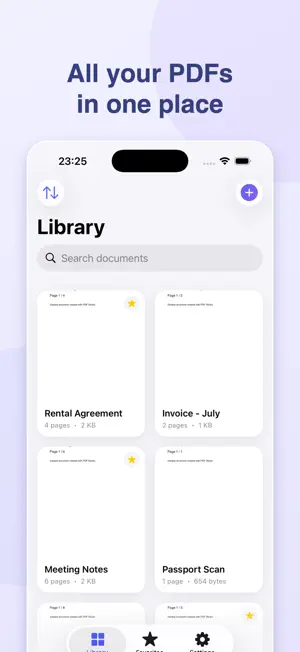
Scan, edit, fill and sign PDFs on your iPhone and iPad with PDF Studio. Completely free, with no ads, subscriptions or account requirement. SCAN AND CREATE • Scan multi-page documents with the camera or create a PDF from photos. • Review pages before saving: rotate, delete and reorder them. • Adjust four corners for perspective correction and choose grayscale, black-and-white or clean scan modes. • Import PDFs from Files, Mail and other apps. EDIT, FILL AND SIGN • Merge, split and reorder pages, or insert a blank page. • Fill existing PDF text fields, checkboxes and choice lists. • Place text, dates and checkmarks exactly where needed on forms without editable fields. • Draw a black or blue signature, drag and resize it on the page, and save it for reuse. • Edit existing text annotations and selected paragraphs. Original styling is preserved where possible; exact layout preservation depends on the PDF. • Highlight, underline, draw, add shapes and notes, and browse your markup in one list. • Add watermarks and page numbers, and edit document properties. READ AND FIND TEXT • Search without case sensitivity and browse results with page numbers and surrounding text. • Use bookmarks, document outlines and remembered reading position. • Comfort Reading offers adjustable text size, sepia/night themes and read-aloud controls. • Recognize scanned text with on-device OCR and create a searchable PDF copy. ORGANIZE AND EXPORT • Organize your documents with folders, tags and favorites. • Undo and redo edits, and recover trashed documents within 30 days. • Export a library backup, including saved signatures, to a location you choose and restore it later. • Compress PDFs, export pages as PNG images and share files. • Protect PDFs with a password, lock the app with Face ID or your device passcode, and create copies with hidden information removed. PRIVACY AND LANGUAGES Documents are processed on your device. PDF Studio does not upload your files to our servers. You control sharing and backup destinations. Core tools work without an internet connection. Interface support for English, Turkish, German, Spanish, French, Italian, Brazilian Portuguese, Russian, Japanese, Korean, Simplified Chinese, Arabic, Hindi and Indonesian.
What’s new
Version 1.2 · Updated October 4, 2026
New in this version: • Fill PDF forms: text fields, checkboxes and choice lists, plus dates and information placed on the page. • Review scans with corner/perspective correction, cropping, color modes, rotation and page reordering. • Back up and restore your library: documents, folders, tags, favorites, bookmarks and saved signatures. • Comfort Reading with adjustable text size, sepia/night themes and read-aloud controls. • Search results with page numbers and surrounding text. • Improved signature placement, dragging and resizing. • Sharper scan output, reliable saving and undo, and fixes for importing password-protected PDFs. Still completely free, with 14 interface languages and on-device document processing.
App privacy
The developer, yusuf hilal, reported these privacy practices to Apple.
Data Not Collected
The developer does not collect any data from this app.
Alternatives to PDF Studio - PDF Editor
Looking for apps like PDF Studio - PDF Editor? Here are 6 similar apps on the App Store. The highest rated is PDF Editor & Scanner: Folbrio (5.0/5), and all 6 are free to download.
-
 FastPDF – PDF Editor & Reader
-
 Pencova
-
 PDF İşaretle: İmza & Not
-
 HabitFlow - Habits & Goals
-
 PDF Editor & Scanner: Folbrio
5.0
PDF Editor & Scanner: Folbrio
5.0
-
 Resecta: Redact PDFs
5.0
Resecta: Redact PDFs
5.0
| App | Rating | Price | Last updated | Compare |
|---|---|---|---|---|
| PDF Studio - PDF Editor | – | Free | October 4, 2026 | |
| FastPDF – PDF Editor & Reader | – | Free | Sep 15, 2026 | Compare |
| Pencova | – | Free | Oct 13, 2026 | Compare |
| PDF İşaretle: İmza & Not | – | Free | Oct 20, 2026 | Compare |
| HabitFlow - Habits & Goals | – | Free | Oct 17, 2026 | Compare |
| PDF Editor & Scanner: Folbrio | 5.0 / 5 (1) | Free | Oct 1, 2026 | Compare |
| Resecta: Redact PDFs | 5.0 / 5 (2) | Free | Oct 5, 2026 | Compare |