

LockDownRadioControl RXV2
Malcolm Messiter Utilities iPhoneiPadiPod touch
LockDownRadioControl RXV2 is a free Utilities app for iPhone and iPad by Malcolm Messiter. Requires iOS 16.0. Updated September 25, 2026.
- Price
- Free
- on the App Store
- Size
- 4 MB
- Age 4+
- Updated
- Sep 25
- 2026 · v5.175
Screenshots


About LockDownRadioControl RXV2
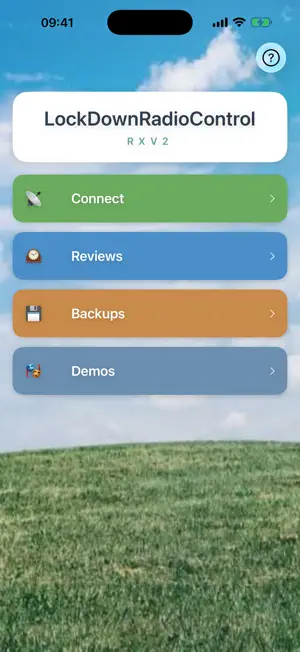
Set up Rotorflight from your phone. RXV2 configures the Rotorflight flight controller in a model helicopter over Bluetooth. No laptop, no computer program, no cables to a PC, at the flying field or on the kitchen table. ROTORFLIGHT ON YOUR PHONE Most of what you would do in the Rotorflight Configurator on a computer, RXV2 does on your phone: • Rates and PIDs for every bank, with sliders that say what they change rather than what they are called • Governor and head speed, per flight bank • Servos, swashplate, blade pitch and travel limits, with a bench hold that drives the swash to exact angles for you • Rescue, switches, telemetry, filters and in-flight adjustments • Reads Rotorflight's black box and shows you the vibrations, then offers the filter change, with limits, a read-back and an undo • Flight traces: head speed, governor, throttle, battery and attitude over time, with a plain-English summary • Backs up the whole Rotorflight setup to your phone, and puts it back • Compare models: your rates side by side with another model's backup • A new-helicopter wizard, from an empty flight controller to ready to fly Works with Rotorflight 2.2 and later; a few pages need 2.3. YOU NEED THE HARDWARE This app talks to the flight controller through LockDownRadioControl hardware: either an LDRC RX V2 receiver or an LDRC dongle. Without one, tap DEMOS on the front screen. Every page then works against a simulated helicopter, so you can look around the whole app before you build anything. The hardware is not for sale. This is an open project: the circuit designs, the firmware and both phone apps are free, and you build your own. Everything you need is at messiter.com. ONE BOARD, THREE JOBS The same little receiver is also a bench dongle (plug it into a flight controller and set the model up with no battery and no blades) and a USB simulator interface, so your real transmitter flies RealFlight or neXt on a PC. It works out for itself which one it is, and the app follows. There are three demos, one for each. IT WORKS WITH THE V1 TRANSMITTER The RX V2 receiver flies with the original LockDownRadioControl transmitter, built on a Teensy 4.1. That transmitter's source is on GitHub, free, for anyone to build: github.com/Mmessiter/LockDownRadioControl PLAIN ENGLISH Every label says what the knob actually does, with Rotorflight's own term in brackets for anyone who wants it. "Roll wind-up relief (I-term relax cutoff)". A search finds any setting by either name. SAFE ON THE BENCH Setting up happens with the blades off or the motor unplugged. The app refuses to change anything while the model is armed, and it never spins a motor or moves a servo of its own accord. FREE, AND FREE SOFTWARE The app is free. No adverts, no accounts, no subscriptions, no tracking, and nothing at all collected about you. Everything stays on your phone and your own receiver. The source of the whole system is published under the GNU General Public License, so you can read it, change it and share it: github.com/Mmessiter/LDRC_V2 messiter.com/rxv2/source.html NOT AFFILIATED LockDownRadioControl is an independent project, not affiliated with or endorsed by the Rotorflight project or any flight-controller manufacturer. Rotorflight is free, open-source flight-controller software for helicopters.
What’s new
Version 5.175 · Updated September 25, 2026
New app icon: a red helicopter with LDRC on the cabin. Safer firmware updates: the app waits for the receiver's WiFi, will not start while the transmitter is on, and never runs its background backup during an update. Reviews open as the right model and now show Travel extents, Ports and Black box. The Rates and PIDs pages follow your transmitter's bank switch (never over unsaved edits). Easy tuning sliders work with the Actual rates type, and the rates chart shows every curve. New: Compare models - your rates side by side with another model's backup. The Rates help explains how each rates type works.
App privacy
The developer, Malcolm Messiter, reported these privacy practices to Apple.
Data Not Collected
The developer does not collect any data from this app.
Alternatives to LockDownRadioControl RXV2
Looking for apps like LockDownRadioControl RXV2? Here are 6 similar apps on the App Store. The highest rated is BLESerial HM-10 (5.0/5), and 4 of the 6 are free to download.
-
 BLESerial HM-10
5.0
-
 HW MotoLink
-
 Dimplex Home
-
 Magnetometer
4.4
-
 FileHub: File Manager
4.5
-
 Hidden Camera - Detect Tracker
4.5
| App | Rating | Price | Last updated | Compare |
|---|---|---|---|---|
| LockDownRadioControl RXV2 | – | Free | September 25, 2026 | |
| BLESerial HM-10 | 5.0 / 5 (1) | 2.99 USD | Sep 16, 2026 | Compare |
| HW MotoLink | – | Free | Aug 22, 2026 | Compare |
| Dimplex Home | – | Free | Jul 1, 2026 | Compare |
| Magnetometer | 4.4 / 5 (13) | 0.99 USD | Oct 29, 2025 | Compare |
| FileHub: File Manager | 4.5 / 5 (149) | Free | Sep 13, 2026 | Compare |
| Hidden Camera - Detect Tracker | 4.5 / 5 (190) | Free | Sep 27, 2024 | Compare |