

StepGate: Screen Time Control
Kush Daga Health & Fitness iPhoneiPadiPod touch
StepGate: Screen Time Control is a free Health & Fitness app for iPhone and iPad by Kush Daga. Requires iOS 17.0. Updated September 28, 2026.
- Price
- Free
- on the App Store
- Size
- 16 MB
- Age 4+
- Updated
- Sep 28
- 2026 · v1.0.5
Screenshots
About StepGate: Screen Time Control
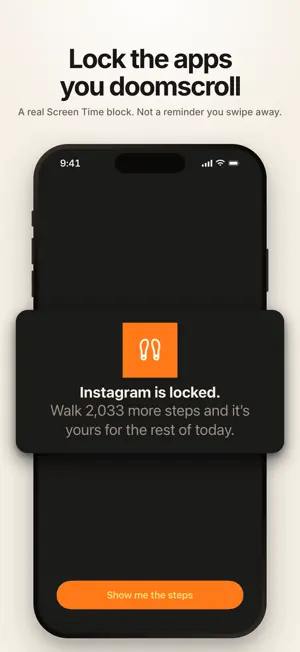
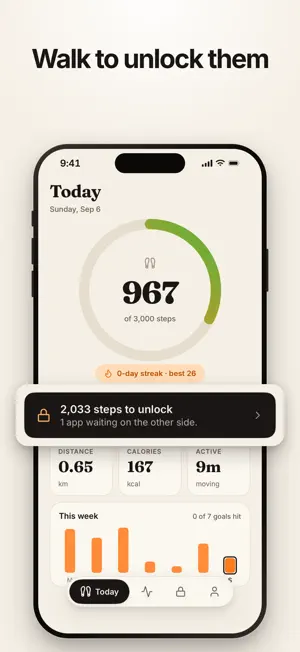
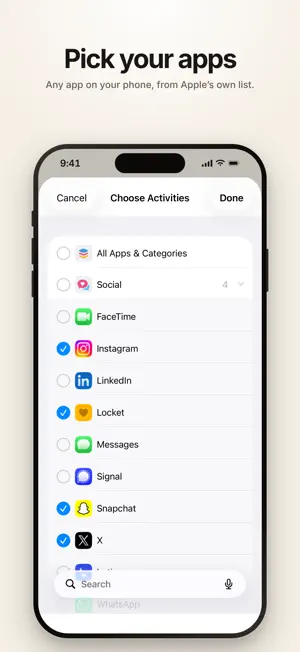
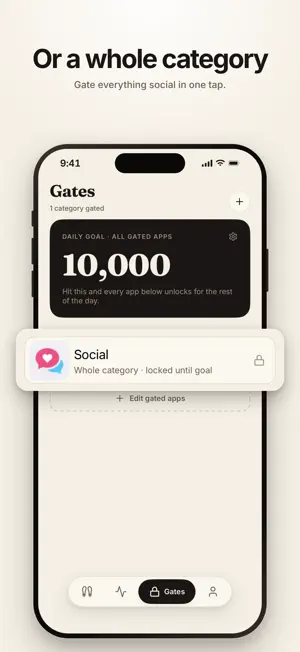
Lock the apps you overuse until you've walked your steps. HOW TO USE STEPGATE: 1) Pick the apps you want locked 2) Set your daily step goal 3) Walk. Hit the goal and they open* A real lock on the apps you doomscroll — it lifts when you hit your steps. Your screen time is earned, not assumed. Not a reminder you can swipe away. StepGate uses Apple's Screen Time to block them for real — a digital detox that costs a walk instead of willpower. Your steps come from Apple Health, so the pedometer is already running. There's no account and no sign-up, and because you pick your apps in Apple's own picker, StepGate never sees which ones you chose. Rest days, active hours and a pause switch are built in. Rigid systems get deleted. Questions or ideas: https://stepgate-omega.vercel.app/support NOTE: StepGate is a habit tool, not medical or fitness advice. Steps are read from Apple Health and Motion & Fitness (read-only). App blocking uses Apple's Family Controls framework with individual authorization — you managing yourself. Requires iOS 17 or later. *STEPGATE PLUS IS REQUIRED TO GATE APPS. Already using StepGate before Plus existed? It stays free for you. TERMS: https://stepgate-omega.vercel.app/terms PRIVACY: https://stepgate-omega.vercel.app/privacy
What’s new
Version 1.0.5 · Updated September 28, 2026
See the lock before you commit: during setup, StepGate now locks your chosen apps for a quick test so you can try opening one. Your step goal starts from your real average over the last week. The lock screen's "Go walk" button now sends your progress. And new morning and evening reminders help you get your steps in.
App privacy
The developer, Kush Daga, reported these privacy practices to Apple.
Data Not Linked to You
The following data, which may be collected but is not linked to your identity, may be used for the following purposes:
- Purchases: Purchase History
- Identifiers: Device ID
- Usage Data: Product Interaction
Used for: Analytics, App Functionality
Alternatives to StepGate: Screen Time Control
Looking for apps like StepGate: Screen Time Control? Here are 6 similar apps on the App Store. The highest rated is Inchworm: ADHD Task Starter (5.0/5), and all 6 are free to download.
-
 Inchworm: ADHD Task Starter
5.0
Inchworm: ADHD Task Starter
5.0
-
 Digital Detox: Screen Time
-
 StepLimit: Walk to Unlock
-
 StepGate — Earn Screen Time
-
 FitToll: Exercise App Blocker
-
 Distance Track
5.0
Distance Track
5.0
| App | Rating | Price | Last updated | Compare |
|---|---|---|---|---|
| StepGate: Screen Time Control | – | Free | September 28, 2026 | |
| Inchworm: ADHD Task Starter | 5.0 / 5 (1) | Free | Aug 4, 2026 | Compare |
| Digital Detox: Screen Time | – | Free | Oct 2, 2026 | Compare |
| StepLimit: Walk to Unlock | – | Free | Sep 30, 2026 | Compare |
| StepGate — Earn Screen Time | – | Free | May 5, 2026 | Compare |
| FitToll: Exercise App Blocker | – | Free | Sep 2, 2026 | Compare |
| Distance Track | 5.0 / 5 (1) | Free | Apr 8, 2024 | Compare |