

Berryjar
Ravneet Nagpal Finance iPhoneiPadiPod touch
Berryjar is a free Finance app for iPhone and iPad by Ravneet Nagpal. Requires iOS 17.0. Updated October 8, 2026.
- Price
- Free
- on the App Store
- Size
- 3 MB
- Age 4+
- Updated
- Oct 8
- 2026 · v1.1
Screenshots


About Berryjar
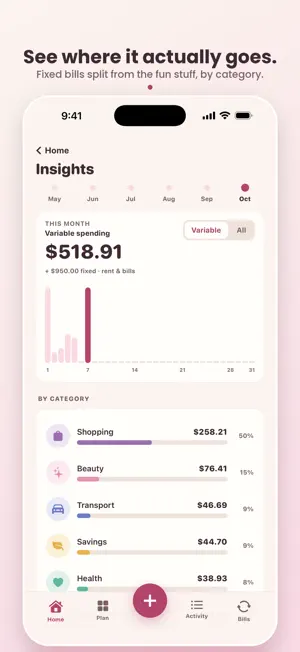
Berryjar is a budgeting app you'll actually want to open. Most money apps feel like a spreadsheet with a login. Berryjar is soft, calm, and pretty enough to screenshot, so tracking your money finally feels good instead of like a chore. LOG A SPEND IN TWO TAPS Tap +, type the number, done. The keypad is up the moment the sheet opens. Add the cents, backdate it, edit or delete anything. The little things other apps get wrong. YOUR BILLS LOG THEMSELVES Rent, Netflix, Spotify, your phone bill. Set them once, weekly, every two weeks or monthly, and Berryjar logs them on schedule and reminds you the day before. For the ones that change month to month, like electricity, Berryjar gently asks "How much was it this month?" so nothing slips through. ONE HONEST NUMBER What's left to spend this month, per day, with the days to go. Set a limit per category and the rings on your home screen show how you're doing at a glance. WATCH YOUR JAR FILL UP Set a savings goal and name it. Every dollar you set aside fills the jar. On Jar Day, the first time you open Berryjar each month, whatever you didn't spend last month can be swept into the jar with a little celebration, and shared. SEE WHERE IT ACTUALLY GOES A monthly breakdown splits your fixed bills from your variable spending, so you can see the money you can actually change. Honest budgets, clear categories, no guilt. ON YOUR HOME SCREEN Two widgets: your jar at a glance, and what's left to spend with your next bill. YOUR DATA IS YOURS Everything stays on your iPhone. No accounts, no cloud, no analytics, no ads. Export your spending as a spreadsheet, back up everything to a file and restore it on a new phone, or delete it all in one tap. BERRYJAR PRO Berryjar needs a Pro membership after a free trial. Try everything free for 7 days, then $34.99 a year, or choose monthly, or pay once for Lifetime. Cancel anytime in Settings. We'll remind you the day before the trial ends, so nothing charges you by surprise. Questions? [email protected] Privacy Policy: https://berryjar.app/privacy Terms of Use (EULA): https://www.apple.com/legal/internet-services/itunes/dev/stdeula/
What’s new
Version 1.1 · Updated October 8, 2026
A new look, berries and cream all the way through, and the jar now fills toward a goal you set. • Jar Day is a full-screen moment with a shareable card • Bills can repeat every two weeks (hello, pay day) • Export your spending to a spreadsheet, back up and restore everything, delete all data • Settings: plan status, manage subscription, support, privacy, terms • Reminders now cover the next three bills, not just one • Bigger text follows your Dynamic Type setting, VoiceOver reads every amount • Fixes: amounts over $9,999,999 could crash the keypad, Jar Day could fire on a partial first month, a lapsed membership kept the app open, and the paywall fits on small screens
App privacy
The developer, Ravneet Nagpal, reported these privacy practices to Apple.
Data Not Collected
The developer does not collect any data from this app.
Alternatives to Berryjar
Looking for apps like Berryjar? Here are 6 similar apps on the App Store. The highest rated is Beanstalk: Allowance Tracker (5.0/5), and all 6 are free to download.
-
 QuarterJar
-
 Paycheck Pet
-
 Beanstalk: Allowance Tracker
5.0
-
 Earno: Savings Challenge
5.0
-
 Okana - Expense Tracker
-
 EMI Calculator : All Loan Calc
| App | Rating | Price | Last updated | Compare |
|---|---|---|---|---|
| Berryjar | – | Free | October 8, 2026 | |
| QuarterJar | – | Free | Oct 21, 2026 | Compare |
| Paycheck Pet | – | Free | Aug 11, 2026 | Compare |
| Beanstalk: Allowance Tracker | 5.0 / 5 (2) | Free | Aug 28, 2026 | Compare |
| Earno: Savings Challenge | 5.0 / 5 (1) | Free | Nov 16, 2026 | Compare |
| Okana - Expense Tracker | – | Free | Nov 2, 2026 | Compare |
| EMI Calculator : All Loan Calc | – | Free | Jan 28, 2026 | Compare |
Compare Berryjar with the top alternatives: ratings, updates, ASO score and keyword gaps →