

Finora Budget
Jorge Palominos Villegas Finance iPhoneiPadiPod touchApple Watch
Finora Budget is a free Finance app for iPhone and iPad by Jorge Palominos Villegas. Requires iOS 26.0. Updated October 13, 2026.
- Price
- Free
- on the App Store
- Size
- 23 MB
- Age 4+
- Updated
- Oct 13
- 2026 · v3.1
Screenshots



About Finora Budget
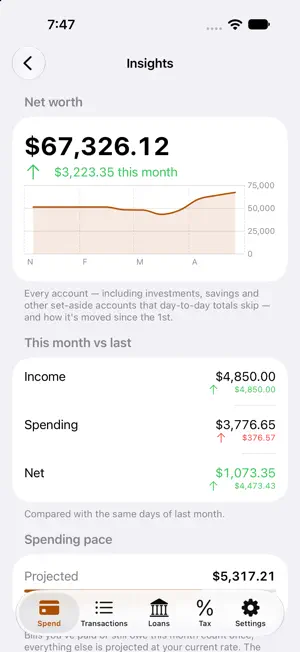
Finora — budgeting that stays on your phone. Private by design, a one-time purchase, no bank login and no subscription. Finora is an all-in-one budget and money tracker that keeps your finances on your device. Nothing to sign into, nothing to sync to a server — just a fast, clear picture of your money. Track it in seconds • Log expenses and income with smart, learn-as-you-go category suggestions • Accounts, transfers, and credit cards with live balances • Recurring bills and pay — including twice a month (the 15th & 30th) • Import a CSV or a bank/credit-card PDF statement, read entirely on your device • Scan receipts to fill in the details See where you stand • Monthly spending, budgets, and "safe to spend" • Savings goals with round-ups and automatic contributions • Net worth, trends, and reports at a glance • A private money assistant powered by Apple Intelligence — ask about your spending and budgets; nothing leaves your iPhone Go further with Pro • Mortgage & loan tracking, a debt-payoff planner, and investments in your net worth • Reports & Insights, plus unlimited budgets and goals • iCloud sync across your devices • A self-employed & VAT/tax helper Widgets, Siri shortcuts, and an Apple Watch glance keep your numbers one tap away. Available in English, Spanish, German, French, and Portuguese, with your currency set automatically from your phone. Your money, your device, yours to keep.
What’s new
Version 3.1 · Updated October 13, 2026
Made for iPhone Duo Finora fills the cover screen and the open screen, upright or turned, with its tabs where iPhone Duo puts them. On iPad, Finora now uses the same tab bar as Vitals Flow and Pool Care, with a sidebar you can open. Upcoming, easier to scan Due, your projected balance, Scheduled and Recurring each have a clear title. Scheduled entries are grouped by day, starting with Tomorrow, and a day with more than one entry shows its total. Recurring items look like the rest of your transactions, with their category icon and colored amounts. A truer projected balance The projected balance chart now steps on the day money moves, no longer bulges on days with more than one entry, and no longer shows a transfer between your own accounts as a dip or as your lowest balance. The right account, every time A new paycheck goes to the account your last one went to, on every device. Payslips work the same way, and a loan payment defaults to the account that paid that loan last. Counted once A closing cost, payslip or investment value that iCloud delivered twice now counts once, so a loan's closing costs are no longer doubled. Also in this release Spend › Browse now runs nearest-first: Upcoming, Budgets, Insights, Savings Goals, then Transactions. Setup marks which sections are part of Finora Pro, and the tax questions come after you unlock it. A loan payment recorded from its reminder is named in your language. Split purchases show their amount in red and their time. VoiceOver reads each quick action once and names the opening-balance fields in setup. At the largest text sizes, quick actions sit one to a row and row icons no longer run into names. Loans has its own icon.
App privacy
The developer, Jorge Palominos Villegas, reported these privacy practices to Apple.
Data Not Collected
The developer does not collect any data from this app.
Alternatives to Finora Budget
Looking for apps like Finora Budget? Here are 6 similar apps on the App Store. The highest rated is Anypenni (4.7/5), and all 6 are free to download.
-
 SpendScanr
-
 Penny Wise - Money Manager
-
 Anypenni
4.7
Anypenni
4.7
-
 MonthBox
-
 Simple: Budgeting & Planning
-
 Allot: Zero-Based Budget
2.0
Allot: Zero-Based Budget
2.0
| App | Rating | Price | Last updated | Compare |
|---|---|---|---|---|
| Finora Budget | – | Free | October 13, 2026 | |
| SpendScanr | – | Free | Apr 16, 2026 | Compare |
| Penny Wise - Money Manager | – | Free | Jul 8, 2026 | Compare |
| Anypenni | 4.7 / 5 (6) | Free | Nov 14, 2024 | Compare |
| MonthBox | – | Free | Sep 28, 2026 | Compare |
| Simple: Budgeting & Planning | – | Free | May 7, 2026 | Compare |
| Allot: Zero-Based Budget | 2.0 / 5 (1) | Free | Sep 5, 2026 | Compare |
Compare Finora Budget with the top alternatives: ratings, updates, ASO score and keyword gaps →