

AstroVitals
MAXIMILIAN BOTEV Utilities iPhoneiPadiPod touchApple Watch
AstroVitals is a free Utilities app for iPhone and iPad by MAXIMILIAN BOTEV. Rated 3.7/5 from 3 ratings. Requires iOS 17.0. Updated August 23, 2026.
- Rating
- 3.7
- 3 ratings
- Price
- Free
- on the App Store
- Size
- 9 MB
- Age 4+
- Updated
- Aug 23
- 2026 · v1.1.0
Screenshots


About AstroVitals
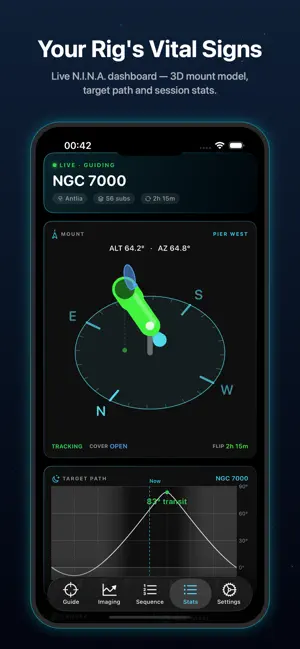
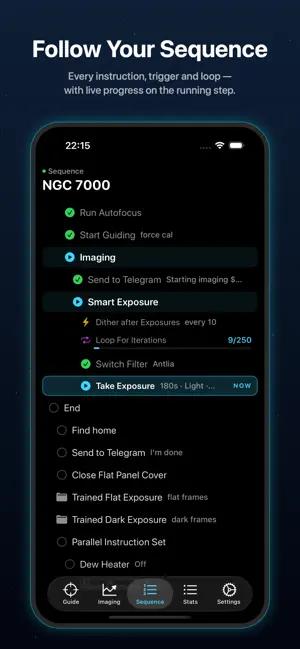
Your telescope is imaging all night. AstroVitals puts its vital signs on your iPhone, iPad and Apple Watch — so you can check on the session from the couch, the tent, or your wrist at 3 AM. AstroVitals connects to N.I.N.A. (Nighttime Imaging 'N' Astronomy) over your local network through the Advanced API plugin, and turns the numbers into a dark, glanceable night-vision dashboard. GUIDING AT A GLANCE • Flowing RA/Dec guide graph, just like your guiding software • Live total RMS plus session best, worst and stability score • Peak-error and pixel-scale readouts, adjustable time window FOCUS & IMAGE QUALITY • Watch autofocus V-curves build point by point, live • Best-focus position and HFR marked when the run completes • HFR and star-count trends across every sub of the session YOUR WHOLE SEQUENCE • The full Advanced Sequencer tree — instructions, triggers, loop conditions • The running step highlighted with live progress (87/250 exposures…) • Values shown inline: exposure length, filter, wait-until times and more THE STATS DASHBOARD • A live 3D model of your mount showing exactly where it points, with meridian-flip warning colors and flat-panel cover state • Target altitude path with transit time and astronomical darkness • Camera cooling, ambient temperature, power draw and input voltage • Rearrangeable tiles — drag them into your preferred layout ON YOUR WRIST • The full dashboard as a native Apple Watch app • Watch-face complications: meridian-flip countdown and subs done • iPhone home-screen and lock-screen widgets with a live flip timer SIMPLE SETUP • Auto-discovers your NINA machine on the local network • Demo mode simulates a full session — try every screen without a telescope SMART ALERTS & CONFIRMED CONTROL • Optional alerts for worsening or recovering image quality, lost guiding and meridian-flip progress while AstroVitals is active • Start, pause and stop the running sequence when Allow Control is enabled • A configurable panic plan can stop activity, park or home the mount, close a detected flat-panel cover and disable selected power outputs • Siri opens the review-and-slide confirmation screen; it never sends a command by itself Requires N.I.N.A. with the free Advanced API plugin (v2) on the same network. AstroVitals starts in Read-only mode. Control requires explicit opt-in and confirmation, and remains on the user's local network. No accounts, no analytics, no data leaves your network.
What’s new
Version 1.1.0 · Updated August 23, 2026
• Smart alerts for image-quality trends, guiding loss and recovery, and meridian flips • Optional sequence start, pause, and stop controls • Configurable, slide-confirmed emergency action on iPhone and Apple Watch • Faster Watch access to Emergency Stop from the Guiding screen • Improved Siri and App Shortcut discovery • New Perfect Night and Cloudy Night demo scenarios • Compact landscape dashboard with Guiding, HFR, Focus, and telescope model • Chart, notification, keyboard, and tile-dragging refinements
App privacy
The developer, MAXIMILIAN BOTEV, reported these privacy practices to Apple.
Data Not Collected
The developer does not collect any data from this app.
Alternatives to AstroVitals
Looking for apps like AstroVitals? Here are 6 similar apps on the App Store. The highest rated is TRITON GOTO - OnStep Control (5.0/5), and 5 of the 6 are free to download.
-
 Cygnus Astro
4.2
Cygnus Astro
4.2
-
 TRITON GOTO - OnStep Control
5.0
TRITON GOTO - OnStep Control
5.0
-
 Touch-N-Stars
4.7
Touch-N-Stars
4.7
-
 MLAstro Hub
5.0
MLAstro Hub
5.0
-
 Polar Scope Align Pro
4.9
Polar Scope Align Pro
4.9
-
 SynScan Pro
2.7
SynScan Pro
2.7
| App | Rating | Price | Last updated | Compare |
|---|---|---|---|---|
| AstroVitals | 3.7 / 5 (3 ratings) | Free | August 23, 2026 | |
| Cygnus Astro | 4.3 / 5 (4) | Free | Jul 31, 2025 | Compare |
| TRITON GOTO - OnStep Control | 5.0 / 5 (4) | Free | Oct 12, 2026 | Compare |
| Touch-N-Stars | 4.7 / 5 (7) | Free | Oct 4, 2026 | Compare |
| MLAstro Hub | 5.0 / 5 (1) | Free | Oct 24, 2026 | Compare |
| Polar Scope Align Pro | 4.9 / 5 (309) | 3.99 USD | Oct 23, 2026 | Compare |
| SynScan Pro | 2.7 / 5 (56) | Free | Jan 26, 2025 | Compare |
Compare AstroVitals with the top alternatives: ratings, updates, ASO score and keyword gaps →