

Volt: Quick Notes & Fast Jot
Myworkingmemory LLC Productivity iPhoneiPadiPod touchMacApple Watch
Volt: Quick Notes & Fast Jot is a free Productivity app for iPhone and iPad by Myworkingmemory LLC. Requires iOS 17.0. Updated September 21, 2026.
- Price
- Free
- on the App Store
- Size
- 8 MB
- Age 4+
- Updated
- Sep 21
- 2026 · v2.0
Screenshots

About Volt: Quick Notes & Fast Jot
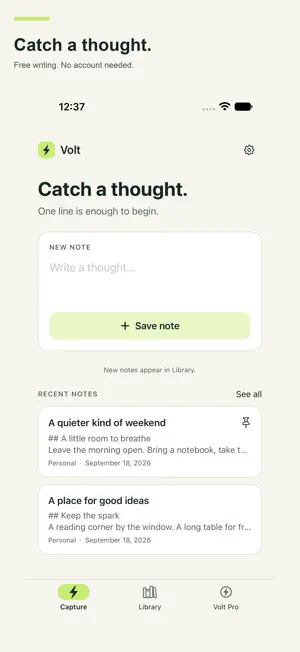
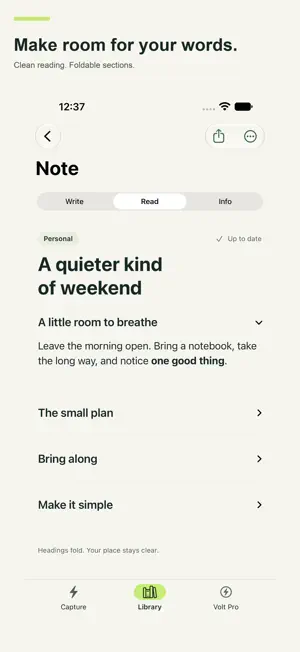
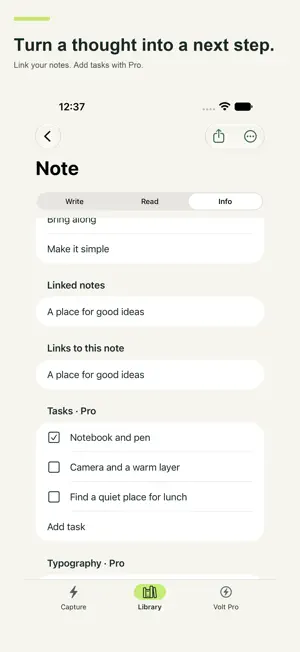
Your ideas, captured fast—and free to write without limits. Volt opens straight into writing. No Volt account, note limit, or launch paywall. WRITE FREE • Unlimited notes, editing, and ordinary search. • Capture with Siri or Shortcuts; speak or type on a paired Apple Watch. • Markdown, foldable sections, links between notes, and backlinks. • Categories, pinning, word counts, and the system share sheet. • Sketch on supported iPads; save selected text and web links from other apps. • Export text, Markdown, TextBundle, rich text, and Volt files. VOLT PRO — MORE FROM EVERY NOTE • Sync via iCloud across supported iPhone, iPad, Mac, and Apple Vision Pro devices. • Password-protect individual notes; lock Volt with device authentication. • Find words inside note images and PDFs; use Spotlight and special searches. • Record voice notes, bookmark moments, and review transcripts on supported devices. • Annotate PDFs and save quotations with their source pages. • Turn notes into action with advanced tags, tasks, review, finish, archive, and revisit. • Keep original captures, recent edit history, and saved actions. • Build visual project, decision, and meeting canvases on supported systems. • Connect your own compatible AI provider; approve each selected note before sending it; save the result as a new note. • Export HTML, DOCX, PDF, JPG, and ePub; customize your typography. CHOOSE A PRO PLAN • Monthly or annual auto-renewable subscription; both unlock the same Pro features. • Apple shows your local price and renewal period before purchase. • Manage or cancel in Apple Account > Subscriptions. Deleting Volt does not cancel. • Eligible earlier paid-app buyers and verified earlier Pro-unlock holders keep access without subscribing. Restore Purchases is in the app. GOOD TO KNOW • Your AI provider may charge separately. Pro includes no AI credits, and a chatbot subscription may not include API access. Protected notes are excluded. • Notes stay on your device unless you enable sync or choose a transfer. Optional app-use and reliability measurement is off until you agree and excludes note content. No ads or cross-app advertising tracking. • Some tools need compatible hardware, operating systems, languages, permissions, or installed Apple assets. New Notes-schema Siri actions need supported OS 27 devices. Watch capture transfers through a paired iPhone. iCloud requires an Apple Account and available storage; it is not a backup. Keep note passwords safe—we cannot recover them. Support: https://www.myworkingmemory.ai/volt-support.html Terms: https://www.myworkingmemory.ai/volt-terms.html Privacy: https://www.myworkingmemory.ai/volt-privacy.html
What’s new
Version 2.0 · Updated September 21, 2026
VOLT 2.0 — WRITE FREE. GO FURTHER WITH PRO. • Unlimited notes, editing, search, Markdown, links, and sharing—with no Volt account or launch paywall. • Capture with Siri, Shortcuts, the share extension, or a paired Apple Watch. • Find text inside images and PDFs with Pro. • Record voice notes, bookmark moments, and review transcripts on supported devices. • Annotate PDFs and save quotations with their source pages. • Plan visually with project, decision, and meeting canvases on supported systems. • Turn notes into tasks; review, finish, archive, and revisit ideas. • Connect your own compatible AI provider. Approve each note before sending it; save the result separately. Provider charges may apply; Pro includes no AI credits. • Sync via iCloud; protect notes; unlock richer exports, typography, and advanced search with Pro. • A new paper-and-ink look for Capture, Library, writing, and reading. • Eligible earlier buyers keep Pro without subscribing. New buyers can choose monthly or annual auto-renewable Pro. Apple shows local prices before purchase. Feature availability varies by device, system, language, permissions, and installed Apple assets. Optional app-use measurement excludes note content.
App privacy
The developer, Myworkingmemory LLC, reported these privacy practices to Apple.
Data Linked to You
The following data, which may be collected and linked to your identity, may be used for the following purposes:
- Purchases: Purchase History
- Identifiers: Device ID
- Usage Data: Product Interaction
- Diagnostics: Crash Data, Performance Data
- User Content: Other User Content
Used for: Analytics, App Functionality
Alternatives to Volt: Quick Notes & Fast Jot
Looking for apps like Volt: Quick Notes & Fast Jot? Here are 6 similar apps on the App Store. The highest rated is Tuck - Screenshot Reminders (5.0/5), and 5 of the 6 are free to download.
-
 ThoughtTrace: Brain Dump Timer
-
 ConoP - Timestamp every copy
-
 Markdown A.I.
-
 Tuck - Screenshot Reminders
5.0
Tuck - Screenshot Reminders
5.0
-
 Saturn — Offline Reminders
-
 Piece Day
| App | Rating | Price | Last updated | Compare |
|---|---|---|---|---|
| Volt: Quick Notes & Fast Jot | – | Free | September 21, 2026 | |
| ThoughtTrace: Brain Dump Timer | – | Free | Oct 5, 2026 | Compare |
| ConoP - Timestamp every copy | – | 1.99 USD | Jul 22, 2026 | Compare |
| Markdown A.I. | – | Free | Aug 23, 2026 | Compare |
| Tuck - Screenshot Reminders | 5.0 / 5 (1) | Free | Aug 29, 2026 | Compare |
| Saturn — Offline Reminders | – | Free | Aug 22, 2026 | Compare |
| Piece Day | – | Free | Aug 12, 2026 | Compare |