

HaoHao: AI Reply Keyboard
ZHI SHENG ZHANG Productivity iPhoneiPadiPod touch
HaoHao: AI Reply Keyboard is a free Productivity app for iPhone and iPad by ZHI SHENG ZHANG. Requires iOS 16.0. Updated September 18, 2026.
- Price
- Free
- on the App Store
- Size
- 3 MB
- Age 4+
- Updated
- Sep 18
- 2026 · v1.1.4
Screenshots
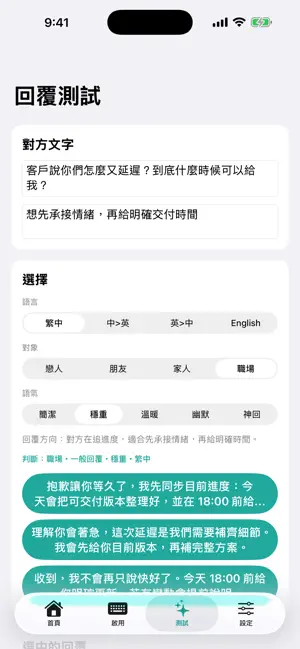


About HaoHao: AI Reply Keyboard
HaoHao helps you find clear, natural wording for messages that are difficult to answer. Copy a message, paste it into HaoHao, choose your context and tone, and review suggested replies. You decide what to edit and send. • Draft replies for everyday and workplace conversations. • Rewrite your own words to express your meaning more clearly. • Translate text and choose your reply language. • Save personal phrases and customize your keyboard controls. • Choose your preferred app interface language. Optional HaoHao Pro subscriptions unlock premium communication packs for polite boundaries, business English, and relationship communication. Monthly and yearly plans provide the same Pro pack access with different billing periods. Basic features are available without a subscription; usage limits may apply. Subscriptions renew automatically unless canceled. Payment is charged to your Apple Account upon purchase confirmation. Manage or cancel your subscription in your App Store account settings. Current prices and billing periods are shown before purchase. Restore Purchases is available in the app. HaoHao does not send messages on your behalf. Check AI-generated wording before using it. The keyboard needs Full Access for network-based AI features. Messages you choose to submit are sent to the service for processing; see the Privacy Policy for details. Privacy Policy: https://haohao-reply-api-server.onrender.com/privacy.html Terms of Use: https://www.apple.com/legal/internet-services/itunes/dev/stdeula/ Support: https://haohao-reply-api-server.onrender.com/support.html
What’s new
Version 1.1.4 · Updated September 18, 2026
Added an English App Store introduction for HaoHao. Customize the position of reply, rewrite, and translation controls in the keyboard editor. Choose from 24 app interface and tutorial languages.
App privacy
The developer, ZHI SHENG ZHANG, reported these privacy practices to Apple.
Data Not Linked to You
The following data, which may be collected but is not linked to your identity, may be used for the following purposes:
- Purchases: Purchase History
- User Content: Emails or Text Messages
Used for: App Functionality
Alternatives to HaoHao: AI Reply Keyboard
Looking for apps like HaoHao: AI Reply Keyboard? Here are 5 similar apps on the App Store. The highest rated is SunTable-Spreadsheet view&edit (4.7/5), and all 5 are free to download.
-
 clientnote客戶筆記
-
 Poker Fans - Player's passport
-
 SunTable-Spreadsheet view&edit
4.7
-
 Recco: AI Meeting Note Taker
4.2
-
 SafeShell VPN: Fast & Secure
4.5
| App | Rating | Price | Last updated | Compare |
|---|---|---|---|---|
| HaoHao: AI Reply Keyboard | – | Free | September 18, 2026 | |
| clientnote客戶筆記 | – | Free | Nov 12, 2025 | Compare |
| Poker Fans - Player's passport | – | Free | Aug 3, 2026 | Compare |
| SunTable-Spreadsheet view&edit | 4.7 / 5 (92) | Free | Jul 28, 2026 | Compare |
| Recco: AI Meeting Note Taker | 4.2 / 5 (15) | Free | Oct 15, 2026 | Compare |
| SafeShell VPN: Fast & Secure | 4.5 / 5 (1,084) | Free | Mar 24, 2026 | Compare |