

Lumo: Creator Agent
Shanghai TacticSpace Technology Co., Ltd. Productivity iPhoneiPadiPod touch
Lumo: Creator Agent is a free Productivity app for iPhone and iPad by Shanghai TacticSpace Technology Co., Ltd. Requires iOS 17.0. Updated October 15, 2026.
- Price
- Free
- on the App Store
- Size
- 10 MB
- Age 4+
- Updated
- Oct 15
- 2026 · v1.3.1
Screenshots



About Lumo: Creator Agent
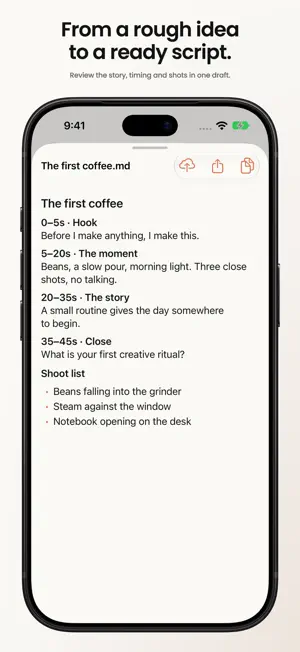
Lumo is an AI workspace for content creators. Turn an idea into a script, a content plan, and work you can review, copy, and share from your iPhone or iPad. Keep your instructions, conversations, and saved results together as you move from planning to creation. DEVELOP IDEAS INTO CONTENT Start with a brief, a photo, or a dictated instruction. Tell your AI agent about the audience, goal, and format, then work on topics, hooks, outlines, scripts, titles, and captions. Develop shot lists, clip plans, and product copy. Continue the conversation to refine the tone or adapt existing work for another format. ORGANIZE YOUR CONTENT SCHEDULE Create, edit, and remove schedule entries, and see what you have planned across projects. Preview an agent-generated content calendar before choosing Add to Schedule. When connected to your Mac, both devices work with the same schedule, so you can plan on your computer and make adjustments on your phone. Scheduling organizes your work; it does not automatically publish posts to social platforms. STAY INVOLVED AS THE AGENT WORKS Follow progress and tool activity as a task runs. Answer follow-up questions and respond to action requests according to your selected permission mode. Add instructions or stop a task when you need to change direction. Return to previous conversations to continue work, and search message history to find earlier requirements and decisions. REVIEW AND USE THE RESULTS Open documents, images, content calendars, tables, diagrams, CSV data, and subtitle files directly in the app. Dedicated previews make writing, clip plans, and product information easier to inspect, with image comparisons available alongside other saved work. Browse artifacts across conversations, copy useful text, and share files through the system share sheet. Use available Skills to start tasks with structured inputs. CONTINUE ON MOBILE, MAC, OR CLOUD Use Lumo Cloud without connecting a Mac, or connect to Lumo for Mac to work with projects on your computer. While your Mac is online and mobile access is enabled, connect over the local network or a remote relay. Send a selected artifact to Lumo Cloud to continue working with it in a new cloud conversation. Add photos or dictate instructions while you are away from your desk. Check results, answer a question, or approve the next step from your phone. Lumo supports English, Simplified Chinese, Japanese, Korean, Spanish, and Brazilian Portuguese, with a language choice in Settings or automatic selection based on your system language. ACCOUNT AND PRIVACY Lumo Cloud requires a Lumo account, and available features depend on your service plan. Connecting to a Mac requires Lumo to be running on that computer. The app explains when messages and attachments are processed by AI services, and provides AI data-sharing and privacy controls in Settings. Support: https://getlumo.io/support Privacy: https://getlumo.io/privacy Contact: [email protected]
What’s new
Version 1.3.1 · Updated October 15, 2026
Fixed some server-side issues. Improved account registration, email verification and password recovery.
App privacy
The developer, Shanghai TacticSpace Technology Co., Ltd., reported these privacy practices to Apple.
Data Linked to You
The following data, which may be collected and linked to your identity, may be used for the following purposes:
- Usage Data: Other Usage Data
- Contact Info: Email Address
- User Content: Photos or Videos, Other User Content
- Identifiers: User ID, Device ID
- Diagnostics: Other Diagnostic Data
Used for: Analytics, App Functionality
Alternatives to Lumo: Creator Agent
Looking for apps like Lumo: Creator Agent? Here are 6 similar apps on the App Store. The highest rated is Jeku.ai (5.0/5), and all 6 are free to download.
-
 Jeku.ai
5.0
Jeku.ai
5.0
-
 EverythingAITool: Find Agents
-
 Ankorlist - Quick Task Capture
5.0
Ankorlist - Quick Task Capture
5.0
-
 Aida Simple Fast Daily Planner
3.7
Aida Simple Fast Daily Planner
3.7
-
 NoteChat: Analytics for Notion
-
 Aura – AI Assistant
4.7
Aura – AI Assistant
4.7
| App | Rating | Price | Last updated | Compare |
|---|---|---|---|---|
| Lumo: Creator Agent | – | Free | October 15, 2026 | |
| Jeku.ai | 5.0 / 5 (3) | Free | Oct 31, 2026 | Compare |
| EverythingAITool: Find Agents | – | Free | Dec 17, 2025 | Compare |
| Ankorlist - Quick Task Capture | 5.0 / 5 (2) | Free | Sep 17, 2026 | Compare |
| Aida Simple Fast Daily Planner | 3.7 / 5 (3) | Free | Oct 30, 2026 | Compare |
| NoteChat: Analytics for Notion | – | Free | Oct 15, 2026 | Compare |
| Aura – AI Assistant | 4.7 / 5 (12) | Free | Sep 3, 2026 | Compare |