

LitLock: Screen Time Control
ONECHUNK Productivity iPhoneiPadiPod touch
LitLock: Screen Time Control is a free Productivity app for iPhone and iPad by ONECHUNK. Requires iOS 18.0. Updated September 18, 2026.
- Price
- Free
- on the App Store
- Size
- 76 MB
- Age 12+
- Updated
- Sep 18
- 2026 · v1.0.0
Screenshots



About LitLock: Screen Time Control
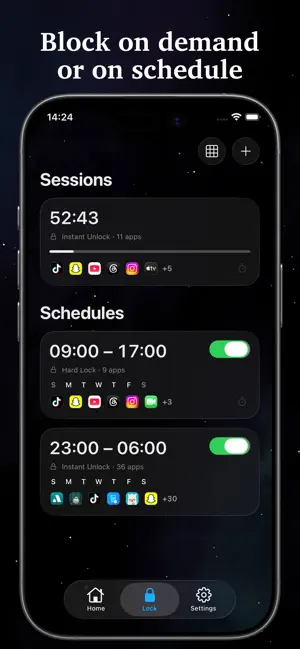
LitLock is a Screen Time blocker that turns each blocked moment into something worth reading. Most tools built to cut screen time are good at exactly one thing: taking something away. Block a distracting app, and what's left is a bare warning screen. It works, but it doesn't give the phone anything better to do. LitLock takes a different approach. It's built on Apple's Screen Time framework, so blocking apps and categories works the normal way. The difference shows up once a session or schedule starts: instead of a warning screen, you get a passage from literature. At the center of the app is a literary clock. Check your phone at 3:47, and the passage on screen is one where that exact time appears in the original text. The library holds more than 1,500 such passages, each credited to its author and title. The result is a small, steady invitation to read: one passage at a time, all day long. WHAT LITLOCK DOES Block, on your terms • Block individual apps or whole categories instantly • Run a timed blocking session for as long as you choose • Set recurring schedules by day and time • Hard Lock: a stricter session you can't end early Read, instead of stare • Open a blocked app and see a passage from literature instead of the usual warning • A literary clock with 1,500+ passages, each matched to the exact time as it appears in the original text • Every passage comes from a public-domain work, credited to its author and title • View the clock in portrait, landscape, or full screen • Works with StandBy • Home Screen quote widgets in Small, Medium, and Large Built for privacy • No account required • No ads. No user tracking. • Your blocking settings and Screen Time data never leave your device LitLock is for anyone who'd rather their phone feel like a quiet, well-kept library than an endless feed. Access to LitLock requires an active subscription or a lifetime purchase. Eligible new subscribers can try the annual plan free for 7 days. This translation and text refinement were assisted by AI. Privacy Policy: https://litlock.onechunk.app/privacy Terms of Use: https://litlock.onechunk.app/terms
App privacy
The developer, ONECHUNK, reported these privacy practices to Apple.
Data Not Linked to You
The following data, which may be collected but is not linked to your identity, may be used for the following purposes:
- Purchases: Purchase History
Used for: Analytics, App Functionality
Alternatives to LitLock: Screen Time Control
Looking for apps like LitLock: Screen Time Control? Here are 6 similar apps on the App Store.
-
 Block Reels & Shorts: Curfew
-
 ReceiptOrg: Receipt Scanner
-
 SwingCat - Focus Timer
-
 Native Voice Check: AI Speech
-
 Stickon - Lock Screen Notes
-
 Applimits - Screen Time Limit
| App | Rating | Price | Last updated | Compare |
|---|---|---|---|---|
| LitLock: Screen Time Control | – | Free | September 18, 2026 | |
| Block Reels & Shorts: Curfew | – | Free | Oct 7, 2026 | Compare |
| ReceiptOrg: Receipt Scanner | – | Free | Aug 1, 2026 | Compare |
| SwingCat - Focus Timer | – | Free | Oct 24, 2026 | Compare |
| Native Voice Check: AI Speech | – | Free | Sep 22, 2025 | Compare |
| Stickon - Lock Screen Notes | – | Free | Oct 25, 2026 | Compare |
| Applimits - Screen Time Limit | – | Free | Oct 25, 2026 | Compare |