

Slow You Down
Edward Clark Travel iPhoneiPadiPod touchApple Watch
Slow You Down is a free Travel app for iPhone and iPad by Edward Clark. Requires iOS 26.0. Updated July 16, 2026.
- Price
- Free
- on the App Store
- Size
- 11 MB
- Age 4+
- Updated
- Jul 16
- 2026 · v1.1
Screenshots


About Slow You Down
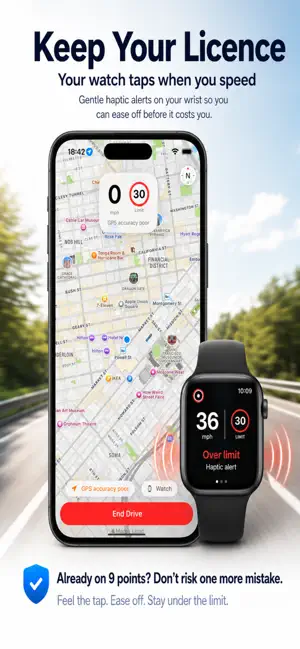
Slow You Down is a quiet safety net for everyday driving. It watches your speed so you don't have to — and when you drift above the posted limit, your Apple Watch gives you a gentle, discreet tap. Nothing to look at. Nothing to interact with. Just a quiet nudge back to the limit. Most speeding isn't deliberate. It's 35 in a 30 on a familiar road, or forgetting to slow down when a 60 becomes a 30. Slow You Down is designed for exactly those moments. HOW IT WORKS Start a drive from your iPhone or Apple Watch. Your iPhone tracks your GPS speed and the road's speed limit, and your Watch shows a big, glanceable speed with the posted limit. Drift above your chosen threshold and you'll feel a gentle tap. Stay above it and you'll get an occasional reminder — never a constant buzz. • Distinct haptics: one gentle tap slightly over, a firmer double tap well over • Lower-limit warnings: a distinctive tap if you enter a 30 from a 60 and haven't slowed enough • Choose your sensitivity: at the limit, +2 mph, +3 mph, +5%, +10%, or custom • Protect My Licence mode: stricter, earlier reminders in 20 and 30 mph zones • Personal reminders: save spots where you've seen speed checks and get a heads-up when approaching • Navigate without noise: enter a destination and follow the route on the map — with automatic rerouting, and no turn-by-turn haptics ever. The only tap you'll feel is about your speed • Journey summary: duration, distance, time within the limit — helpful, never judgemental • Works with the screen locked, for the duration of your drive only BUILT FOR PRIVACY • No account. No sign-up. • Your location is processed on your device and never sold or shared • Routes are not kept unless you choose to keep them • Tracking runs only during an active drive and stops the moment you end it HONEST BY DESIGN Slow You Down is an aid, not a guarantee. GPS speeds and mapped speed limits can be inaccurate, so the app tells you how confident it is — and when the data is uncertain, it stays quiet and shows "Check posted signs" rather than guessing. You remain responsible for observing road signs and driving within the law. The posted speed limit is always the legal maximum. Requires an iPhone. An Apple Watch is strongly recommended — wrist haptics are the heart of the experience. Slow You Down. Gentle speed awareness for Apple Watch.
What’s new
Version 1.1 · Updated July 16, 2026
New in Version 1.1: - Linked the speed limits to OpenStreMap to more accurately map the speed limits - Moved icons on right hand side down so they don't interfere with iPhone battery icon etc. - Added further safety warnings
App privacy
The developer, Edward Clark, reported these privacy practices to Apple.
Data Not Collected
The developer does not collect any data from this app.
Alternatives to Slow You Down
Looking for apps like Slow You Down? Here are 6 similar apps on the App Store. The highest rated is AuxR_M le vélo (5.0/5), and all 6 are free to download.
-
 Bike Tracker: SpiderRoute
-
 Nippy Bridlington
-
 Keep My Bag
-
 Speedometer GPS Speed & HUD
-
 AuxR_M le vélo
5.0
AuxR_M le vélo
5.0
-
 GA Parking
5.0
GA Parking
5.0
| App | Rating | Price | Last updated | Compare |
|---|---|---|---|---|
| Slow You Down | – | Free | July 16, 2026 | |
| Bike Tracker: SpiderRoute | – | Free | Oct 20, 2026 | Compare |
| Nippy Bridlington | – | Free | Aug 29, 2025 | Compare |
| Keep My Bag | – | Free | Jul 24, 2025 | Compare |
| Speedometer GPS Speed & HUD | – | Free | Aug 12, 2026 | Compare |
| AuxR_M le vélo | 5.0 / 5 (6) | Free | Oct 19, 2026 | Compare |
| GA Parking | 5.0 / 5 (1) | Free | Aug 8, 2026 | Compare |
Compare Slow You Down with the top alternatives: ratings, updates, ASO score and keyword gaps →