

InkReader: Journal to Text
Ventiq LLC Productivity iPhoneiPadiPod touch
InkReader: Journal to Text is a free Productivity app for iPhone and iPad by Ventiq LLC. Requires iOS 15.0. Updated September 16, 2026.
- Price
- Free
- on the App Store
- Size
- 32 MB
- Age 4+
- Updated
- Sep 16
- 2026 · v1.0.8
Screenshots


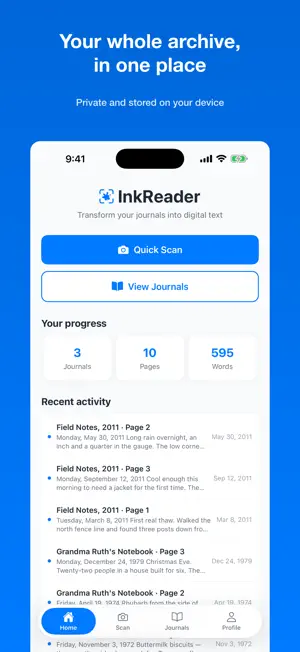
About InkReader: Journal to Text
Your journals are full of words you can't search. InkReader turns them into text. Point your camera at a page. InkReader finds the edges, straightens the shot, and reads the handwriting — including the messy cursive that other scanners give up on. What you get back is clean, editable text, saved alongside the original page. TRY IT FREE Your first 10 pages are free. No account, no credit card, no sign-up form. Scan a page and see the transcription for yourself before you decide anything. BUILT FOR REAL HANDWRITING Most scanning apps were built for printed documents and fall apart on a handwritten page. InkReader uses AI transcription tuned for handwriting, so faded ink, slanted lines, and cursive still come through. SCAN A WHOLE JOURNAL, NOT ONE PAGE Capture page after page in one sitting — an entire journal without stopping. Open the book flat and photograph the whole spread; InkReader reads both pages. Then read it back as one continuous journal, organized by the date of each entry, not by how you scanned it. FIND ANY MEMORY IN SECONDS Search inside a journal and jump between matches, or scrub through years by month with a flick. Find the trip, the name, the argument, the recipe — without turning a single page. YOUR WORDS, YOUR DEVICE Journals are stored on your phone. There's no account and no copy on our servers. A page is sent securely to be transcribed and then discarded — never stored, never used to train AI. KEEP A COPY ANYWHERE Export any journal — or just the entries you choose — as a PDF or text file, straight to Files, iCloud Drive, email, or anywhere the share sheet reaches. INKREADER PREMIUM Unlimited transcription for $4.99/month or $29.99/year. Everything else stays exactly as it is. Subscriptions are billed through your App Store account and renew automatically unless cancelled at least 24 hours before the period ends. Manage or cancel any time in Settings. Terms of Use (EULA): https://www.ventiqinator.com/inkreader/terms Privacy Policy: https://www.ventiqinator.com/inkreader/privacy
What’s new
Version 1.0.8 · Updated September 16, 2026
Transcribe saved scans, iCloud backup you can see, and search by date. • Transcribe from the Scans tab: tap Select, pick pages, and transcribe them. Pages without text are flagged so you can catch them in one tap. • Full scanning sessions are more reliable. All 24 pages of a session now transcribe, with automatic retries, and you're told before saving any page that didn't. • Back up to iCloud Drive: each journal is saved as a text file in Files › iCloud Drive › InkReader, including your corrections. Backups run on their own after every change, and Profile shows progress through to iCloud. • Search by date in the Read tab: type a date like "March 14, 2023", "3/14/23" or "March 2023" to jump to it. Page titles are searchable too. • Ready for iOS 27.
App privacy
The developer, Ventiq LLC, reported these privacy practices to Apple.
Data Linked to You
The following data, which may be collected and linked to your identity, may be used for the following purposes:
- Purchases: Purchase History
- Identifiers: User ID
Used for: App Functionality
Alternatives to InkReader: Journal to Text
Looking for apps like InkReader: Journal to Text? Here are 6 similar apps on the App Store. The highest rated is Cadrage Studio (5.0/5), and all 6 are free to download.
-
 Scriptify: Text to Handwriting
-
 Document : Text & Ink Remover
4.5
-
 Foundy: Find Lost Bluetooth
3.2
-
 Cadrage Studio
5.0
-
 TTS Reader : AI Text to Speech
4.2
-
 Messenger Pigeon
2.5
| App | Rating | Price | Last updated | Compare |
|---|---|---|---|---|
| InkReader: Journal to Text | – | Free | September 16, 2026 | |
| Scriptify: Text to Handwriting | – | Free | Aug 20, 2026 | Compare |
| Document : Text & Ink Remover | 4.5 / 5 (4) | Free | Jan 7, 2026 | Compare |
| Foundy: Find Lost Bluetooth | 3.3 / 5 (4) | Free | Sep 9, 2026 | Compare |
| Cadrage Studio | 5.0 / 5 (1) | Free | Oct 22, 2026 | Compare |
| TTS Reader : AI Text to Speech | 4.2 / 5 (16) | Free | Oct 20, 2026 | Compare |
| Messenger Pigeon | 2.5 / 5 (24) | Free | Oct 19, 2026 | Compare |