

BillsPaid: Bill Tracker
Sandoval LLC Finance iPhoneiPadiPod touchMac
BillsPaid: Bill Tracker is a free Finance app for iPhone and iPad by Sandoval LLC. Rated 5.0/5 from 4 ratings. Requires iOS 17.6. Updated October 13, 2026.
- Rating
- 5.0
- 4 ratings
- Price
- Free
- on the App Store
- Size
- 6 MB
- Age 4+
- Updated
- Oct 13
- 2026 · v1.8
Screenshots
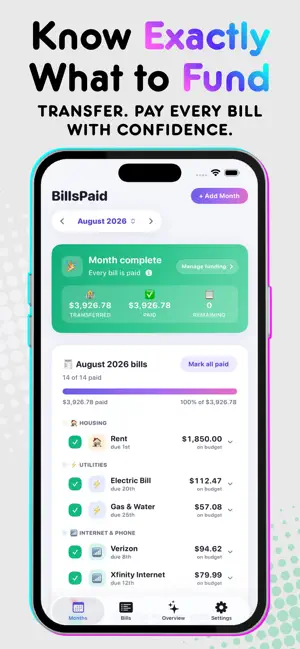
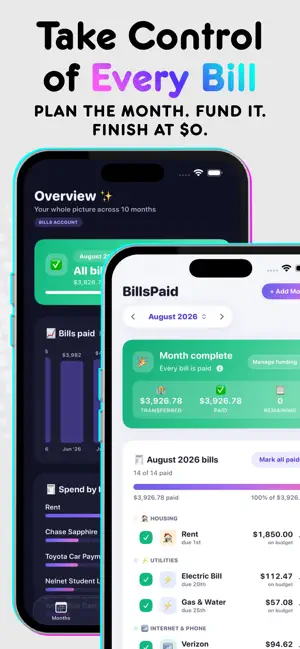


About BillsPaid: Bill Tracker
BillsPaid takes the stress and guesswork out of paying monthly bills. Instead of tracking coffee, groceries, and every card swipe, BillsPaid focuses on one job: knowing what your bills need, setting that money aside, and making sure every bill gets paid. With the recommended Bills Account method, you keep bill money in a dedicated account, separate from everyday spending. Each month, BillsPaid uses your entered bill amounts, recorded transfers, and carryover to calculate how much you still need to set aside. Pay bills from that account, record your payments, and track what remains until every bill is paid and your recorded balance reconciles to zero. No spreadsheets. No bank connections. No bills getting lost among everyday spending. HOW IT WORKS 1. Choose a dedicated account for your bill money. 2. Add your recurring bills once. BillsPaid automatically places them into each applicable month. 3. Review the month’s bill amounts and transfer what BillsPaid recommends. 4. Pay bills from that account and mark them paid as they clear. 5. Finish the month with every bill paid and your recorded bill money reconciled. You can fund the account with one monthly transfer or several dated transfers that match your pay schedule. Carryover from the previous month is included automatically, so BillsPaid recommends only what is still needed based on your records. OPTIONAL BILL REMINDERS Get a reminder on a bill’s due date or ahead of time, at your preferred hour. Use default reminders across your bills or choose custom timing for individual bills. Reminders are off by default. Enable them in Settings or choose Custom when editing a bill. BillsPaid asks for notification permission only when you enable reminders. Reminder preferences are set separately on each device. PREFER TO PAY FROM YOUR MAIN ACCOUNT? Choose Bill Tracking during setup. You’ll get the same focused monthly checklist, due dates, reminders, payment progress, history, and dashboard—without transfer calculations or account reconciliation. Switch between Bills Account and Bill Tracking anytime in Settings. BUILT FOR REAL BILLS • Recurring bills automatically appear in the appropriate month. • Fixed and variable amounts are easy to review and adjust. • Weekly bills are calculated from their actual occurrence dates. • Auto Pay bills can be marked paid automatically on their scheduled dates. • Quarterly, twice-yearly, and annual bills appear in their applicable months. • Partial payments remain open until the full amount has been paid. • Each bill maintains useful payment history, averages, ranges, and recent amounts. • Monthly summaries show spending by bill and category. • Choose your preferred currency, with appropriate symbols and decimal formatting. One currency applies across the app; amounts are not converted. • Find bills quickly with search and sorting by due date, name, and more. • Keep bills up to date across iPhone, iPad, and Mac with private iCloud syncing. PRIVATE BY DESIGN No BillsPaid account. No bank connection. No ads. No analytics. No behavioral tracking. Your information stays on your devices and, when iCloud sync is available, in your private iCloud database. BillsPaid does not operate a server that receives or stores your bill data. ONE PURCHASE, NOT ANOTHER SUBSCRIPTION BillsPaid includes up to five active bills for free, with the complete workflow available to try. A single, optional purchase unlocks unlimited bills forever. The purchase covers BillsPaid on iPhone, iPad, and Mac and supports Family Sharing. Each person continues using their own private data. A bill-tracking app shouldn’t become another bill. BillsPaid is an organizational tool for tracking bills and payments. It does not move money, pay bills, or verify bank balances. Automatic paid status is based on your settings, not confirmation from your bank. BillsPaid is not a bank and does not provide financial advice.
What’s new
Version 1.8 · Updated October 13, 2026
Your favorite bill tracker just got better. • Refreshed bill cards and cleaner layouts across iPhone, iPad, and Mac. • Clearer archiving and restoring, with your payment history preserved. • More spending insights: filter by the past 3, 6, or 12 months, year to date, or a custom range. • Easier access to Manage Funding and clearer guidance for extra funds carried forward. • Refined reminder controls for individual bills and default settings. • Mac window size and position remembered between launches. • Small-screen layout improvements and visual polish throughout.
App privacy
The developer, Sandoval LLC, reported these privacy practices to Apple.
Data Not Collected
The developer does not collect any data from this app.
Alternatives to BillsPaid: Bill Tracker
Looking for apps like BillsPaid: Bill Tracker? Here are 6 similar apps on the App Store. The highest rated is Mês Leve: Budget & Cash Flow (5.0/5), and all 6 are free to download.
-
 Bills Organizer Reminder
4.5
-
 Mês Leve: Budget & Cash Flow
5.0
-
 Bill Check: Monthly Bills
4.7
-
 Bill Organizer: Money Manager
5.0
-
 Billiary - Bill Tracker
4.7
-
 Bill Manager: Due Date Tracker
5.0
| App | Rating | Price | Last updated | Compare |
|---|---|---|---|---|
| BillsPaid: Bill Tracker | 5.0 / 5 (4 ratings) | Free | October 13, 2026 | |
| Bills Organizer Reminder | 4.5 / 5 (2) | Free | Jun 4, 2026 | Compare |
| Mês Leve: Budget & Cash Flow | 5.0 / 5 (1) | Free | Oct 7, 2026 | Compare |
| Bill Check: Monthly Bills | 4.7 / 5 (15) | Free | Oct 23, 2026 | Compare |
| Bill Organizer: Money Manager | 5.0 / 5 (2) | Free | Oct 23, 2026 | Compare |
| Billiary - Bill Tracker | 4.7 / 5 (3) | Free | Oct 10, 2026 | Compare |
| Bill Manager: Due Date Tracker | 5.0 / 5 (4) | Free | Sep 15, 2026 | Compare |