

Timeline Scan: Date Old Photos
Spencer Baker Photo & Video iPhoneiPadiPod touch
Timeline Scan: Date Old Photos is a free Photo & Video app for iPhone and iPad by Spencer Baker. Requires iOS 17.0. Updated October 16, 2026.
- Price
- Free
- on the App Store
- Size
- 27 MB
- Age 4+
- Updated
- Oct 16
- 2026 · v1.4
Screenshots


About Timeline Scan: Date Old Photos
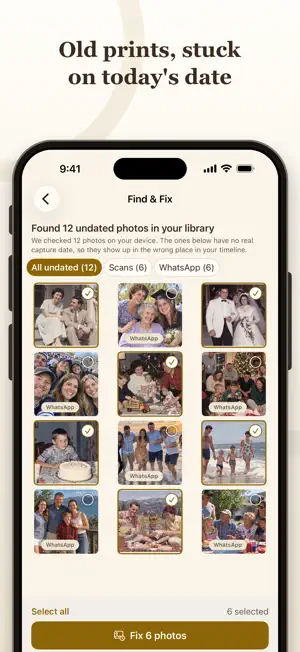
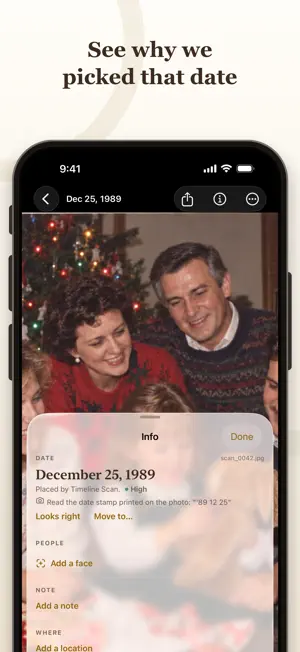
Scanned photos often carry the day they were scanned instead of the day they were taken. Timeline Scan estimates when each old photo was taken so you can put it in the right place in your photo history. Add scans from Photos or Files. Include scans of the backs when you have them. Timeline Scan uses clues in the picture, printed date stamps, photo lab markings and handwriting on the back to estimate a date. Review your photos in date order, see the clues behind an estimate, and change any date yourself. Add more scans to the same album as you work through a box of prints. Find & Fix checks the photo library on your device for scans, screenshots and saved images that may have the wrong date. Choose which photos to date. Only small previews are uploaded for this flow, and you decide when the corrected dates are written back to Apple Photos. People can help sharpen the estimates. With your consent, Timeline Scan groups faces so you can name people and add their birth years. You can then re-date eligible photos using those clues, once per photo, at no extra cost. Download copies of your uploaded scans with the corrected dates written into the files. Save them to Files or Photos. If the photos are already on your device, use Find my photos to review matches and update them in place. You can choose to leave photos that were not found alone instead of adding copies. Your uploaded original files are not overwritten. Photos are kept online for a limited time, so check Downloads for each album's deletion date and save your dated copies. Start with a free trial, no purchase required. After that, buy one-time photo packs for the photos you want dated. There are no recurring charges. Help is built into the app at Settings > Help & contact, or visit timelinescan.com/contact. Terms of Use: https://timelinescan.com/legal/terms Privacy Policy: https://timelinescan.com/legal/privacy
What’s new
Version 1.4 · Updated October 16, 2026
• A simpler app focused on dating your photos. Family Library features have been removed. • Add more photos to a dated album. New results are marked New. • Re-date eligible photos with named people and birth years, once per photo at no extra cost. • Update photos already on your device without adding copies of photos not found. • Preview download folders and choose files named in date order. • See which uploads did not finish and retry the missing photos. • Clearer dating progress and fixes for launch and scrolling.
App privacy
The developer, Spencer Baker, reported these privacy practices to Apple.
Data Linked to You
The following data, which may be collected and linked to your identity, may be used for the following purposes:
- Purchases: Purchase History
- Identifiers: User ID
- Usage Data: Product Interaction
- Contact Info: Email Address, Name
- User Content: Photos or Videos, Other User Content
- Sensitive Info: Sensitive Info
Used for: Analytics, App Functionality
Alternatives to Timeline Scan: Date Old Photos
Looking for apps like Timeline Scan: Date Old Photos? Here are 6 similar apps on the App Store. The highest rated is DearKeep (5.0/5), and all 6 are free to download.
-
 DearKeep
5.0
DearKeep
5.0
-
 PhotoDate: Scan Vintage Photos
-
 SuperCurate Photos
-
 Tuckaway: Hide Photos & Videos
-
 Heirloom: Restore Old Photos
-
 Save Google Map Image
| App | Rating | Price | Last updated | Compare |
|---|---|---|---|---|
| Timeline Scan: Date Old Photos | – | Free | October 16, 2026 | |
| DearKeep | 5.0 / 5 (1) | Free | Oct 23, 2026 | Compare |
| PhotoDate: Scan Vintage Photos | – | Free | Sep 6, 2026 | Compare |
| SuperCurate Photos | – | Free | Jun 24, 2026 | Compare |
| Tuckaway: Hide Photos & Videos | – | Free | Oct 23, 2026 | Compare |
| Heirloom: Restore Old Photos | – | Free | Sep 3, 2026 | Compare |
| Save Google Map Image | – | Free | Aug 25, 2026 | Compare |