

Scapeso|Sound Mixing Platform
MURAT EVCIL Music iPhoneiPadiPod touch
Scapeso|Sound Mixing Platform is a free Music app for iPhone and iPad by MURAT EVCIL. Requires iOS 16.4. Updated August 13, 2026.
- Price
- Free
- on the App Store
- Size
- 85 MB
- Age 4+
- Updated
- Aug 13
- 2026 · v1.4
Screenshots


About Scapeso|Sound Mixing Platform
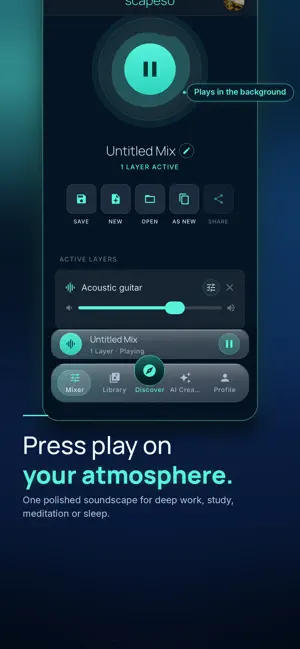
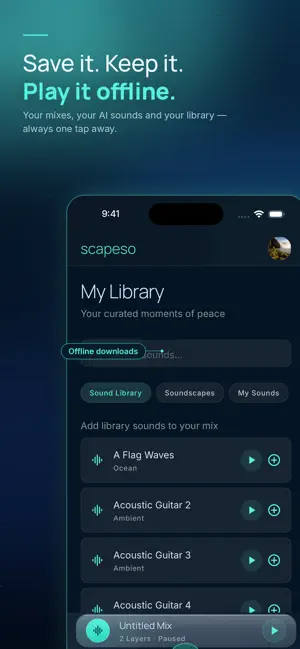
Scapeso is your AI soundscape studio—create any sound, mix it into a living atmosphere, and play it for focus, calm, or sleep. Stop settling for the same playlists. With Scapeso, you describe the sound you want, generate it with AI, layer it with rain, room tone, soft melodies, and more—then save a mix that’s uniquely yours. To read Terms of Use/Service access through this link: https://scapeso.com/legal/terms WHY SCAPESO • AI sound creation — Generate custom effects and melodies from a simple prompt • Multi-layer mixer — Stack, balance, and fine-tune speed and loop timing • Unified playback — Your mix becomes one polished soundscape, ready anytime • Vibe mode — Immersive, audio-reactive visuals while you listen • Discover — Explore soundscapes shared by the community • Share your way — Publish to Discover or send a private link • Sleep timer — Drift off and let playback fade when you’re ready • Your library — Save mixes, keep AI sounds, and download for offline listening BUILT FOR REAL MOMENTS Deep work. Study sessions. Meditation. Wind-down routines. Late-night focus. Scapeso adapts to how you need to feel—not just what you want to hear. CREATE IN MINUTES Generate or pick sounds from the curated library Mix layers in the Mixer until it feels right Save, share, or open Vibe and press play Whether you’re crafting a soft rain loft for sleep or a focused ambient bed for deep work, Scapeso turns sound into a tool you control. Start building your atmosphere. Download Scapeso and make sound work for you. You can review the full Terms of Service and Terms of Use by visiting the following link: https://scapeso.com/legal/terms
What’s new
Version 1.4 · Updated August 13, 2026
-Added: numbered drag handles next to each layer in the mixer. Long-press a number box and drag to reorder layers in the stack (replaces the previous up/down arrows). Volume % input beside the slider remains for precise volume entry. -Changed: raised the audio engine max layer count from 12 to 20 so it matches the mixer's 20-layer limit (adding a 13th+ layer previously failed in the audio manager even though the UI allowed it). -Added: soundscape names in Discover that don't fit on one line now slide (marquee) to reveal the full title, looping with a pause at the start and end; short titles that already fit are unaffected. -Fixed: cutting a layer sometimes trimmed a slightly different region than what was visually selected. A fast drag-then-cut could read a stale guide position instead of the one shown on screen; the cut now always uses the exact on-screen selection. -Fixed: layers from "My Sounds" (AI-generated) showing as the generic label "AI Sound" under a soundscape's name in the Library. They now show the sound's actual (possibly renamed) name. -Fixed: fade-in/fade-out glitching after shortening or lengthening a layer. Fade regions were left anchored to the layer's old (pre-trim) duration and could point past the new shorter length; they are now re-clamped to the layer's new duration whenever it changes. -Fixed/Stabilized: the UNDO button. It previously stored only a single last-action slot, which its own restore logic could overwrite mid-undo, so a second edit silently erased the first one's undo data and a failed restore could corrupt the next undo. Replaced with a proper 20-step undo history. UNDO now reliably covers: adding/removing a layer, trimming/cutting a layer and its fades, and layer position/volume changes. -Fixed: two layers using the same sound stacked on the same timeline position and rendered visually identical (both defaulted to the same color slot), making them look merged into one layer. Each new layer now gets a distinct timeline color so duplicate-sound layers stay visually distinguishable. -Fixed: detailed mixer's Simple/Detailed view toggle sometimes stopped responding ("tabs" not registering). The switch-view transition cleared its "switching" lock through a chain of animation-frame callbacks with no fallback; if that chain was ever interrupted (e.g. app backgrounded mid-switch), the toggle stayed disabled permanently. Added a safety timeout so the toggle always re-enables.
App privacy
The developer, MURAT EVCIL, reported these privacy practices to Apple.
Data Linked to You
The following data, which may be collected and linked to your identity, may be used for the following purposes:
- Purchases: Purchase History
- Contact Info: Email Address, Name
- User Content: Photos or Videos
Used for: Product Personalization, App Functionality
Alternatives to Scapeso|Sound Mixing Platform
Looking for apps like Scapeso|Sound Mixing Platform? Here are 6 similar apps on the App Store. The highest rated is Drones - Ambient Noise Mixer (5.0/5), and all 6 are free to download.
-
 Sonixifi
-
 Liminar
-
 Drones - Ambient Noise Mixer
5.0
Drones - Ambient Noise Mixer
5.0
-
 Mix-MasterPro
5.0
Mix-MasterPro
5.0
-
 Beatly: Generative Music
4.7
Beatly: Generative Music
4.7
-
 Briiks
4.7
Briiks
4.7
| App | Rating | Price | Last updated | Compare |
|---|---|---|---|---|
| Scapeso|Sound Mixing Platform | – | Free | August 13, 2026 | |
| Sonixifi | – | Free | Sep 11, 2026 | Compare |
| Liminar | – | Free | Apr 3, 2025 | Compare |
| Drones - Ambient Noise Mixer | 5.0 / 5 (3) | Free | Aug 26, 2026 | Compare |
| Mix-MasterPro | 5.0 / 5 (2) | Free | Oct 18, 2026 | Compare |
| Beatly: Generative Music | 4.7 / 5 (14) | Free | Sep 30, 2026 | Compare |
| Briiks | 4.7 / 5 (20) | Free | Jan 22, 2025 | Compare |