

Downsizer: Photo & Video
Chih-Yu Tung Photo & Video iPhoneiPadiPod touchMac
Downsizer: Photo & Video is a free Photo & Video app for iPhone and iPad by Chih-Yu Tung. Requires iOS 17.0. Updated September 20, 2026.
- Price
- Free
- on the App Store
- Size
- 4 MB
- Age 4+
- Updated
- Sep 20
- 2026 · v2.3
Screenshots


About Downsizer: Photo & Video
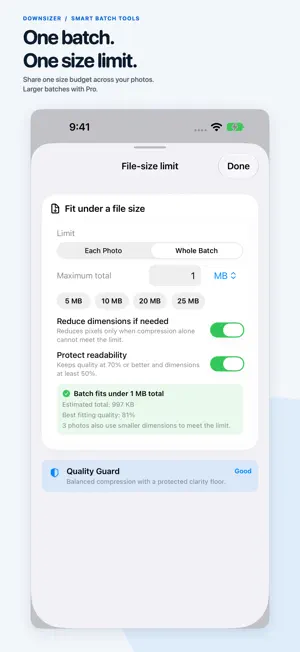
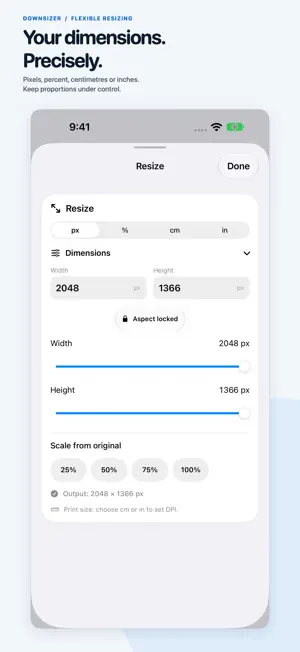
Make photos and videos smaller without uploading them anywhere. Downsizer helps you meet upload limits, resize precisely, convert formats, and preview the result before you export. A CLEANER PHOTO WORKSPACE Tap the photo to reveal Original/Preview, zoom, and size details; tap again for a clean view. Adjust width and height beside the photo, keep proportions locked, and inspect details up close. Glass controls sit above solid, easy-to-read settings panels on iOS 26 or later; earlier supported versions use a native material appearance. FIT UNDER A FILE-SIZE LIMIT Enter a KB or MB target for JPEG, HEIC, or WebP. Choose a limit for each photo or one total for the whole selection. Downsizer adjusts compression and can reduce dimensions when needed, then checks the output before export. If your settings cannot meet the target, it asks you to adjust them. WebP and larger photo selections require Pro. QUALITY GUARD An Excellent, Good, or Review rating helps you assess the estimated result. Protect Readability sets a minimum compression quality and dimension scale. It is guidance, not a guarantee: compare the actual preview, especially for text and fine detail. PRECISE RESIZING Use pixels, percent, centimetres, or inches. Set print resolution, use quick scale options, and control the aspect lock. Work with one photo or apply settings across a Pro batch. QUICK PRESETS Start with Email 10 MB, Web Upload, or Application Form, then fine-tune the settings. Use Quick Downsizer in the app, from the Photos share extension, or through Shortcuts. CONVERT YOUR PHOTOS Convert HEIC photos to JPEG or PNG, or choose HEIC for efficient storage. JPEG, HEIC, and PNG are included free. Pro adds WebP and PDF. Supported embedded metadata is retained where the output format allows it. COMPRESS VIDEO Choose Original, 1080p, 720p, or 480p. Adjust quality or enter a target size, choose H.264 or HEVC, export MP4, MOV, or M4V, and optionally remove audio. Video target sizes are estimates; the final size can vary. SAVE OR SHARE Save copies to Photos or share to Files, Mail, Messages, AirDrop, and other apps. Import directly from Apple Photos with Add to Downsizer. Deleting originals is optional and requires an iOS confirmation. PRIVATE BY DESIGN Photo and video processing stays on your iPhone or iPad. No account, no ads, and no media uploads to a Downsizer server. FREE AND PRO Free includes unlimited photo exports, one photo at a time, with JPEG/HEIC/PNG, resizing, file-size targets, Quality Guard, presets, and the first completed video export. Downsizer Pro is a one-time purchase, not a subscription. It unlocks larger batches: up to 50 photos on supported higher-memory devices, or up to 20 on other supported devices. Pro also includes WebP, PDF, and unlimited video exports. Restore Purchase is available for existing purchasers.
What’s new
Version 2.3 · Updated September 20, 2026
A fresh look, with your favourite tools still close at hand. • Refined Liquid Glass controls with solid, easy-to-read settings panels. • A more compact photo preview with smaller controls and less unused space. • Tap the photo to show comparison, zoom, and size details; tap again to hide them. • Adjust H and W beside the preview, with aspect locking and live output dimensions. • Switch between Original and Preview and enlarge the photo to inspect details. • Get to Resize, Presets, Quality Guard, and All tools from a cleaner workspace. • Keep the tools you already use: file-size targets, whole-batch limits, format conversion, video compression, and share-extension imports. Free and Pro features are unchanged. All photo and video processing remains on your device.
App privacy
The developer, Chih-Yu Tung, reported these privacy practices to Apple.
Data Not Collected
The developer does not collect any data from this app.
Alternatives to Downsizer: Photo & Video
Looking for apps like Downsizer: Photo & Video? Here are 6 similar apps on the App Store. The highest rated is Video Compress: Crop & Resize (5.0/5), and 5 of the 6 are free to download.
-
 Picto: Photo & Image Converter
-
 Video Compress: Crop & Resize
5.0
Video Compress: Crop & Resize
5.0
-
 Stitch - ScreenShot Stitcher
-
 Flit Photo Editor
5.0
Flit Photo Editor
5.0
-
 Video to GIF: Vifto
5.0
Video to GIF: Vifto
5.0
-
 Time Warp Scan: Live Camera
4.3
Time Warp Scan: Live Camera
4.3
| App | Rating | Price | Last updated | Compare |
|---|---|---|---|---|
| Downsizer: Photo & Video | – | Free | September 20, 2026 | |
| Picto: Photo & Image Converter | – | Free | Jul 11, 2026 | Compare |
| Video Compress: Crop & Resize | 5.0 / 5 (1) | Free | Aug 4, 2026 | Compare |
| Stitch - ScreenShot Stitcher | – | 0.99 USD | Jul 31, 2026 | Compare |
| Flit Photo Editor | 5.0 / 5 (2) | Free | Jul 21, 2026 | Compare |
| Video to GIF: Vifto | 5.0 / 5 (1) | Free | Jul 13, 2026 | Compare |
| Time Warp Scan: Live Camera | 4.3 / 5 (34) | Free | Oct 14, 2026 | Compare |