

PawPeek: Pet Camera
SHIH TSUNG CHEN Lifestyle iPhoneiPadiPod touchMac
PawPeek: Pet Camera is a free Lifestyle app for iPhone and iPad by SHIH TSUNG CHEN. Requires iOS 16.0. Updated October 12, 2026.
- Price
- Free
- on the App Store
- Size
- 16 MB
- Age 4+
- Updated
- Oct 12
- 2026 · v1.3
Screenshots



About PawPeek: Pet Camera
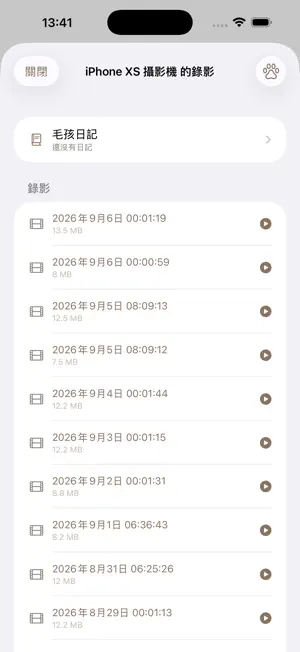
Your old iPad is the best pet camera you'll ever own. (Before you start: you'll need two devices running iOS 16 or later - one as the camera, one to watch from.) PawPeek turns a spare iPad or iPhone into a home camera: recording, live remote viewing, two-way talk and AI pet detection - no monthly fee, no account to create, and your video never passes through any cloud server. AI PET DETECTION (ON DEVICE) Recording starts only when your cat or dog shows up, so you use about 10x less storage. The AI runs entirely on the device; nothing is uploaded anywhere. EVERY CAMERA ON ONE WALL Put an old device in each room and watch them all live, side by side, on your phone. Wherever your cat wanders, you'll see it. VIDEO CALL YOUR PET Tap any camera to see them, hear them and talk to them - your face appears on the camera's screen. REMOTE PLAYBACK AND A DAILY TIME-LAPSE Watch clips back while you're out. Snapshots build up through the day into a one-tap time-lapse of your pet's day. PAIR BY QR, KEYS THAT ROTATE A new device pairs by scanning the QR code on the camera's screen. Each pairing key is used once and then replaced, so pairing only works from inside your home. Revoke any device whenever you want. WATCH FROM ANYWHERE, STILL NO FEES Zero setup on your own Wi-Fi. When you're out, the direct connection is automatic if your router supports NAT-PMP/UPnP and has a public IP address. WORKS EVEN WHEN THE NETWORK KEEPS DEVICES APART Office, dorm and guest Wi-Fi often isolate devices from one another. PawPeek switches automatically to a direct device-to-device link - no router, no configuration. Just keep the two devices near each other with Wi-Fi turned on. BACK UP TO YOUR OWN CLOUD Recordings can back up automatically to iCloud, Google Drive, OneDrive and others - your account, which we never touch. In-app purchase "PawPeek Pro" (one-time, not a subscription): unlocks watching from several devices at once, plus cat-arrival alerts (even with the app closed, delivered encrypted through your own iCloud; can be turned off). No subscription. No account. Video never touches a server. Your home, your video. Requires two devices running iOS 16 or later (one as the camera, one to watch from).
What’s new
Version 1.3 · Updated October 12, 2026
• Find your camera even when you're away: if your ISP changes your home IP, your router restarts, or a port changes, the app automatically gets the camera's new address and reconnects — no need to go home and connect again. (The camera device must be signed in to iCloud; the address travels encrypted, and video never goes through any server.) • New in Pro, "Alert even when the app is closed": get pet arrival alerts with the camera's name and a thumbnail even when the app isn't open. Alerts travel encrypted through your own iCloud, and you can turn this off anytime. • If the camera isn't signed in to iCloud, its settings explain why and take you to Settings; viewers also list which cameras' background alerts won't ring, and why. • Pinch to zoom and drag to look closer in full-screen view; double-tap to return to normal size. • The viewer's Timeline now shows recording thumbnails. • After the camera's certificate renews automatically, paired devices no longer need to scan the QR code again. • Long recordings are now split into segments automatically, so a single video can't use up your storage. • Turning off remote access now also removes the port rules from your router. • Fixed the viewer losing its camera connections, and alerts, when switching to the Timeline tab. • Fixed the camera stopping monitoring when switching to the Timeline tab on the camera device. • Fixed a paused camera resuming on its own when switching tabs or returning to the app. • Fixed recordings appearing twice in the Timeline. • Recordings can now be deleted from the Timeline on the camera device. • Pet arrival alerts no longer depend on auto-recording: you're notified when your pet shows up even if auto-recording is off or already recording. • Revoking trust for a device now ends its current connection immediately. • When the system interrupts the camera, the app now tries to recover automatically. • Improved security for remote access and pairing.
App privacy
The developer, SHIH TSUNG CHEN, reported these privacy practices to Apple.
Data Not Collected
The developer does not collect any data from this app.
Alternatives to PawPeek: Pet Camera
Looking for apps like PawPeek: Pet Camera? Here are 6 similar apps on the App Store. The highest rated is Pawtient AI (5.0/5), and all 6 are free to download.
-
 Pawtient AI
5.0
Pawtient AI
5.0
-
 喵世代 Purrzilla - 貓咪罐罐
-
 Little One Diary : Photo a Day
-
 Furwise - Cat Care & Tracker
5.0
Furwise - Cat Care & Tracker
5.0
-
 DoggyCatty 狗狗貓貓領養趣
5.0
DoggyCatty 狗狗貓貓領養趣
5.0
-
 婚禮小幫手 – 禮金簿、迎賓、桌位與統計
| App | Rating | Price | Last updated | Compare |
|---|---|---|---|---|
| PawPeek: Pet Camera | – | Free | October 12, 2026 | |
| Pawtient AI | 5.0 / 5 (1) | Free | Jun 29, 2026 | Compare |
| 喵世代 Purrzilla - 貓咪罐罐 | – | Free | Apr 26, 2026 | Compare |
| Little One Diary : Photo a Day | – | Free | Oct 10, 2026 | Compare |
| Furwise - Cat Care & Tracker | 5.0 / 5 (1) | Free | Oct 11, 2026 | Compare |
| DoggyCatty 狗狗貓貓領養趣 | 5.0 / 5 (1) | Free | Jun 13, 2025 | Compare |
| 婚禮小幫手 – 禮金簿、迎賓、桌位與統計 | – | Free | Jun 22, 2026 | Compare |