

Phase Ag
Amery Drage Productivity iPhoneiPadiPod touch
Phase Ag is a free Productivity app for iPhone and iPad by Amery Drage. Requires iOS 15.0. Updated October 18, 2026.
- Price
- Free
- on the App Store
- Size
- 34 MB
- Age 4+
- Updated
- Oct 18
- 2026 · v1.08
Screenshots

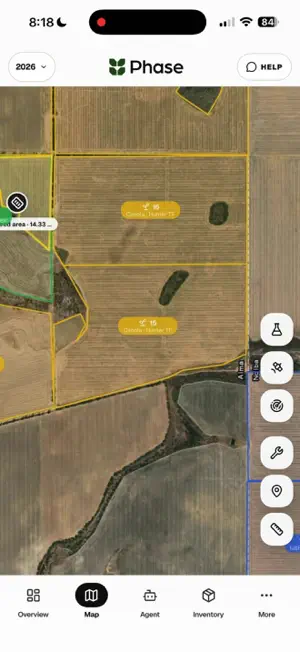


About Phase Ag
Your whole farm. One place. Phase brings paddocks, crop plans, inventory, weather, machinery and team records together around a map. Tap a paddock to see its plan, soil and yield data, Sightings, work and history without hunting across separate systems. PLAN AND RECORD • Build crop plans by paddock, farm or crop, with products, rates, timing, costs and notes • Compare required quantities with stock on hand • Record spraying, fertiliser, seeding, harvest and other activities • Keep recommendations and plan-versus-actual records together MANAGE INVENTORY • Track products across sheds, tanks, silos, fuel and seed locations • Review invoice, statement, spreadsheet and CSV imports before saving • Keep labels, SDS, batch history, stocktakes and movements together • Deduct matched inventory when work is completed WORK FROM THE MAP • View paddock plans, soil, yield, analysis and history • Add mapped Sightings with photos and notes • Create jobs, assign due dates and track status • Keep a read-only farm snapshot available when reception drops; editing currently needs a connection WEATHER AND FARM DATA • View forecasts, radar, rainfall and hourly spray conditions • Import and compare soil, rainfall and yield records • Create reports and export available records in CSV, XLSX and PDF formats PHASE AGENT Ask questions across your connected farm records, check quantities and prepare crop-plan or recommendation changes. Phase shows proposed changes for review; nothing is applied until you confirm. AI output may be incomplete or wrong, so check products, rates, units and affected records before confirming. CONNECTED MACHINERY Where enabled for your organisation, connect John Deere Operations Center to import farm and paddock setup. Supported connected-work features can bring completed operations, harvest summaries and available machine-hour readings into Phase for review. TEAM ACCESS Owners, managers, employees and advisers work from the same organisation record, with access controlled by roles and invitations. Phase is designed for Australian farm businesses and people authorised to work with them. An existing Phase organisation account or a valid team access code is required. Phase is a recordkeeping and decision-support tool. Always follow applicable law, chemical labels, permits, withholding periods, safety directions and current local conditions.
What’s new
Version 1.08 · Updated October 18, 2026
- Summer and winter crops: split a season into its two halves and plan each one. Money, stock and reports count the whole crop year. - Lists: tag the people a list is for, and they hear when anything is added, ordered or got. - Mark jobs done with no signal; they save when you're back in range. - CarPlay: crop colours on paddocks, pinch to zoom and turn the map, and rain radar. - Rainfall over the last 12 months, and choose the months your growing-season rainfall adds up. - Faster, more careful reading of invoices, soil tests and livestock files.
App privacy
The developer, Amery Drage, reported these privacy practices to Apple.
Data Linked to You
The following data, which may be collected and linked to your identity, may be used for the following purposes:
- Location: Precise Location
- Contact Info: Email Address, Name
- User Content: Photos or Videos, Audio Data
Used for: App Functionality
Alternatives to Phase Ag
Looking for apps like Phase Ag? Here are 6 similar apps on the App Store.


| App | Rating | Price | Last updated | Compare |
|---|---|---|---|---|
| Phase Ag | – | Free | October 18, 2026 | |
| BlacklegCM | – | Free | Sep 11, 2026 | Compare |
| NetBlotchBM | – | Free | Jun 16, 2026 | Compare |
| UCI BlacklegCM | – | Free | Sep 14, 2026 | Compare |
| FarmTrak | – | Free | Jun 12, 2026 | Compare |
| iLime | – | Free | Oct 14, 2026 | Compare |
| YellowSpotWM | – | Free | Jun 12, 2026 | Compare |
Compare Phase Ag with the top alternatives: ratings, updates, ASO score and keyword gaps →