

Kept: Photo Cleanup & Space
Kevin MacDonald Photo & Video iPhoneiPadiPod touch
Kept: Photo Cleanup & Space is a free Photo & Video app for iPhone and iPad by Kevin MacDonald. Requires iOS 17.0. Updated October 1, 2026.
- Price
- Free
- on the App Store
- Size
- 4 MB
- Age 4+
- Updated
- Oct 1
- 2026 · v1.0.6
Screenshots


About Kept: Photo Cleanup & Space
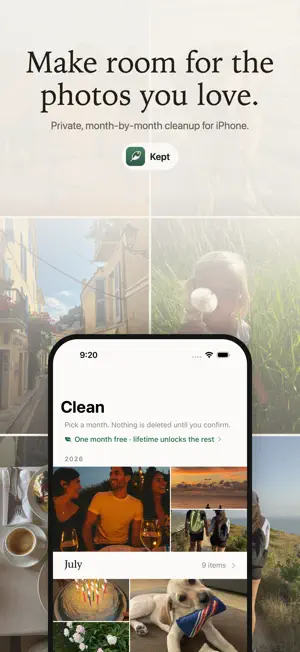
Kept helps you clean up your photo library the way you remember it: one month at a time. An overflowing camera roll is too big to face all at once. Kept breaks it into months, so each session is small, finite, and finishable. Pick a month, swipe through its photos one by one (keep or delete), and watch the month go from cluttered to clean. NOTHING IS DELETED WITHOUT YOUR REVIEW Swiping only marks a photo. Before anything is removed, Kept shows you every marked photo in a review grid where you can change your mind, and iOS asks for final confirmation before deletion. Deleted photos then sit in your Photos app's Recently Deleted album, where they are typically recoverable for around 30 days. MONTH BY MONTH - Browse your whole library as a timeline of months - See at a glance which months are heavy with photos - Work through a whole month in one focused session - A summary shows what was removed and an estimate of the space reclaimed SMART GROUPS FOR QUICK WINS The easiest space to reclaim is the stuff you never meant to keep. - Screenshots, screen recordings, large videos, and burst shots in ready-made groups - An on-demand scan finds similar photos from recent months for you to review - A Start Here card on the Clean tab points you at the biggest easy pile first - See the item count and the space you could free before you start - Mark all screenshots or recordings at once. Favorites stay out, and you still review first. - The same swipe-and-review flow. Nothing is deleted automatically. A LITTLE JOY WHILE YOU TIDY The Memory tab resurfaces a random older photo whenever you open or shuffle it. A small reason to use the app that isn't a chore. PRIVATE BY DESIGN Everything happens on your iPhone. Kept has no account, no sign-in, no analytics, no ads, and no tracking. Your photos are never uploaded anywhere, and the app collects no data at all. TRY IT, THEN UNLOCK UNLIMITED Clean up to 15 photos free so you can see Kept work. After that, unlock unlimited cleanups with a weekly plan or a one-time lifetime purchase. The weekly plan renews automatically until you cancel in your Apple Account settings. A 3-day free trial is available where offered. No ads and no account. WHY PHOTOS ACCESS IS NEEDED Kept asks for access to your photo library so it can show your photos month by month and remove the ones you confirm. Access is used only for that, on your device, and nowhere else. Kept requires iOS 17 or later. Terms of Use (EULA): https://www.apple.com/legal/internet-services/itunes/dev/stdeula/
What’s new
Version 1.0.6 · Updated October 1, 2026
Find similar photos with an on-demand scan in Groups. Kept also gathers burst shots and shows small "Similar Shot" or "Possible Low Quality" hints while you review. You still choose what to keep or delete, and iOS asks before anything is removed. Settings now includes Rate Kept.
App privacy
The developer, Kevin MacDonald, reported these privacy practices to Apple.
Data Not Collected
The developer does not collect any data from this app.
Alternatives to Kept: Photo Cleanup & Space
Looking for apps like Kept: Photo Cleanup & Space? Here are 6 similar apps on the App Store. The highest rated is PhotoSwipe - Clear Out Photos (5.0/5), and all 6 are free to download.
-
 Clean Up Photos: Kept
-
 PhotoSwipe - Clear Out Photos
5.0
-
 Swipe Photos Clean
5.0
-
 Swipe to Delete Photo: Deleep
5.0
-
 Random Gallery
3.2
-
 Pic Roulette - Photo Shuffle
4.2
| App | Rating | Price | Last updated | Compare |
|---|---|---|---|---|
| Kept: Photo Cleanup & Space | – | Free | October 1, 2026 | |
| Clean Up Photos: Kept | – | Free | Sep 23, 2026 | Compare |
| PhotoSwipe - Clear Out Photos | 5.0 / 5 (11) | Free | Oct 24, 2026 | Compare |
| Swipe Photos Clean | 5.0 / 5 (1) | Free | Apr 20, 2026 | Compare |
| Swipe to Delete Photo: Deleep | 5.0 / 5 (2) | Free | Oct 22, 2026 | Compare |
| Random Gallery | 3.2 / 5 (9) | Free | Oct 23, 2026 | Compare |
| Pic Roulette - Photo Shuffle | 4.2 / 5 (17) | Free | Sep 2, 2026 | Compare |