

Arrivio: Location Reminders
Review It LLC Productivity iPhoneiPadiPod touch
Arrivio: Location Reminders is a free Productivity app for iPhone and iPad by Review It LLC. Rated 5.0/5 from 1 ratings. Requires iOS 26.0.
- Rating
- 5.0
- 1 ratings
- Price
- Free
- on the App Store
- Size
- 26 MB
- Age 4+
- Updated
- Sep 22
- 2026 · v1.3
Screenshots


About Arrivio: Location Reminders
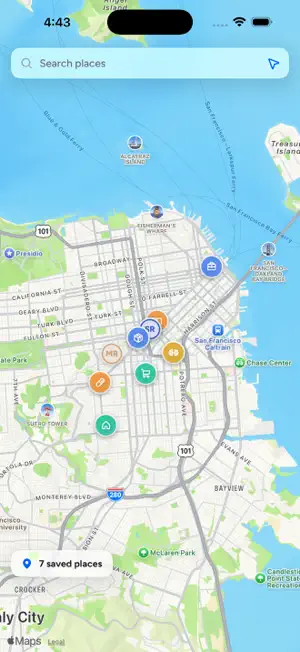
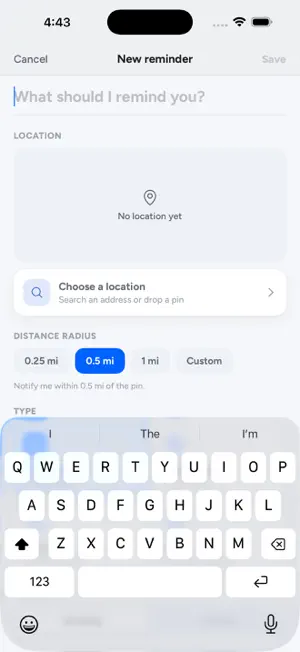
Arrivio reminds you where it matters — not when you'll ignore it. Tie a task or a list to a place, and Arrivio nudges you the moment you arrive or leave: “grab the prescription” as you pull into the pharmacy, “take out the recycling” as you get home. No more alarms that fire while you're in a meeting, miles from where the task lives. PLACE-BASED REMINDERS • Nudges when you arrive or leave — one-time, until done, or every visit • Pick your radius in miles and watch it draw on the map • “Any place” reminders: any pharmacy, any Trader Joe's — whichever you reach first • Deadline fallback: if you never pass by, you're reminded anyway • Works in the background, even after a restart APPOINTMENTS THAT MEET YOU THERE • Add the time you're expected — day-before, morning-of, and 2-hour heads-ups • “Time to leave” alerts computed from real driving time • Walk in and your checklist fires: insurance card, referral, questions to ask LISTS THAT RUN THEMSELVES • Shopping lists, to-dos, and checklists pinned to places • A Places tab with everything organized by where it happens • Weekly self-resetting lists — your grocery list re-arms itself every Monday YOUR WHOLE HOUSEHOLD • Share lists with family or roommates — updates in real time • Whoever gets there first gets nudged; check something off and it clears for everyone • See approximate household positions on the map (each person opts in separately) • Assign tasks and invite trusted people with a revocable link AND THE DETAILS • Home Screen, Lock Screen, and Control Center widgets • Quiet hours, once-a-day caps, day/time windows • A reliability panel that shows exactly why a nudge did or didn't fire • Actionable notifications: done, snooze, next visit, mute here • Sign in with Apple or email; export your data anytime; delete your account for real Exact live location stays on your phone for geofencing. Saved-place coordinates sync so your reminders work across devices; an approximately 100-meter household position is shared only when you turn that off-by-default switch on. No ads, tracking, or selling data — ever. Arrivio Plus is an auto-renewing subscription at $4.99/month after your free month. Payment is charged to your Apple Account, renews automatically unless turned off at least 24 hours before the period ends, and can be managed in your Apple Account settings. Terms of Use: https://arrivio-app.web.app/terms/ Privacy Policy: https://arrivio-app.web.app/privacy/
What’s new
Version 1.3 · Updated September 22, 2026
Reliability, mostly. This one came out of a full audit of the last release, and several of the fixes are things Arrivio was getting wrong silently. Reminders now work while your phone is locked. Arriving somewhere with your phone in your pocket could be missed entirely, because the app could not read its own saved reminders until the phone was unlocked. This was the most common way to arrive somewhere and hear nothing. Home now tells you when reminders cannot reach you. If notifications are off, or location is set to "While Using" instead of "Always", a banner explains which one and takes you straight to fixing it. Before, both cases failed silently: the app looked like it was working and simply never nudged you. On a fresh start, Arrivio now watches the places nearest you. iOS only lets an app watch 20 places at once, and before your phone had worked out where you are, Arrivio was picking the first 18 alphabetically instead of the closest 18. Snooze and "Mute today" now survive closing the app. Items you tick off without a signal are no longer lost. Saving with no connection now tells you it could not save, instead of freezing the Save button. The buttons on a notification now work when the app is closed. A failed card no longer locks you out of your own reminders. Apple gives you 16 days to fix a payment and you stay subscribed that whole time. Also in this release: the two options behind the + button now respond anywhere on the row, small grey text is darker and easier to read, the circle you tap to complete a reminder is easier to hit, and place categories are translated.
App privacy
The developer, Review It LLC, reported these privacy practices to Apple.
Data Linked to You
The following data, which may be collected and linked to your identity, may be used for the following purposes:
- Diagnostics: Other Diagnostic Data
- Location: Precise Location
- Contact Info: Email Address, Name
- User Content: Photos or Videos, Other User Content
- Identifiers: User ID, Device ID
Used for: Analytics, App Functionality
Alternatives to Arrivio: Location Reminders
Looking for apps like Arrivio: Location Reminders? Here are 6 similar apps on the App Store. The highest rated is RoboForm Password Manager (4.7/5), and all 6 are free to download.
-
 OTF Control Tower
4.6
OTF Control Tower
4.6
-
 Cloud Ready printer
4.0
Cloud Ready printer
4.0
-
 slydial
4.6
slydial
4.6
-
 Notepad ++
1.2
Notepad ++
1.2
-
 Zoho Calendar
4.0
Zoho Calendar
4.0
-
 RoboForm Password Manager
4.7
RoboForm Password Manager
4.7
| App | Rating | Price | Last updated | Compare |
|---|---|---|---|---|
| Arrivio: Location Reminders | 5.0 / 5 (1 rating) | Free | September 22, 2026 | |
| OTF Control Tower | 4.6 / 5 (9) | Free | Aug 28, 2026 | Compare |
| Cloud Ready printer | 4.0 / 5 (1,670) | Free | Jul 27, 2026 | Compare |
| slydial | 4.6 / 5 (507) | Free | Oct 30, 2025 | Compare |
| Notepad ++ | 1.2 / 5 (59) | Free | Sep 17, 2026 | Compare |
| Zoho Calendar | 4.0 / 5 (4) | Free | Sep 9, 2026 | Compare |
| RoboForm Password Manager | 4.7 / 5 (48,907) | Free | Oct 12, 2026 | Compare |