

Case Marker: Dental Photos
Warmie Health Medical iPhoneiPadiPod touch
Case Marker: Dental Photos is a free Medical app for iPhone and iPad by Warmie Health. Requires iOS 18.0. Updated October 24, 2026.
- Price
- Free
- on the App Store
- Size
- 30 MB
- Age 4+
- Updated
- Oct 24
- 2026 · v1.0.10
Screenshots



About Case Marker: Dental Photos
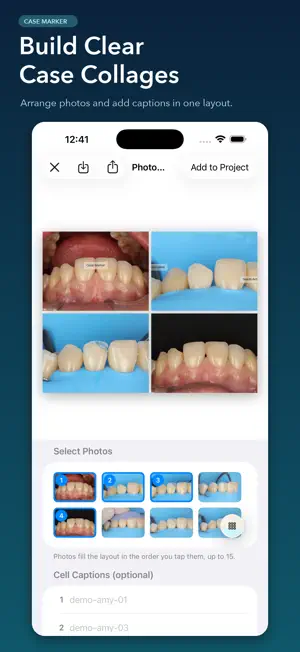
High-quality photo exports — Show every case detail clearly Export edited and annotated photos as high-quality JPG files to clearly present the details of your clinical cases. Case Marker helps dentists and dental teams organize clinical photos, annotate case images, and create presentations for case discussions, teaching, and training. WORK ACROSS MACBOOK, IPAD AND IPHONE Organize clinical cases and prepare presentations on your MacBook, review images on iPad, and access your cases on iPhone. Sign in to the same Case Marker account and enable cloud sync to continue working across devices. Available on iPhone, iPad and Macs with Apple silicon (M1 or later), including MacBook Air and MacBook Pro; macOS 15 or later is required. On your Mac, download Case Marker from the Mac App Store. Bring photos and videos into one project, highlight details with labels and drawings, build multi-image collages, and export JPG, PDF, or PowerPoint files. Keep your dental photography workflow organized from import to presentation. Create projects, import photos and videos from Photos, Camera, Files, drag and drop, or the system share menu, then refine each image with rotation, leveling, crop, perspective, brightness, contrast, saturation, temperature, clarity, and reference-point white balance controls. Add markers, leader lines, labels, styled text boxes, freehand drawings, and reusable image stamps. Built-in marker types provide neutral workflow defaults—Observation, Pending, and Needs Action—and can be renamed, recolored, reordered, or given custom default text. Key features: - Create, search, duplicate, and manage photo projects - Import photos and videos from multiple system sources - Rotate, flip, level, crop, and correct horizontal or vertical perspective - Adjust brightness, contrast, saturation, temperature, clarity, and white balance - Add markers, text boxes, drawings, stamps, labels, and leader lines - Build multi-image collages with individual framing and caption styles - Batch export JPG files with optional clean copies - Create 16:9 PDF and PowerPoint presentations - Follow batch export progress with Live Activities - Share results or save them to Photos or a chosen Files location - Sign in to sync projects across devices, back them up, and collaborate with colleagues - Optional cloud storage plans: Free 250 MB, or 5 GB, 10 GB, 20 GB and 100 GB monthly subscriptions Media editing takes place primarily on your device. Accounts, cloud sync, backups and collaboration transmit and store the necessary projects, photos, videos and annotations on the servers and storage services we use. Once sync is enabled, relevant changes may upload automatically. Case Marker is a manual organization and annotation tool. It does not provide automated diagnosis, disease detection, treatment recommendations, or medical decision-making. Clinical decisions should be made by qualified professionals based on individual assessment. Terms of Use (Apple Standard EULA): https://www.apple.com/legal/internet-services/itunes/dev/stdeula/ Privacy Policy: https://marker.glamour.dental/en/privacy.html
What’s new
Version 1.0.10 · Updated October 24, 2026
Improved the French interface with clearer collaboration messages and correct photo, video, and marker counts. Added localized controls for manual image alignment. Improved Latin American Spanish with clearer instructions and consistent terms. Signed-in iPhone and iPad users can now find a MacBook entry in Settings to open the download page, copy the link, or share it with AirDrop. Sign in to the same account and enable cloud sync to continue across devices.
App privacy
The developer, Warmie Health, reported these privacy practices to Apple.
Data Linked to You
The following data, which may be collected and linked to your identity, may be used for the following purposes:
- Identifiers: Device ID, User ID
- Health & Fitness: Health
- Purchases: Purchase History
- Contact Info: Email Address, Name
- User Content: Photos or Videos, Other User Content
Used for: Analytics, App Functionality
Data Not Linked to You
The following data, which may be collected but is not linked to your identity, may be used for the following purposes:
- Location: Coarse Location
- Usage Data: Product Interaction
- Diagnostics: Crash Data, Performance Data, Other Diagnostic Data
Used for: Analytics, App Functionality