

SmoothCapture
Vu Nguyen Photo & Video iPhoneiPadiPod touch
SmoothCapture is a free Photo & Video app for iPhone and iPad by Vu Nguyen. Rated 5.0/5 from 1 ratings. Requires iOS 18.0. Updated August 11, 2026.
- Rating
- 5.0
- 1 ratings
- Price
- Free
- on the App Store
- Size
- 79 MB
- Age 4+
- Updated
- Aug 11
- 2026 · v1.0
Screenshots



About SmoothCapture
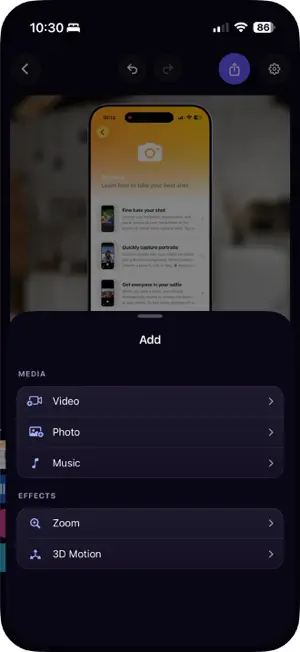
Turn a plain screen recording into a demo video people actually watch. The recording is already in your camera roll. SmoothCapture adds the polish: a beautiful background, a real 3D iPhone around your screen, a smooth zoom on the part that matters, and music to carry it. Import, tap a few times, export. That is the whole job. SHOW YOUR APP INSIDE A REAL 3D IPHONE Your recording plays inside a lifelike 3D phone that you can spin and tilt to any angle. The metal catches the light and the glass reflects like the real thing. Prefer the classic look? Flat frames are there too. BACKGROUNDS THAT MAKE IT POP Dozens of hand-picked backgrounds, from soft gradients to nature and abstract art. Adjust the padding, corners and border until the framing looks right. ZOOM AND MOTION, NO EDITING SKILLS NEEDED Drop a zoom on the timeline and it glides in and out by itself. Pan across the screen while zoomed in. Spin or tilt the phone with a simple joystick. Your video gets real movement without touching a keyframe. CUT IT LIKE A PRO Combine clips and photos in any order. Trim, reorder, speed up, mute, and fade between takes. Every clip keeps its own look, so each take can have its own style. ADD MUSIC Pick a track from the built-in library or bring your own. The waveform on the timeline makes it easy to line your cuts up with the beat. EXPORT AND SHARE ANYWHERE Export in the size and shape that fits where you are posting: the App Store, TikTok, X, YouTube, or a chat with your team. Save to Photos or share straight from the app. START FROM ANYWHERE Share a recording from Photos or Files into SmoothCapture and it opens as a project, ready to edit. FREE TO TRY, NO WATERMARK Importing and editing are free. Your first 3 exports are free too, in full quality with no watermark and nothing held back. ONE PAYMENT, YOURS FOREVER After that, unlimited exports are a single purchase of $29.00. Nothing renews, nothing expires, and there is nothing to cancel. This is a launch price and it will go up. Prices may vary by region. Payment is charged to your Apple Account at confirmation of purchase. Terms of Use: https://www.smoothcapture.app/ios/terms Privacy Policy: https://www.smoothcapture.app/ios/privacy Please note: SmoothCapture is an editor, not a recorder. Record your screen with the built-in iOS screen recording control, then bring the clip here.
App privacy
The developer, Vu Nguyen, reported these privacy practices to Apple.
Data Linked to You
The following data, which may be collected and linked to your identity, may be used for the following purposes:
- Purchases: Purchase History
- Identifiers: Device ID
Used for: App Functionality
Alternatives to SmoothCapture
Looking for apps like SmoothCapture? Here are 6 similar apps on the App Store. The highest rated is Scantic (5.0/5), and 5 of the 6 are free to download.
-
 Shotly - Screenshot Editor
-
 Video Editor: Trim, Cut & Crop
4.9
Video Editor: Trim, Cut & Crop
4.9
-
 ClipPro: Video & Photo Editor
4.0
ClipPro: Video & Photo Editor
4.0
-
 Dual Shot Recorder・Dual Camera
4.7
Dual Shot Recorder・Dual Camera
4.7
-
 Collage Maker Photo Editor Pro
3.0
Collage Maker Photo Editor Pro
3.0
-
 Scantic
5.0
Scantic
5.0
| App | Rating | Price | Last updated | Compare |
|---|---|---|---|---|
| SmoothCapture | 5.0 / 5 (1 rating) | Free | August 11, 2026 | |
| Shotly - Screenshot Editor | – | Free | Aug 19, 2026 | Compare |
| Video Editor: Trim, Cut & Crop | 4.9 / 5 (19) | Free | Oct 2, 2026 | Compare |
| ClipPro: Video & Photo Editor | 4.0 / 5 (4) | 9.99 USD | Oct 22, 2026 | Compare |
| Dual Shot Recorder・Dual Camera | 4.7 / 5 (15) | Free | Oct 29, 2026 | Compare |
| Collage Maker Photo Editor Pro | 3.0 / 5 (10) | Free | Sep 29, 2026 | Compare |
| Scantic | 5.0 / 5 (3) | Free | Sep 5, 2026 | Compare |
Compare SmoothCapture with the top alternatives: ratings, updates, ASO score and keyword gaps →