

Remote Mouse for Mac
joon kwang kim Utilities iPhoneiPadiPod touch
Remote Mouse for Mac is a free Utilities app for iPhone and iPad by joon kwang kim. Requires iOS 15.0. Updated August 27, 2026.
- Price
- Free
- on the App Store
- Size
- 6 MB
- Age 4+
- Updated
- Aug 27
- 2026 · v1.0.3
Screenshots



About Remote Mouse for Mac
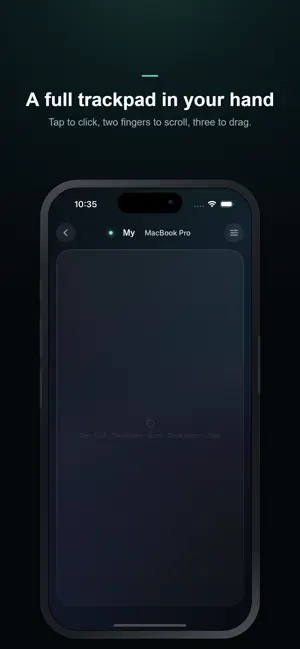
Turn your iPhone and iPad into a wireless trackpad for your Mac. Remote Mouse for Mac lets you control your Mac using the device in your hand — just like a Magic Trackpad, with no cables and no extra mouse. From the couch, during a presentation, or in bed, move your Mac's cursor freely from anywhere. ■ Just Like a Real Trackpad · Tap to click, two-finger tap to right-click · Two-finger scroll · Three-finger drag and double-tap drag · Adjust tracking speed and scroll sensitivity to your liking It feels exactly like a Magic Trackpad. ■ Connect Without Cables On the same Wi-Fi, your Mac is discovered automatically and shown in the list. One tap connects. No Wi-Fi? It connects over Bluetooth too. ■ Multiple Macs at Once Home and office, MacBook and Mac mini — every Mac running the Receiver appears in the list, so you can pick and connect to any of them. ■ Secure by Design When your iPhone connects, your Mac must approve it. No one can access your Mac without permission. ■ A Refined Experience A neon glow blooms with every touch, wrapped in a design like no other. Available in Korean, English, Japanese, and Chinese, following your device language automatically. ■ Getting Started 1. Install this app. 2. Run the free Receiver on your Mac (download from remotemouseformac.com). 3. Pick your Mac in the app, approve it, and it becomes a trackpad instantly. Note: To control your Mac's cursor, you need to run the free Receiver app on your Mac once. After the first launch, it starts automatically at login.
What’s new
Version 1.0.3 · Updated August 27, 2026
A thorough overhaul of how the trackpad feels. • Momentum scrolling — flick and the scroll glides to a natural stop. • Sharper pointer control — move slowly for fine precision, quickly to cover more ground. Small targets are far easier to hit. • Fixed slow scrolling that moved in visible steps. • Scrolling now locks to an axis, so vertical swipes no longer drift sideways. • Fixed the cursor jumping when you finish a two-finger scroll. • Fixed cursor speed differing from device to device. • Fixed a drag starting unintentionally when you tapped elsewhere right after a click. • Smoother 120Hz response on ProMotion devices.
App privacy
The developer, joon kwang kim, reported these privacy practices to Apple.
Data Not Collected
The developer does not collect any data from this app.
Alternatives to Remote Mouse for Mac
Looking for apps like Remote Mouse for Mac? Here are 6 similar apps on the App Store. The highest rated is Air Voice Boost Pro : Hearing (5.0/5), and 5 of the 6 are free to download.
-
 Air Voice Boost Pro : Hearing
5.0
Air Voice Boost Pro : Hearing
5.0
-
 DueSnap: Expiry Date Tracker
-
 BabelVoice - Speech to Text
5.0
BabelVoice - Speech to Text
5.0
-
 TV Remote: Smart & Universal
5.0
TV Remote: Smart & Universal
5.0
-
 Padme - Custom keypad for Mac
-
 EasyBeauty-Beauty is so easy
| App | Rating | Price | Last updated | Compare |
|---|---|---|---|---|
| Remote Mouse for Mac | – | Free | August 27, 2026 | |
| Air Voice Boost Pro : Hearing | 5.0 / 5 (2) | Free | Jul 17, 2026 | Compare |
| DueSnap: Expiry Date Tracker | – | Free | Jul 27, 2026 | Compare |
| BabelVoice - Speech to Text | 5.0 / 5 (2) | 3.99 USD | Aug 23, 2026 | Compare |
| TV Remote: Smart & Universal | 5.0 / 5 (6) | Free | Oct 14, 2026 | Compare |
| Padme - Custom keypad for Mac | – | Free | Jul 28, 2026 | Compare |
| EasyBeauty-Beauty is so easy | – | Free | Aug 11, 2026 | Compare |