

SARAS Device Manager
Excelsoft Technologies Ltd Education iPhoneiPadiPod touch
SARAS Device Manager is a free Education app for iPhone and iPad by Excelsoft Technologies Ltd. Requires iOS 15.6. Updated August 24, 2026.
- Price
- Free
- on the App Store
- Size
- 37 MB
- Age 4+
- Updated
- Aug 24
- 2026 · v1.0
Screenshots



About SARAS Device Manager
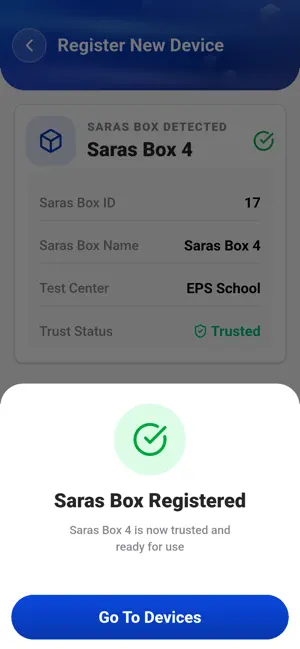
SARAS Device Manager is a powerful mobile application designed to simplify the setup, management, and monitoring of SARAS Assessment-in-a-Box (SARAS Box) devices. The application provides authorized users with a centralized platform to connect to SARAS Boxes, configure device settings, monitor device health, manage network connectivity, and track assessment data from anywhere. The application enables quick and secure device onboarding through QR code-based registration. Users can easily register new SARAS Boxes, establish device connectivity, and automatically synchronize device date and time with their mobile devices. Once registered, all devices can be accessed and managed from a single interface, making device administration efficient and convenient. SARAS Device Manager provides real-time visibility into device status, including connection status, signal strength, device name, hostname, storage utilization, and last synchronization details. Users can remotely perform essential device management tasks such as restarting or powering off a SARAS Box, synchronizing device time, checking storage availability, and viewing detailed device identification information. The application also includes an integrated Wi-Fi management feature that allows SARAS Boxes to connect to external wireless networks. Users can scan available networks, refresh Wi-Fi lists, enter network credentials, and establish internet connectivity to support content synchronization and result uploads. A comprehensive Dashboard provides complete visibility into assessment-related packages. Users can monitor Question Packages (Q Packs) and Result Packages (R Packs), view package summaries, track synchronization status, and monitor package progress across different system layers. Advanced filtering options allow users to search and analyze package information by date range and package type for improved operational visibility. Key Features: Secure user authentication and access control QR-code based SARAS Box registration Real-time device monitoring and status tracking Centralized management of registered devices Remote power control and device restart functionality Automatic date and time synchronization Storage monitoring and capacity tracking Wi-Fi configuration and network management Device information and identification details Q Pack and R Pack monitoring dashboard Assessment package status tracking across multiple system layers Date and package-based filtering capabilities Benefits: Simplifies SARAS Box setup and administration Improves operational efficiency during assessments Provides real-time device visibility and monitoring Enables seamless network connectivity management Supports offline and semi-connected assessment environments Streamlines assessment package tracking and synchronization Reduces manual effort in device configuration and maintenance SARAS Connect is the ideal companion application for assessment administrators and field operators, providing a reliable, secure, and user-friendly solution for managing SARAS Assessment devices and ensuring smooth assessment delivery.
App privacy
The developer, Excelsoft Technologies Ltd, reported these privacy practices to Apple.
Data Not Collected
The developer does not collect any data from this app.
Alternatives to SARAS Device Manager
Looking for apps like SARAS Device Manager? Here are 6 similar apps on the App Store. The highest rated is Unstop (4.7/5), and all 6 are free to download.


| App | Rating | Price | Last updated | Compare |
|---|---|---|---|---|
| SARAS Device Manager | – | Free | August 24, 2026 | |
| Oxford Ignite | – | Free | Sep 19, 2026 | Compare |
| Proofile.in | – | Free | Sep 1, 2026 | Compare |
| ExamHub | – | Free | Jan 7, 2026 | Compare |
| Kadmik : Govt Exam Prep App | 4.3 / 5 (18) | Free | Mar 4, 2024 | Compare |
| Emeritus Classroom | – | Free | Jul 2, 2026 | Compare |
| Unstop | 4.7 / 5 (23) | Free | Aug 26, 2026 | Compare |