

Ukulele Buddha: Chords & Songs
Lazy Lopez Productions Music iPhoneiPadiPod touchMacApple Watch
Ukulele Buddha: Chords & Songs is a free Music app for iPhone and iPad by Lazy Lopez Productions. Rated 5.0/5 from 1 ratings. Requires iOS 17.0.
- Rating
- 5.0
- 1 ratings
- Price
- Free
- on the App Store
- Size
- 58 MB
- Age 4+
- Updated
- Sep 7
- 2026 · v1.4
Screenshots



About Ukulele Buddha: Chords & Songs
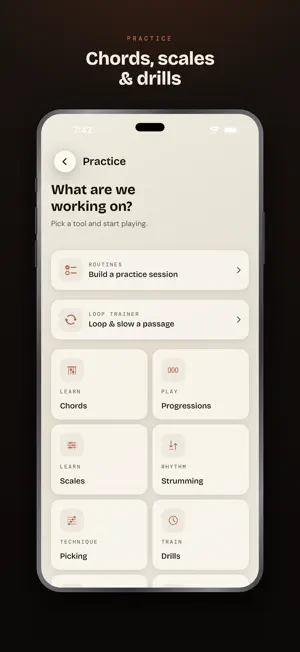
A sunnier way to sit with your ukulele. Every feature free, forever — no subscription, no ads, no account. Tell it the three chords you know, and start playing songs tonight. - `SONGS` — 1,052 built in, chords ready, no login and nothing to download. Transpose, capo, simplify the awkward shapes, or paste in a tab and watch a cursor track it. - `SONGS YOU CAN PLAY` — tick off the chords you know and the library shows what's ready tonight, and what's one or two chords away. - `TUNER` — standard high-G, low-G, baritone and D, plus a library of your own: name a tuning, save as many as you have instruments. In tune inside ten cents, and it works out which string you're on. - `CHORDS` — 168 of them, grouped into eight families, so you pick the sound you want and then the root. Open one and hear it ring, or tap a single note to hear just that one. - `SCALES` — 70 shapes, every one built for gCEA so it lands on real notes, and laid out across the whole neck. Build your own by tapping the notes you want in it. - `STRUMMING & PICKING` — six strums and four picking patterns that count you in and speed up slowly. - `PROGRESSIONS` — 41 in genre and mood packs, or build your own from the chords that live in your key. - `JAM` — pick a key and a feel and drums, bass and keys lock in behind you, across nine grooves. Loop it, record over the top. - `PRACTICE` — three ready-made routines to start from, a metronome from 40 to 240, twelve backing loops, drills, an ear trainer, and a fretboard you can learn one note at a time. - `THE WOODSHED` — bring in an audio file, loop the bar that keeps beating you, and slow it to half speed without the pitch dropping with it. - `IDEAS` — hum the melody before it floats off. The chords and key are worked out on your device and kept with it. - `ON YOUR WRIST` — a metronome, a tuner and chord diagrams on Apple Watch. - `YOURS, ON YOUR DEVICE` — no account, no cloud sync, nothing to sign up for. Back it all up to a file you keep. Anonymous analytics stay off unless you turn them on. - `FREE MEANS FREE` — every feature, unlocked, forever. The tip jar is there if it helps you play more, and it unlocks nothing.
What’s new
Version 1.4 · Updated September 7, 2026
Find a chord by family — and build scales and tunings of your own. • Chords, grouped the way you'd ask for them — Pick a family (major, minor, dominant, suspended, diminished and the rest), then pick the root. 168 chords across eight families, so Cm and Cm7 finally sit together instead of landing in different filters. • Poke a note to hear it — The NOTES row under a chord or scale looked like buttons and wasn't. Now a chord tone sounds at the pitch it actually holds in the shape on screen and lights that string's dot; a scale degree sounds in the box drawn above it. • Scales you build yourself — Tap the notes you want and the scale is yours, with its own spelling, fretboard box, neck map and playback, exactly like a bundled one. Twelve modes of harmonic and melodic minor come bundled too — 70 scale shapes in all. • A library of your own tunings — Name a tuning and keep it. As many as you have instruments, each with its own strings, instead of one unnamed slot the next save quietly wiped. • Your theory library — Heart any chord, scale, or progression and it waits under a Saved pill, with recents beside it. Chords show where they want to resolve, and every scale unrolls across the whole neck, in your tuning. • A copy you keep — Settings can write your practice log, routines, progressions, and the scales and tunings you built to one file, and read it back on a new phone. The log also exports as a spreadsheet. It all stays on your device: no account, nothing uploaded. • The screen stays awake while the mic is live — A take no longer ends with you unlocking the phone to reach Stop. • Squashed — B9 has a voicing at last; Bdim is no longer "simplified" to B major; a scale's notes row and its neck agree on spelling; the tuner picks up a tuning chosen in Settings without a relaunch; every Ear Trainer round actually plays; long tabs keep every system when imported; reordering a setlist can't scramble it; and turning analytics off really turns it off. • A quiet note in Settings about the rest of the family: Guitar, Bass and Drum Buddha. Thanks for playing — and for writing in. — Ukulele Buddha
App privacy
The developer, Lazy Lopez Productions, reported these privacy practices to Apple.
Data Not Linked to You
The following data, which may be collected but is not linked to your identity, may be used for the following purposes:
- Identifiers: Device ID
- Usage Data: Product Interaction, Other Usage Data
- Diagnostics: Crash Data, Performance Data, Other Diagnostic Data
Used for: Analytics
Alternatives to Ukulele Buddha: Chords & Songs
Looking for apps like Ukulele Buddha: Chords & Songs? Here are 6 similar apps on the App Store. The highest rated is Ear Training Mandala (5.0/5), and all 6 are free to download.
-
 Ear Training Mandala
5.0
-
 Soloist Ukulele: Chords & Tabs
-
 Riddiments — Drum Practice
5.0
-
 PocketChop
-
 Ukulalala - Learn Ukulele
4.2
-
 Leaf Light
5.0
| App | Rating | Price | Last updated | Compare |
|---|---|---|---|---|
| Ukulele Buddha: Chords & Songs | 5.0 / 5 (1 rating) | Free | September 7, 2026 | |
| Ear Training Mandala | 5.0 / 5 (9) | Free | Oct 14, 2026 | Compare |
| Soloist Ukulele: Chords & Tabs | – | Free | Oct 5, 2026 | Compare |
| Riddiments — Drum Practice | 5.0 / 5 (1) | Free | Aug 26, 2026 | Compare |
| PocketChop | – | Free | Jul 25, 2026 | Compare |
| Ukulalala - Learn Ukulele | 4.3 / 5 (4) | Free | Sep 11, 2026 | Compare |
| Leaf Light | 5.0 / 5 (1) | Free | Oct 23, 2026 | Compare |