

Kotoba Snap
YINGDE YANG Education iPhoneiPadiPod touch
Kotoba Snap is a free Education app for iPhone and iPad by YINGDE YANG. Requires iOS 15.5. Updated August 16, 2026.
- Price
- Free
- on the App Store
- Size
- 93 MB
- Age 4+
- Updated
- Aug 16
- 2026 · v1.2.1
Screenshots
About Kotoba Snap
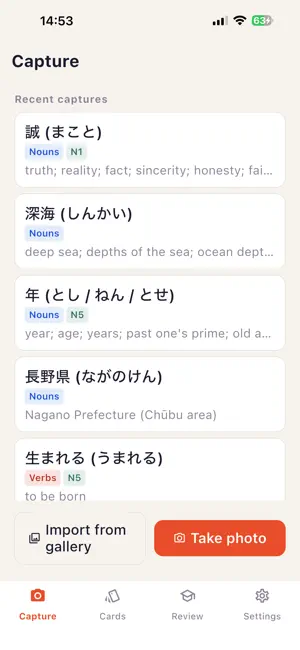
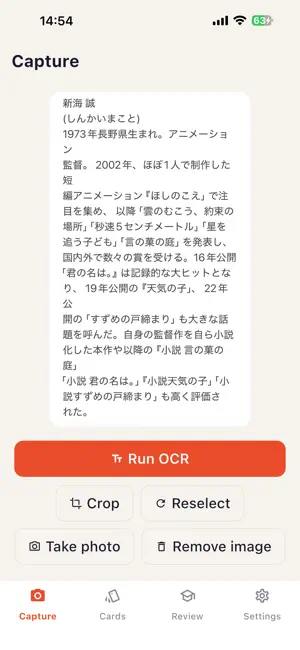
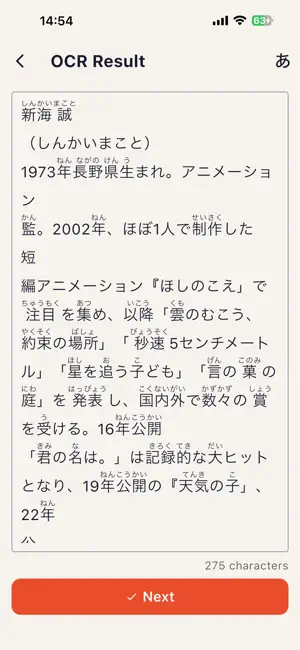
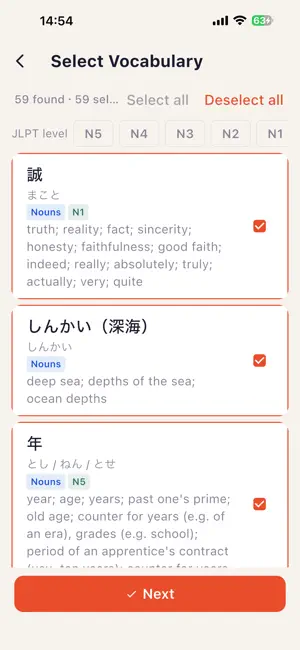
Snap a photo. Turn the Japanese words in it into flashcards. Menus, street signs, packaging, a page of a novel — whenever you run into Japanese you don't know, just photograph it. Kotoba Snap recognizes the text, splits it into words, and lets you pick the ones worth learning. Interface languages: English and Simplified Chinese. The app starts in Simplified Chinese — switch to English under Settings → Language. Japanese interface is not available yet. · Photo to text — handles vertical Japanese, recognized on your device · Instant lookup — offline dictionary with readings, part of speech, JLPT level · Read it again — recognized text is kept with the photo, readable with furigana any time, and still selectable while furigana is on · Build cards by hand — written form, reading, meaning, part of speech and JLPT level, with dictionary lookup while you edit · Verb conjugation — expand any verb into its full set of forms and usages, with transitive and intransitive marked · Spaced review — scheduling handled for you, no deciding when to revisit · Source photos — browse cards grouped by the picture you found them in · Reference translation — Japanese sentences translated into Simplified Chinese on your device. Requires iOS 18 or later and the Simplified Chinese interface; one language pack is downloaded the first time, offline after that. A Japanese-to-English path is not available yet. · AI translation — optional, off by default. Enter your own API key and the recognized text can be translated by Claude, ChatGPT or DeepSeek. Photos are never sent, and the key stays on this device. Note: definitions are provided in Simplified Chinese and English. No account. No sign-up. The dictionary ships with the app: capture, recognition, lookup and review all run on your device and need no network. The reference-translation language pack is downloaded once on first use, and works offline after that. AI translation is optional and off by default; once you enable it and enter your own API key, translating sends the recognized text to the provider you chose.
What’s new
Version 1.2.1 · Updated August 16, 2026
The launch animation is a little slower It used to end before you could see it. The full dictionary now starts loading the moment you open the app It used to wait until after your first photo lookup, so if you only made cards by hand it never loaded at all. Now it prepares in the background at launch, takes a few seconds, and blocks nothing while it does. Fixed: while the dictionary was still loading, making a card by hand said "not in the dictionary" That was untrue — the word was there, that half of the dictionary just was not ready yet. It now says the full dictionary is still loading and to try again shortly.
App privacy
The developer, YINGDE YANG, reported these privacy practices to Apple.
Data Not Linked to You
The following data, which may be collected but is not linked to your identity, may be used for the following purposes:
- Identifiers: Device ID
- Usage Data: Product Interaction
- Diagnostics: Performance Data, Other Diagnostic Data
- Other Data: Other Data Types
- User Content: Other User Content
Used for: Analytics, App Functionality