

DingPOS: Offline Cashier
Shiang-Jih Shih Business iPad
DingPOS: Offline Cashier is a free Business app for iPad by Shiang-Jih Shih. Requires iOS 17.0. Updated October 26, 2026.
- Price
- Free
- on the App Store
- Size
- 24 MB
- Age 4+
- Updated
- Oct 26
- 2026 · v3.3
Screenshots



About DingPOS: Offline Cashier
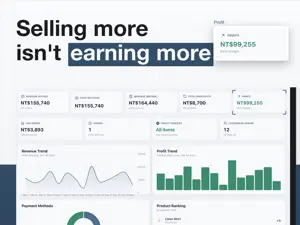
DingPOS is an offline-first point of sale for small retailers worldwide. Products, checkout, orders and reports all run on the iPad in your hands. There is no account to create and no network to depend on. GETTING SET UP Nothing to sign up for, no backend to provision. Pick your country; the currency, tax mode and tax rate fill themselves in. Name the store, add a few products, start selling. CHECKOUT • Up to 10 carts at once, so the second customer never waits • Search products by name or barcode • Item-level and cart-level discounts, fixed amount or percentage • Tax-inclusive or tax-exclusive, rounded to your currency's decimal places • Cash with automatic change, card, mobile payments, custom payment labels • A "Ding!" when the sale lands PRODUCTS • Variants with two options such as size and color, each with its own price and cost • Barcodes typed or scanned; a duplicate is rejected and names the product it collides with • Photos and categories INVENTORY • Stock tracking is a per-product switch • Checkout deducts, voiding restores, both inside the same database transaction • Full movement ledger: sale, void, manual adjustment PROMOTIONS • Cart thresholds, Nth-item deals, buy A get B, paid add-ons, any N items for a fixed price • Schedules and happy-hour windows, product or category targeting, member tiers and birthday month • Priority order, stacking rules, usage limits • Re-evaluated at checkout. If the total moves, the cashier confirms before the sale closes CUSTOMERS AND POINTS • Earn on spend, redeem for money off, every threshold and cap is yours to set • Member tiers, birthday-month offers, welcome bonus for new customers • Voiding an order reverses the points automatically REPORTS • Today: revenue, gross profit, total discount, payment mix, top 5 products • Daily, weekly and monthly ranges with revenue and profit trend charts BACKUP • iCloud, Google Drive or Dropbox. Or none of them. • Keeps the last 5 snapshots, so a new iPad restores in one step • Backups go to your own cloud account, not to our servers SUBSCRIPTION 30 days of everything, free, no credit card. After that, pick a plan, billed monthly or yearly: • Lite: checkout, products, orders, reports, cloud backup • Standard: all of Lite plus the promotion engine, loyalty points, member tiers and inventory • Pro: all of Standard plus staff PINs and roles, manager approval, an activity log and advanced reports Prices in your currency are listed under In-App Purchases on this page. Annual plans work out to two months free. Subscriptions renew automatically and can be cancelled any time in your App Store account settings. Skipping the subscription does not lock your data. Checkout stops, but products, orders and reports stay readable, and nothing is ever deleted. Available in 32 languages, including English, Traditional and Simplified Chinese, Japanese, Korean, Thai, Vietnamese, Indonesian, Spanish, French and German. Requires iPadOS 17.0 or later. Terms of Use: https://alu-studio.com/dingpos/terms/ Privacy Policy: https://alu-studio.com/dingpos/privacy/
What’s new
Version 3.3 · Updated October 26, 2026
• Open Price products can charge a percentage of the cart: choose Percent and enter 5, and the item is priced at 5% of the other items' subtotal, recalculated as the cart changes. • Cash received on returns and pre-order pickups now uses the checkout cash keypad: Exact fills in the amount due in one tap, with quick cash amounts in the row below. • Order, customer, and purchase order lists now load as you scroll, so they open quickly even with lots of data. Edit Sort Order shows categories and a loading indicator first instead of a blank screen. • Order list date headers update their count and total right after a return or a search. Deleting a customer who still owes money or has an open pre-order now tells you why it can't be done, up front. • Bug fixes and performance improvements.
App privacy
The developer, Shiang-Jih Shih, reported these privacy practices to Apple.
Data Linked to You
The following data, which may be collected and linked to your identity, may be used for the following purposes:
- Usage Data: Product Interaction, Advertising Data
- Contact Info: Email Address, Name, Phone Number
- User Content: Photos or Videos, Customer Support, Other User Content
- Identifiers: Device ID
- Diagnostics: Crash Data, Other Diagnostic Data
- Other Data: Other Data Types
Used for: Analytics, App Functionality
Data Not Linked to You
The following data, which may be collected but is not linked to your identity, may be used for the following purposes:
- Identifiers: Device ID
Used for: Analytics
Alternatives to DingPOS: Offline Cashier
Looking for apps like DingPOS: Offline Cashier? Here are 6 similar apps on the App Store.


| App | Rating | Price | Last updated | Compare |
|---|---|---|---|---|
| DingPOS: Offline Cashier | – | Free | October 26, 2026 | |
| JunPOS | – | Free | Oct 14, 2026 | Compare |
| BORDO | – | Free | Aug 27, 2026 | Compare |
| Tauke POS 掌收 | – | Free | Jul 30, 2026 | Compare |
| SStockFlow | – | Free | Apr 27, 2026 | Compare |
| Fodo - 智慧餐飲管理 | – | Free | Jun 13, 2026 | Compare |
| Shop POS Point of Sale Billing | – | Free | Oct 29, 2026 | Compare |