

Mesh Mapper
Jack Richmond Utilities iPhoneiPadiPod touch
Mesh Mapper is a free Utilities app for iPhone and iPad by Jack Richmond. Requires iOS 17.0. Updated August 11, 2026.
- Price
- Free
- on the App Store
- Size
- 2 MB
- Age 4+
- Updated
- Aug 11
- 2026 · v1.4
Screenshots



About Mesh Mapper
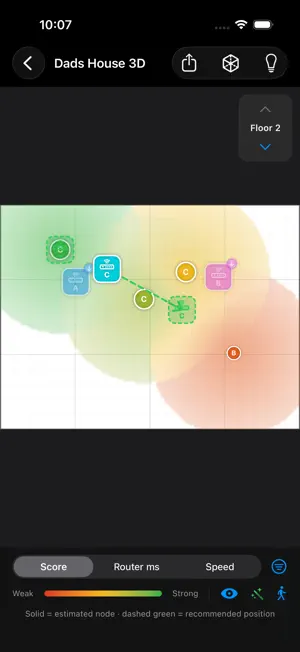
Mesh Mapper helps you understand home Wi-Fi coverage the way a field survey tool would, without extra hardware. Create a survey from a floor plan photo, a blank grid, or a LiDAR RoomPlan scan. Then walk around your home and tap where you are standing to measure what your Wi-Fi actually delivers at each spot. Mesh Mapper turns those measurements into clear coverage heat maps and practical placement advice: - Score, router latency, internet latency, and throughput maps - Mesh node labels based on the Wi-Fi access point serving each sample - Multi-floor surveys with 3D house visualization - LiDAR floor plan scanning on supported devices - Placement advisor for weak spots and suggested node moves - Shareable PNG reports for comparing layouts iOS does not expose raw Wi-Fi signal strength to third-party apps, so Mesh Mapper focuses on real-world network behavior: router response time, internet latency, download throughput, and serving-node identity. That makes it useful for finding dead zones, diagnosing sticky roaming, and deciding where a mesh router or satellite should move next. Mesh Mapper stores surveys locally on your device and does not require an account.
What’s new
Version 1.4 · Updated August 11, 2026
This release focuses on measurement accuracy. More accurate Wi-Fi speed readings. Speeds are now measured as sustained throughput rather than averaged over the whole test, which removes the slow start at the beginning of every transfer. Quick walk-by samples and full measurements now agree about the same spot. Consistent scoring. A spot no longer scores differently depending on whether it was measured by tapping, walking, or scanning. Better router detection. If your router isn't at the usual address, Mesh Mapper now finds it instead of reporting your whole home as a dead zone. Honest coverage. The Advisor now tells you when part of the area you walked has no measurements behind it, when your speeds are capped by your internet plan rather than your Wi-Fi, and when a survey accidentally mixes two networks. More accurate mesh node diagnostics, including per-node backhaul timing.
App privacy
The developer, Jack Richmond, reported these privacy practices to Apple.
Data Not Collected
The developer does not collect any data from this app.
Alternatives to Mesh Mapper
Looking for apps like Mesh Mapper? Here are 6 similar apps on the App Store. The highest rated is QTHnow (5.0/5), and 5 of the 6 are free to download.


| App | Rating | Price | Last updated | Compare |
|---|---|---|---|---|
| Mesh Mapper | – | Free | August 11, 2026 | |
| MB-88F Fractional Calculator | – | Free | Jul 6, 2026 | Compare |
| PingDoc | – | Free | Feb 4, 2026 | Compare |
| Router Monitor | – | Free | Sep 24, 2026 | Compare |
| QTHnow | 5.0 / 5 (1) | 2.99 USD | May 5, 2024 | Compare |
| AR Wifi Analyzer | 5.0 / 5 (1) | Free | Oct 14, 2026 | Compare |
| BlueSeek | – | Free | Dec 1, 2025 | Compare |
Compare Mesh Mapper with the top alternatives: ratings, updates, ASO score and keyword gaps →