

SpecRecon
Calvin Timmons Business iPhoneiPadiPod touch
SpecRecon is a free Business app for iPhone and iPad by Calvin Timmons. Requires iOS 15.0. Updated October 5, 2026.
- Price
- Free
- on the App Store
- Size
- 5 MB
- Age 4+
- Updated
- Oct 5
- 2026 · v1.4
Screenshots


About SpecRecon
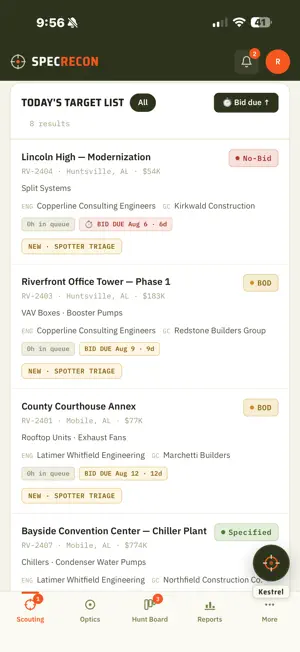
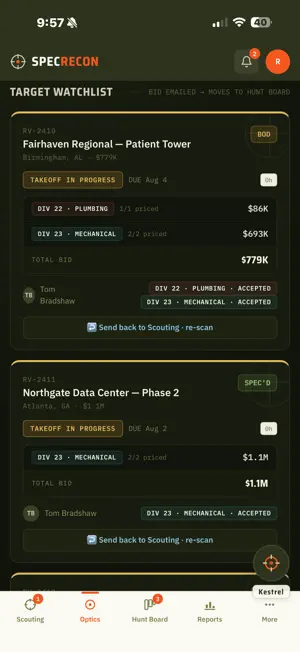
SpecRecon is the field-and-office companion for HVAC and mechanical subcontractors who bid Division 22 (Plumbing) and Division 23 (Mechanical) work. It turns the daily flood of plan-room activity into a clear, role-based pipeline — from the first project sighting through spec classification, estimating, pursuit, and order release. Built for how estimating teams actually work, SpecRecon keeps spotters, applications, estimators, and salespeople on the same page, so the right projects get pursued and nothing slips through the cracks. WHAT YOU CAN DO • Scouting Report — triage each day's flagged projects at a glance: verdict, engineer, bid date, and the competitors named in the documents. • Project Dossier — see your spec position, targets, and next action; call the engineer, clear out bad mentions, and route work to the right team in a tap. • Spec Intelligence — upload the plans, specs, and addenda and get the basis of design, approved-equal manufacturers, model numbers, and spec sections identified automatically. • Hunt Board — track every pursuit from bid sent, through GC award, to order release. • Reports — win/loss, pipeline value, and eligibility mix, filterable by owner, GC, engineer, manufacturer, and more. BUILT FOR TEAMS Role-based access keeps each person focused on their part of the workflow — spotting, spec classification, estimating, and pursuit — with a clean handoff trail so accountability is always clear. SUBSCRIPTION & ACCESS SpecRecon is a subscription service for mechanical and plumbing contracting companies. Access is granted by your company's administrator — there is no consumer sign-up, and nothing is sold inside the app. To explore without an account, tap "Demo Login" on the sign-in screen to load sample data.
What’s new
Version 1.4 · Updated October 5, 2026
This update is about phoning your subs, seeing what is in play, and asking Kestrel about the market. CALLING YOUR SUBS • Confirm call: after a bid goes out, each salesman gets a list of the subs to phone. Open the job, press Confirm call on the sub's row, and note where our price stands and when they expect it to award. The list opens whenever you open the Hunt Board. • The timer counts up from the bid date: green for the first week, yellow after, red after a month. A revised bid starts it over. • Any Hunter can confirm a sub nobody owns yet, and Spotters can confirm any call. • Reports has a Sub calls tab showing who is phoning their subs and who is not. • Open bids follow the account: when a sub changes salesman, its open bids go with it. THE HUNT BOARD • Sort each column by bid date or dollar value, and filter to a range of bid dates. • Jobs still in design reach the Hunt Board once their bid goes out, so you can confirm with the subs. They stay until someone sends them back out for bid. PRICING • Every unpriced line carries an estimate until the quote is scanned in. After that the quote wins, and any line it left out keeps its estimate, marked not quoted, so the money we did not quote stays visible. • Estimates learn from the quotes we have scanned. Venting is estimated per boiler. • A bid sent by mistake can be taken back to Optics from the division card, with a reason. • A job with two divisions sends only the priced ones to the Hunt Board. REPORTS • Tabs are named for the boards: Pre-Bid, Bidding and Post-Bid. A Manufacturer report shows one brand across every live job, and prints. • Every column sorts, and every project name opens its dossier. • The No-Bid report shows what is waiting, whose desk it is on and how long, and lists jobs not yet handed to the Tagmaster. A job leaves the queue when no No-Bid line is left. MARKET ANALYSIS • Managers and Executives can ask Kestrel about the market: statewide counts by region, what the spec books say, and our own numbers, such as win rates, projects we did not bid and items not quoted. Kestrel can research the web for any equipment. SMALLER THINGS • Engineering calls save per project, and the project opens in a new tab. • A 75% CD set can be tagged by hand. • Removing a member takes them off every board, and Delete erases the account. • A notification opens the right job, and a refresh keeps account-admin rights. • Kestrel speaks your vocabulary.
App privacy
The developer, Calvin Timmons, reported these privacy practices to Apple.
Data Linked to You
The following data, which may be collected and linked to your identity, may be used for the following purposes:
- Contact Info: Email Address, Name, Phone Number
- User Content: Other User Content
- Identifiers: User ID
Used for: App Functionality
Alternatives to SpecRecon
Looking for apps like SpecRecon? Here are 6 similar apps on the App Store. The highest rated is Noble | AI Mentor (5.0/5), and all 6 are free to download.
-
 Contract Radar
-
 Resupply Ai
-
 Gov Contract Hunter
3.7
-
 GovBidder App
-
 addy.io extension
-
 Noble | AI Mentor
5.0
| App | Rating | Price | Last updated | Compare |
|---|---|---|---|---|
| SpecRecon | – | Free | October 5, 2026 | |
| Contract Radar | – | Free | Oct 18, 2026 | Compare |
| Resupply Ai | – | Free | Dec 23, 2025 | Compare |
| Gov Contract Hunter | 3.7 / 5 (3) | Free | Oct 6, 2026 | Compare |
| GovBidder App | – | Free | May 11, 2026 | Compare |
| addy.io extension | – | Free | Jul 25, 2026 | Compare |
| Noble | AI Mentor | 5.0 / 5 (16) | Free | Feb 24, 2026 | Compare |
Compare SpecRecon with the top alternatives: ratings, updates, ASO score and keyword gaps →