

ReelPilot: AI Video Generator
Muhammad Adeel Photo & Video iPhoneiPadiPod touch
ReelPilot: AI Video Generator is a free Photo & Video app for iPhone and iPad by Muhammad Adeel. Requires iOS 15.0. Updated October 13, 2026.
- Price
- Free
- on the App Store
- Size
- 38 MB
- Age 4+
- Updated
- Oct 13
- 2026 · v3.2.0
Screenshots



About ReelPilot: AI Video Generator
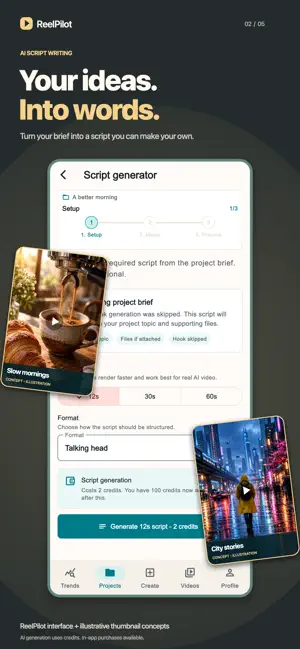
ReelPilot helps creators turn one idea into a complete short-form video workflow. Plan, generate, organize, and export Reel-ready projects for TikTok, Shorts, Instagram Reels, ads, launches, and creator campaigns. Start with a topic, niche, or campaign brief. ReelPilot helps you create hooks, structured scripts, captions, hashtags, voiceover assets, project visuals, and export-ready MP4 drafts. Keep every project organized from first idea to final video, with creator defaults, brand notes, credits, and project readiness built into the workflow. New workflow improvements help you choose video type and length earlier, including 12-second AI video setup for better script, voiceover, caption, and export alignment. What you can do: - Create organized video projects for campaigns, products, and creator ideas. - Set up quick video drafts with video type and length selected upfront. - Generate hook options for short-form content. - Turn selected hooks into structured scripts. - Create AI voiceover assets from approved scripts. - Fit voiceover timing for 12-second AI video workflows. - Generate captions, hashtags, and on-screen text ideas. - Upload project visuals, screenshots, clips, and media references. - Preview video assets and create MP4 exports. - Track credits, subscription status, and project readiness. - Manage AI data sharing permission before using AI generation. ReelPilot is built for creators, founders, marketers, freelancers, and small teams who want a repeatable content workflow instead of starting from a blank page. AI-generated content should be reviewed before publishing. Users are responsible for making sure final videos, claims, and uploaded media comply with platform rules, advertising policies, intellectual property rights, and applicable laws. Terms of Use: https://goilabs.com/terms?product=ReelPilot Privacy Policy: https://goilabs.com/privacy?product=ReelPilot
What’s new
Version 3.2.0 · Updated October 13, 2026
- A refreshed welcome screen and simpler sign-in experience. - Refined account forms with improved spacing on iPhone and iPad. - Improved navigation and layouts for smaller and larger displays. - Smoother resizing when rotating or folding, keeping entered text and your place. - Clearer first-video guidance and project and video empty states. - Better spacing, readable labels, and dropdowns across the app.
App privacy
The developer, Muhammad Adeel, reported these privacy practices to Apple.
Data Linked to You
The following data, which may be collected and linked to your identity, may be used for the following purposes:
- Usage Data: Product Interaction, Other Usage Data
- Diagnostics: Crash Data, Performance Data, Other Diagnostic Data
- Purchases: Purchase History
- Contact Info: Email Address, Name
- User Content: Photos or Videos, Audio Data, Customer Support, Other User Content
- Identifiers: User ID
Used for: Analytics, App Functionality
Alternatives to ReelPilot: AI Video Generator
Looking for apps like ReelPilot: AI Video Generator? Here are 6 similar apps on the App Store. The highest rated is AI Video Maker Studio (1.0/5), and all 6 are free to download.
-
 AI Photo Editor: SnapMiora
-
 AI Video Editor Play
-
 AI Video Maker Studio
1.0
AI Video Maker Studio
1.0
-
 AI Video Generator – Reels
-
 Old Photo Restorer AI
-
 Reel Maker: Video Editor
| App | Rating | Price | Last updated | Compare |
|---|---|---|---|---|
| ReelPilot: AI Video Generator | – | Free | October 13, 2026 | |
| AI Photo Editor: SnapMiora | – | Free | Oct 2, 2026 | Compare |
| AI Video Editor Play | – | Free | Apr 29, 2025 | Compare |
| AI Video Maker Studio | 1.0 / 5 (1) | Free | Jul 27, 2026 | Compare |
| AI Video Generator – Reels | – | Free | Jun 20, 2026 | Compare |
| Old Photo Restorer AI | – | Free | Oct 26, 2026 | Compare |
| Reel Maker: Video Editor | – | Free | May 2, 2026 | Compare |