

PixelForge - Text to Image AI
Rizwan Rashid Photo & Video iPhoneiPadiPod touch
PixelForge - Text to Image AI is a free Photo & Video app for iPhone and iPad by Rizwan Rashid. Requires iOS 15.0. Updated August 13, 2026.
- Price
- Free
- on the App Store
- Size
- 53 MB
- Age 17+
- Updated
- Aug 13
- 2026 · v1.0.3
Screenshots



About PixelForge - Text to Image AI
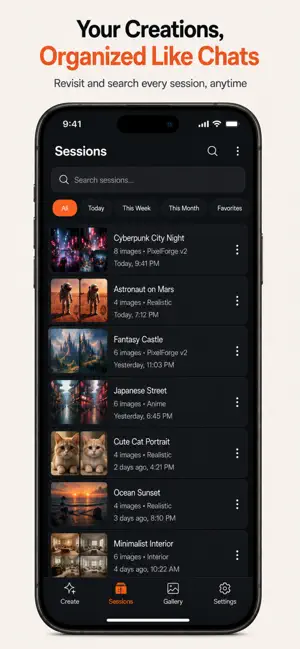
Turn your words into stunning AI-generated images — instantly, and completely free. PixelForge is a clean, fast, no-clutter AI art studio built for people who actually want to create — not fight with a confusing app. Type what you imagine, adjust a few simple settings, and watch it come to life. Generate one image or a whole batch of variations at once, then keep everything organized in your own private history, right on your device. WHY PIXELFORGE - Batch Generation — Create up to 8 variations of the same idea in one tap, instead of generating one image at a time like most apps. - Full Creative Control — Choose your image size (square, portrait, story, landscape, or fully custom dimensions), pick a model, lock a seed for reproducible results, or let the AI enhance your prompt automatically. - Your Sessions, Saved Like Chats — Every prompt and every result is organized into sessions you can revisit, search, and pick back up later — just like a conversation history. - Never Lose a Generation — Failed image? Retry it instantly with one tap, no need to retype your prompt or lose your place. - 100% Local & Private — Your history, prompts, and generated images stay on your device. No account, no login, no cloud upload required. - Clean, Distraction-Free Design — No clutter, no confusing menus, no intrusive ads interrupting your flow — just a fast, focused way to create. - Completely Free to Use — No subscription required to start generating. WHO IT'S FOR Whether you're designing a wallpaper, exploring concept art, creating a thumbnail, prototyping an idea, or just turning a fun thought into a picture, PixelForge gives you a simple, powerful way to go from words to image in seconds. HOW IT WORKS 1. Type a description of the image you want. 2. Choose your size, style, and settings (or just use the smart defaults). 3. Generate one image or a full batch of variations. 4. Save, favorite, share, or revisit anything from your history — anytime, even offline. Download PixelForge and turn your imagination into images today. Privacy Policy : https://sites.google.com/view/pixel-forge-privacy-policy/home https://www.apple.com/legal/internet-services/itunes/dev/stdeula/
What’s new
Version 1.0.3 · Updated August 13, 2026
What's New in This Version: - Performance improvements for a smoother experience - Fixed minor bugs to improve stability - UI enhancements for better usability - General under-the-hood optimizations
App privacy
The developer, Rizwan Rashid, reported these privacy practices to Apple.
Data Used to Track You
The following data may be used to track you across apps and websites owned by other companies:
- Identifiers: Device ID
- Usage Data: Product Interaction
Data Not Linked to You
The following data, which may be collected but is not linked to your identity, may be used for the following purposes:
- Identifiers: Device ID
- Usage Data: Product Interaction
Used for: Third-Party Advertising
Alternatives to PixelForge - Text to Image AI
Looking for apps like PixelForge - Text to Image AI? Here are 6 similar apps on the App Store. The highest rated is iPhotos - Beauty Photo Studio (5.0/5), and 5 of the 6 are free to download.
-
 Pixel Loom : Ai Video Maker
3.0
-
 iPhotos - Beauty Photo Studio
5.0
-
 Sukemaru: Verified Cutout PNG
-
 AI Headshots & Photo: AI Piccy
-
 AI photo enhancer - NuziAi
5.0
-
 diffuria: AI Image & Video
5.0
| App | Rating | Price | Last updated | Compare |
|---|---|---|---|---|
| PixelForge - Text to Image AI | – | Free | August 13, 2026 | |
| Pixel Loom : Ai Video Maker | 3.0 / 5 (4) | Free | Nov 3, 2025 | Compare |
| iPhotos - Beauty Photo Studio | 5.0 / 5 (1) | Free | Aug 12, 2026 | Compare |
| Sukemaru: Verified Cutout PNG | – | 1 USD | Oct 27, 2026 | Compare |
| AI Headshots & Photo: AI Piccy | – | Free | Apr 3, 2025 | Compare |
| AI photo enhancer - NuziAi | 5.0 / 5 (1) | Free | Sep 2, 2025 | Compare |
| diffuria: AI Image & Video | 5.0 / 5 (1) | Free | Mar 26, 2026 | Compare |