

Espresso Dial In: tastewell
MARKUS HAMMERSCHMID Food & Drink iPhoneiPadiPod touch
Espresso Dial In: tastewell is a free Food & Drink app for iPhone and iPad by MARKUS HAMMERSCHMID. Requires iOS 16.4. Updated October 5, 2026.
- Price
- Free
- on the App Store
- Size
- 86 MB
- Age 4+
- Updated
- Oct 5
- 2026 · v1.3.0
Screenshots



About Espresso Dial In: tastewell
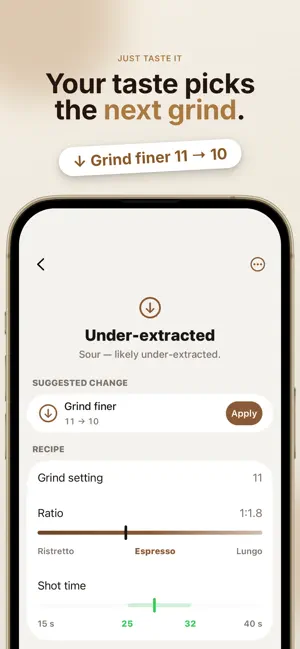
Sour today, bitter tomorrow? tastewell helps you dial in espresso at home. Log a shot, say how it tastes, and get the one change to make next, until your espresso tastes balanced. Made for home baristas with an espresso machine and a grinder. No trained palate, no barista course, no spreadsheets. Add your coffee, pick your grinder and machine, and start your first guided dial-in in a few steps. GUIDED DIAL-IN, SHOT BY SHOT • Enter the grind setting, dose, yield and shot time. tastewell shows you whether the shot ran too fast, too slow or in range. • Rate what stands out in the cup: acidity, bitterness and body. Your previous shot is right there to compare, and if you're not sure what you taste, tastewell goes by time and ratio. • Get one clear suggestion, such as grind finer, grind coarser, or a different yield or dose, and apply it to your next shot with one tap. • See your ratio as ristretto, espresso or lungo, and get temperature tips if your machine lets you change the temperature. • Pause anytime and pick up where you left off. YOUR GRINDER AND MACHINE, BUILT IN Choose from over 90 grinders and over 70 espresso machines by brand and model, from Comandante, Eureka, Niche, Baratza, 1Zpresso and Mahlkönig to Breville, De'Longhi, Gaggia, Rancilio, Lelit, Profitec, ECM, Rocket and La Marzocco. • tastewell knows your grinder's dial, where espresso usually sits on it, and a good starting setting. • It fills in your machine's brew temperature and basket size, and starts the dose from your basket. • Machines with a built-in grinder, like the Barista Express, bring their grinder along. • Stepless grinders can be set in steps of 0.1, and any other gear can be entered by hand. A SAVED RECIPE FOR EVERY BEAN When a shot tastes right, mark it as dialed in. tastewell saves the recipe for that bean on that grinder and machine: grind setting, dose, yield, time and temperature. Switch beans, come back weeks later, and your recipe is waiting. When a bean changes as it ages, re-dial from your last recipe instead of starting over. YOUR BEAN SHELF Keep every coffee on one shelf with roaster, origin, roast level, Arabica/Robusta blend and flavor notes, decaf included. Each bean keeps its full shot history, with the taste and notes of every shot. LEARN AS YOU BREW The Dial-in Guide explains the four steps of dialing in and what your shot time tells you. The Tasting Guide helps you tell sour from bitter and recognize a balanced espresso. TASTEWELL PRO Everything above is free for up to 3 beans at a time. tastewell Pro, an auto-renewing subscription, adds: • Unlimited beans • A cover for every bean, created by AI from its details • A home screen widget with the bean you're brewing NO ACCOUNT, NO ADS No sign-up and no ads. Your coffees, shots and notes are stored on your iPhone, and dialing in works offline. You choose whether to share usage data and can change it anytime in Settings. Download tastewell and dial in your next bag of beans. Available in English, German, French, Spanish and Portuguese, in light and dark mode. Terms of Use (EULA): https://www.apple.com/legal/internet-services/itunes/dev/stdeula/ Privacy Policy: https://h-markus.github.io/tastewell-website/privacy.html
What’s new
Version 1.3.0 · Updated October 5, 2026
Getting started is faster: add your coffee, pick your grinder and machine from the list and start your first dial-in right away. • Your grinders and machines in Settings are now a compact list. Swipe to delete one or make it your default. • A new switch in Settings lets you decide whether to share usage data.
App privacy
The developer, MARKUS HAMMERSCHMID, reported these privacy practices to Apple.
Data Not Linked to You
The following data, which may be collected but is not linked to your identity, may be used for the following purposes:
- Purchases: Purchase History
- Location: Coarse Location
- User Content: Other User Content
- Identifiers: Device ID
- Usage Data: Product Interaction
- Diagnostics: Crash Data, Other Diagnostic Data
Used for: Analytics, App Functionality