

OneOctave – Play-Along Piano
Jun Park Music iPhoneiPadiPod touch
OneOctave – Play-Along Piano is a free Music app for iPhone and iPad by Jun Park. Requires iOS 15.0. Updated October 21, 2026.
- Price
- Free
- on the App Store
- Size
- 155 MB
- Age 4+
- Updated
- Oct 21
- 2026 · v1.1.1
Screenshots

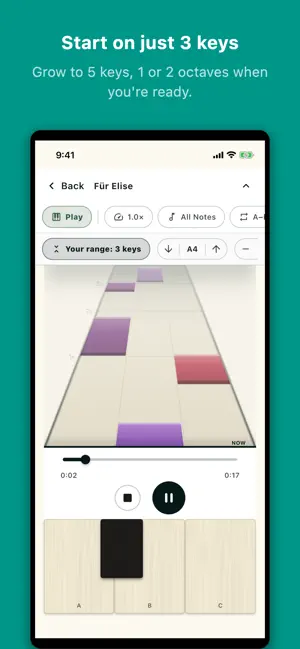


About OneOctave – Play-Along Piano
OneOctave turns any MIDI into a play-along. You cover a small range of the keyboard — as few as 3 keys — and the app performs every note outside your window. So even hard pieces are within reach from your very first day. Falling notes show you exactly what to play. Anything you don't cover, OneOctave plays for you — so the music always sounds complete. WHAT YOU CAN DO • Start on just 3 keys, then grow to 5 keys, 1 octave, or 2 octaves • Four ways to play — Listen (watch it perform), Play (perform in time), Learn (the song waits for each note), Rhythm (a rhythm game with Easy / Normal / Hard and best scores) • Import any MIDI (.mid) file and play along — it's saved to your library so it's never lost • Piano → MIDI: record your piano (or choose a recording) and OneOctave writes out every note, right on your device • Build your own song in the MIDI editor: tap notes onto the timeline, preview, and save • Slow the tempo, transpose to your range, or show the melody only while you learn • Bundled beginner tunes and warm-ups so you can start right away PRIVATE BY DESIGN OneOctave works fully offline. There's no account and no internet connection — nothing you play, record or create ever leaves your device. Even Piano → MIDI runs entirely on your device.
What’s new
Version 1.1.1 · Updated October 21, 2026
New in 1.1.1 — Piano → MIDI and Rhythm mode! PIANO → MIDI Record yourself playing the piano, or choose a recording, and OneOctave writes out every note. After a 3-second countdown it starts listening; name the result and it's saved to Your library, ready to play along with. It all runs on your device. RHYTHM MODE Play any song in OneOctave as a rhythm game. Notes fall onto the keys: press them in time (hold the long ones) and the real song plays back — miss, and it stays silent. • Play on 3 keys, 5 keys, or a whole octave • Easy, Normal, or Hard — Easy sticks to the main beats • Beat your best score for every song and difficulty • Or turn on Rhythm hit sounds: the whole song plays and each good hit adds a soft beat • Try the new 3D highway view in Settings • Loop a tricky part with the new A–B button • Set a daily goal and keep your streak going • Tune Rhythm timing for your device in Settings • The screen stays on while you play, and leaving the app pauses the song • Repeated notes now show a small gap, so each one gets its own press Your last setup is remembered, so the next song opens the way you left it.
App privacy
The developer, Jun Park, reported these privacy practices to Apple.
Data Not Collected
The developer does not collect any data from this app.
Alternatives to OneOctave – Play-Along Piano
Looking for apps like OneOctave – Play-Along Piano? Here are 6 similar apps on the App Store. The highest rated is ChordFrog: Piano Ear Training (5.0/5), and 5 of the 6 are free to download.
-
 soundboardstudioPRO ipad
-
 무지개 피아노 - 아기 동요 계이름 놀이
-
 Piano Dream: Play & Learn
-
 Notely - Sheet Music Composer
-
 Laser Harp: Light Synth
-
 ChordFrog: Piano Ear Training
5.0
| App | Rating | Price | Last updated | Compare |
|---|---|---|---|---|
| OneOctave – Play-Along Piano | – | Free | October 21, 2026 | |
| soundboardstudioPRO ipad | – | 4.99 USD | Jun 24, 2026 | Compare |
| 무지개 피아노 - 아기 동요 계이름 놀이 | – | Free | Sep 6, 2026 | Compare |
| Piano Dream: Play & Learn | – | Free | Jan 26, 2026 | Compare |
| Notely - Sheet Music Composer | – | Free | Jul 22, 2026 | Compare |
| Laser Harp: Light Synth | – | Free | Oct 3, 2026 | Compare |
| ChordFrog: Piano Ear Training | 5.0 / 5 (1) | Free | Oct 15, 2026 | Compare |